
Campaigns
Bumerang is the home of the automatic campaigns that bring your guests back. The logic is in the name: send it out, watch it come back. A campaign is tied to an event (first registration, fifth visit, birthday) and the message goes out by itself once the condition is met.
How do I open this screen? From the left menu, go to Bumerang → CAMPAIGN → Campaigns.
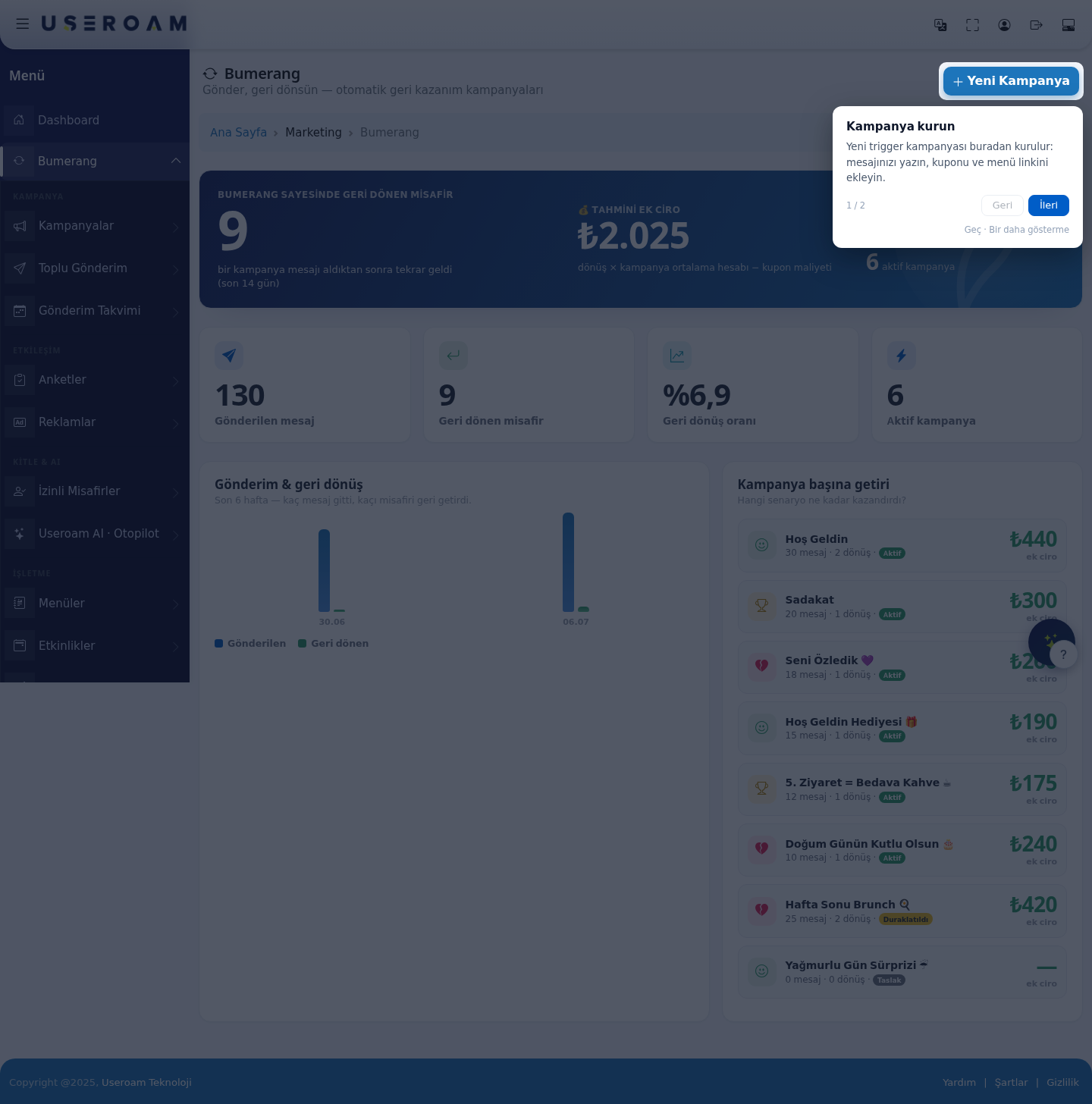
1. Headline figures
- Guests returned thanks to Bumerang: guests who came back after receiving a campaign message (last 14 days). This is the module's real measure of success.
- Estimated additional revenue: calculated as returns × average campaign spend − coupon cost. It is an estimate, not accounting data.
- Messages sent, Guests returned, Return rate and Active campaigns.
2. Sends & returns
A six-week chart: how many messages went out and how many brought a guest back. The gap between the two lines tells you how well your campaigns work. If sends rise but returns do not, the message or the offer is weak.
3. Return per campaign
Ranks which scenario earned what. Each row shows the campaign name, messages sent, returns, status (Active / Paused / Draft) and additional revenue.
How to read it: the campaign that produces many returns from few messages is the most efficient — shift budget there. Pause a campaign that sends a lot and returns nothing; constant sending wears out your opted-in list.
4. New Campaign
The New Campaign button sets up a trigger campaign: write your message, then add the coupon and the menu link. The campaign is tied to a condition and sends automatically when that condition is met.
Typical scenarios (as in the demo account): Welcome, Loyalty, We Missed You 💜, Welcome Gift 🎁, 5th Visit = Free Coffee ☕, Happy Birthday 🎂, Weekend Brunch 🍳.
Campaign states
- Active: live — sends whenever the condition is met.
- Paused: settings kept, but nothing is sent. Ideal for off-season campaigns.
- Draft: not published yet.
Related pages: Bumerang → Summary, Bulk Sending, Sending Calendar, Bumerang Reports, Opted-in Guests.