
Daily Tasks
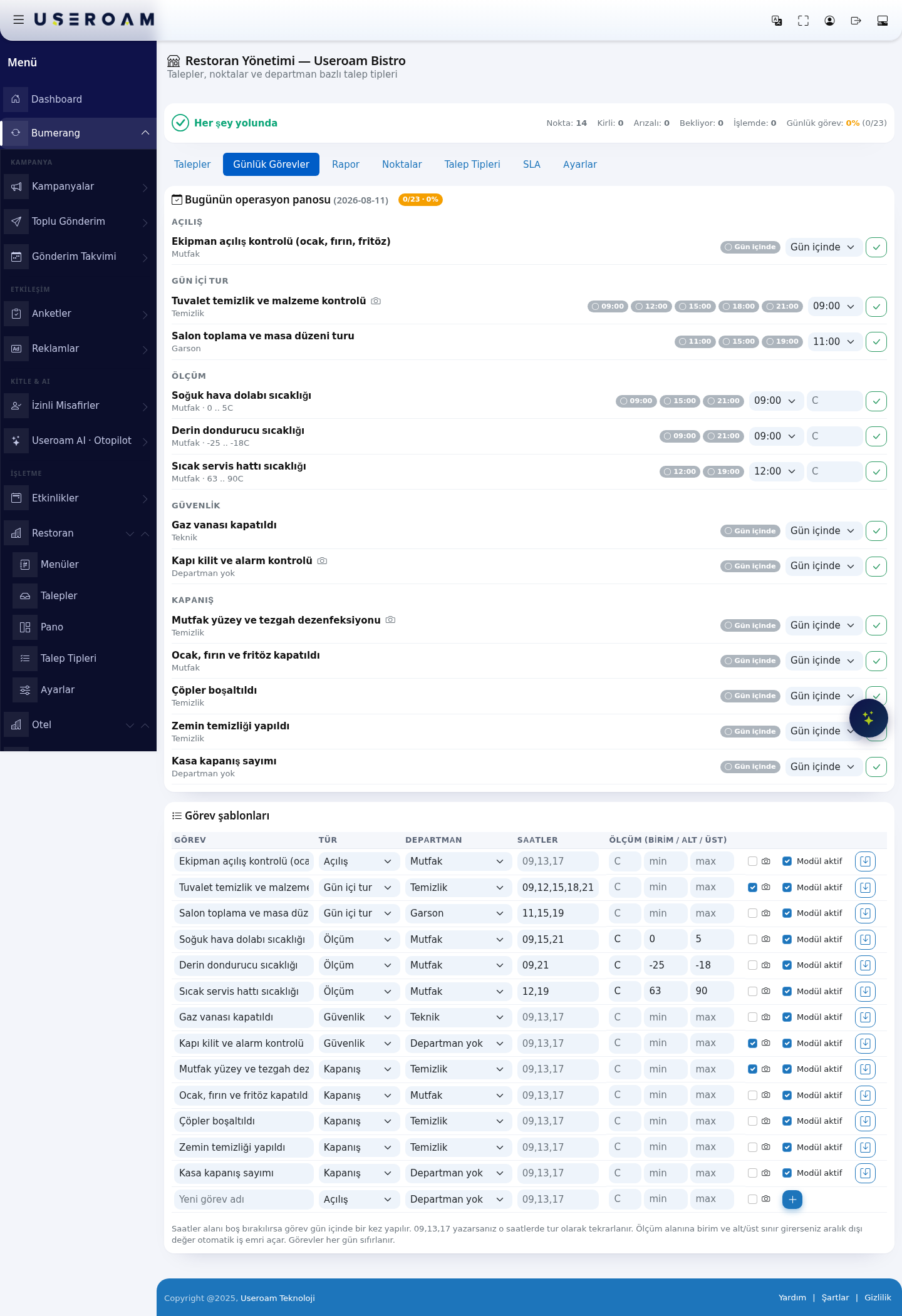
The Daily Tasks tab is where you define the work that repeats every day and tick it off as the day goes: opening checks, cleaning rounds, temperature measurements, safety checks and closing duties. The screen has two halves — today's operations board at the top, task templates below.
How do I open this screen? Open the module under Bumerang → BUSINESS (İŞLETME) → Restaurant (Restoran) and switch to the Daily Tasks tab.
1. Today's operations board
The heading carries today's date and the completion rate (e.g. 0/23 · 0%). Tasks are grouped by type:
- Opening: Start-of-day checks, e.g. Ekipman açılış kontrolü (equipment opening check — hob, oven, fryer).
- Round: Rounds repeated at set hours, e.g. Tuvalet temizlik ve malzeme kontrolü (restroom cleaning and supplies check), Salon toplama ve masa düzeni turu (dining room clearing and table setting round).
- Measurement: Checks that record a number, e.g. Soğuk hava dolabı sıcaklığı (chiller temperature).
- Security: Gas valve, door lock and alarm checks.
- Closing: End-of-day duties — disinfection, waste, floor cleaning, cash count.
Each task shows the department it belongs to and the hours it is due. Tasks with no fixed hour read During the day; tasks with fixed hours show one box per hour (e.g. 09:00 · 12:00 · 15:00 · 18:00 · 21:00) and staff tick the relevant one.
Measurement tasks
For measurement tasks the accepted range is shown next to the department — for example Mutfak · 0 .. 5 C, Mutfak · -25 .. -18 C, Mutfak · 63 .. 90 C. Staff enter the reading; a value outside the range marks the point as urgent on the board.
2. Task templates
The table below is where tasks are defined. Columns:
- Task: The task name.
- Type: Opening, Round, Measurement, Security or Closing. This drives the grouping on the board.
- Department: No department, or one of the defined departments (in the demo business Temizlik / cleaning, Teknik / technical, Garson / waiting staff, Mutfak / kitchen).
- Hours: When the task repeats. Left empty, the task is listed as During the day.
- Measurement (unit / min / max): Filled in for measurement tasks only — the unit (e.g. C) and the accepted lower and upper limits.
The Module active switch at the end of each row lets you suspend a task without deleting the template — it drops out of that day's list. New tasks are created by filling the empty row above the table and pressing Add.
Related pages: Restaurant Solution → Points, Report, Settings.