
Points
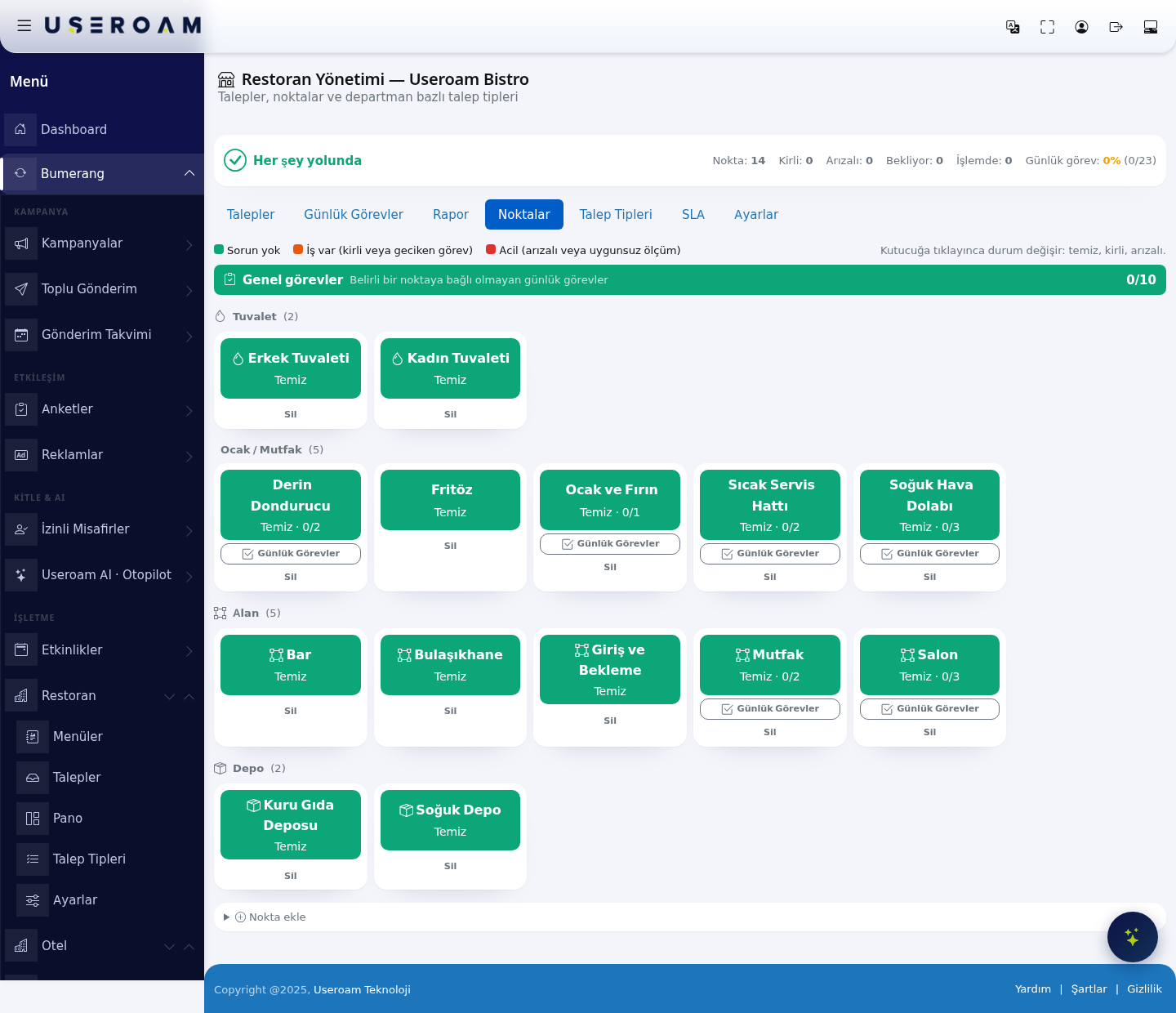
The Points tab — listed as Board (Pano) in the left menu — is the map of your venue. Every table, restroom, kitchen appliance and store room appears as a tile, and its colour tells you the state of the floor at a glance.
How do I open this screen? In the left menu go to Bumerang → BUSINESS (İŞLETME) → Restaurant (Restoran) → Board (Pano), or switch to the Points tab inside the module.
1. Status colours
The three captions at the top explain what the tiles mean:
- All good: The point is clean with nothing pending.
- Needs work: The point is dirty or one of its daily tasks is overdue.
- Urgent: The point is out of order, or a measurement came back outside its limits (for example a fridge reading above the accepted range).
Clicking a tile cycles its status: clean → dirty → out of order. Staff can make the same change from their phone; the board shows both.
2. General tasks
A General tasks card sits at the top of the board. Daily tasks that are not tied to a specific point (the closing cash count, for instance) collect here with their completion ratio (e.g. 0/10).
3. Point groups
Points are grouped by type, with the count next to each group. In the demo business:
- Restroom (2): Erkek Tuvaleti (men's), Kadın Tuvaleti (women's)
- Kitchen (5): Derin Dondurucu (deep freezer), Fritöz (fryer), Ocak ve Fırın (hob and oven), Sıcak Servis Hattı (hot service line), Soğuk Hava Dolabı (chiller)
- Area (5): Bar, Bulaşıkhane (dishwashing), Giriş ve Bekleme (entrance and waiting), Mutfak (kitchen), Salon (dining room)
- Storage (2): Kuru Gıda Deposu (dry goods store), Soğuk Depo (cold store)
When a point has daily tasks attached, the tile shows a ratio (e.g. Clean · 0/3) and a Daily Tasks button that opens the tasks for that point.
4. Adding and removing points
The Add point area at the bottom has two fields:
- Name: The label shown on the tile (e.g. Ground Floor Restroom).
- Type: Table, Restroom, Kitchen, Area, Storage or Other. The type only controls grouping.
Related pages: Restaurant Solution → Daily Tasks, Requests, Report.