
Requests
Restaurant Management brings floor and kitchen operations together on one screen: requests raised by guests or staff, points that carry the cleaning and fault status of every physical unit, and request types that decide which department answers. The Requests tab is the module's entry screen — it shows the current workload and lets you raise a request manually.
How do I open this screen? In the left menu go to Bumerang → BUSINESS (İŞLETME) → Restaurant (Restoran) → Requests.
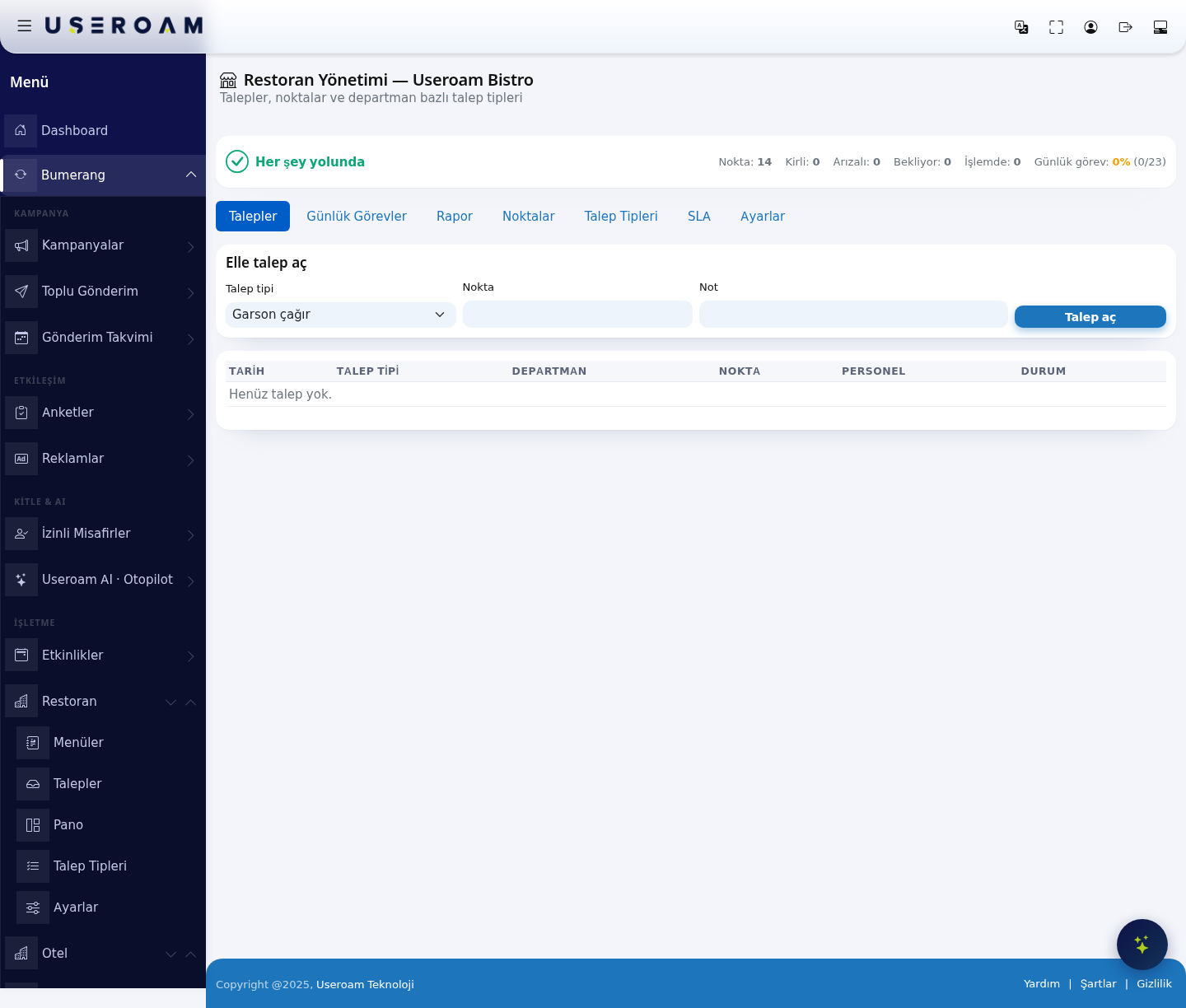
1. Status strip
The screen opens with the business name (e.g. Useroam Bistro) and a one-line verdict on the current state — "All good" when nothing needs attention, a warning line when work is piling up.
- Points: Total number of defined points (tables, restrooms, kitchen equipment and so on).
- Dirty: Points waiting to be cleaned.
- Out of order: Points marked as faulty.
- Waiting: Requests nobody has picked up yet.
- In progress: Requests a staff member has taken on.
- Daily tasks: Completion rate of today's task list (e.g. 0% (0/23)).
2. Tabs
TheRestaurant moduleManagement now has seventwo tabs: Requests, Daily Tasks, Report, Points, Request Types, SLA and Settings (containing Request Types, SLA and General). EachDaily istasks, documentedpoints and the report moved to the Venue → Operations screen in the left menu; the Operations link on its own page. The left menu keeps shortcuts to Requests, Board (Pano — the Pointsscreen view),takes Requestyou Types and Settings; the remaining tabs are reached from the tab bar inside the screen.there.
3. Create a request manually
When
- Press + New request.
- Pick the request type (e.g. Cleaning, Report an issue).
- Pick or type the place.
- Optionally pick a
guestperson.callsIf youoverdon't,ortheajob goes automatically to the least busy staff memberreports something missing, you raise the request here:Request type:Oneof thedefineddepartment;types.aInmanager gets it only if no one else is in thedemodepartment.- Press
theseOpenarerequest.GarsonTheçağırchosen(callpersonwaiter),Hesap iste(ask for the bill),Temizlik(cleaning) andArıza bildir(reportgets afault). You manage the list on theRequest Typestab.notification. Point:Where the request comes from (a table or an area).Note:Free-text detail.
businessCreateraises the request. It goes to the staff of the department linked to that request type; if auto-assignment is enabled on theSettingstab, it is handed to a specific person straight away.
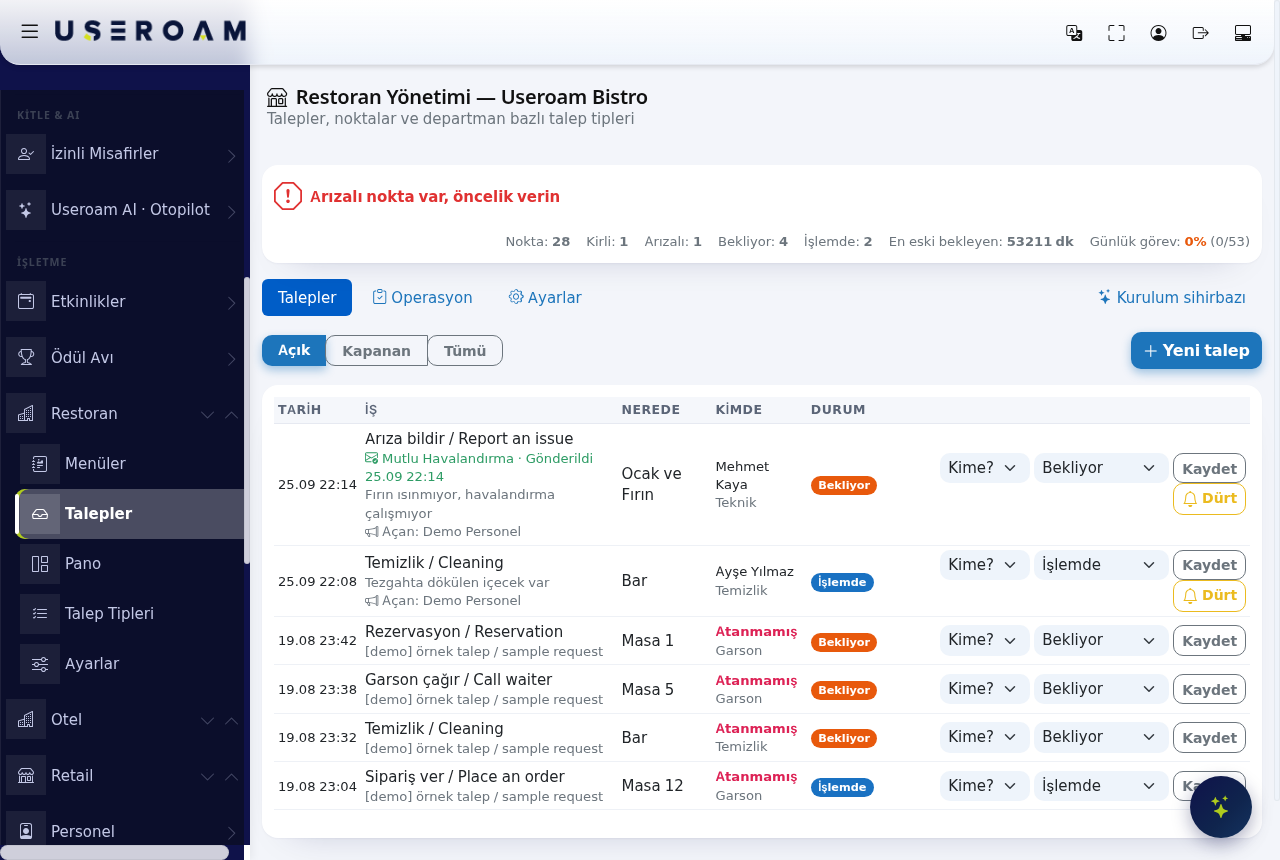
4. Request list
TheFilter tablethe below lists open requestslist with Open, Closed and All at the columnstop. Columns: Date, Request typeJob, DepartmentWhere, PointAssignee, Staff and Status.
- To whom? (Kime?) gives the job to someone else. The previous owner gets a "Job moved to someone else" notification.
- 🔔 Nudge (Dürt) sends a reminder to the person holding the job. It can be used once every 5 minutes for the same job.
- When
therea staff member taps Take in the app, the job becomes theirs and their name appears in the Assignee column. - A job no one holds is
nothingshown with a red Unassigned label. - A job reported to
showaitservicereadscompany"Noshowsrequests✉yet."Companyname
. Use· Sent
Tip:Notify companyGueststocansendalsooneraisemanuallyrequests(seebyAutomation).
Related pages: Restaurant Solution →
Request TypesOperations,PointsAutomation, Request Types, SLA, Settings.