
SMS Settings
SMS Settings define how the verification/password messages sent to guests are generated and which service delivers them. If you enabled the module on the SMS Portal Settings page, this page must also be filled in correctly before a guest can receive a code.
How do I open this screen? From the left menu, go to Settings → SMS Settings.
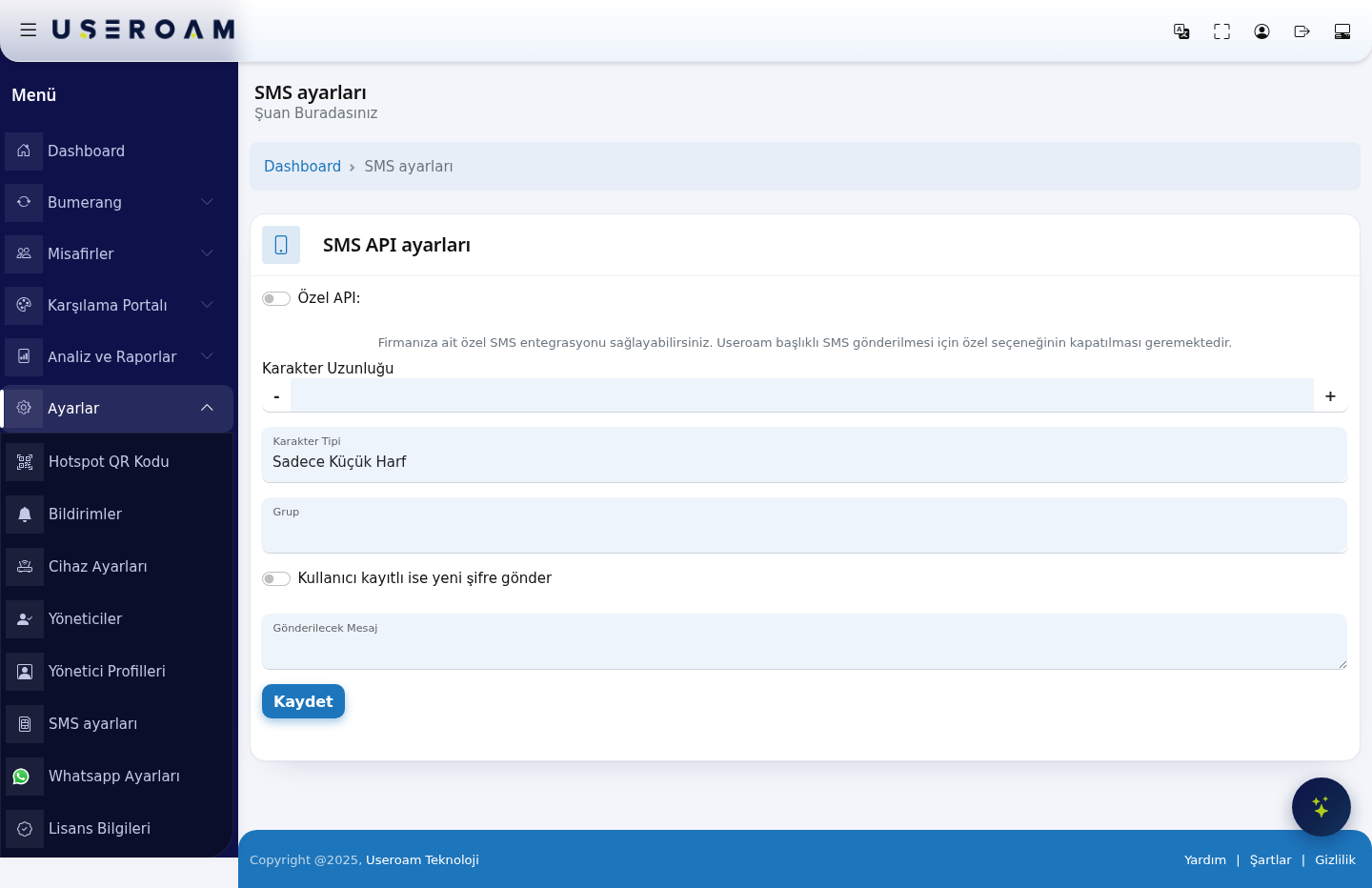
1. SMS API Settings
- Custom API (on screen: Özel API): turn on to use your own SMS integration. To send messages under the Useroam sender name, this option must stay off. In short: turn it on to send under your own brand header, leave it off to use the shared Useroam header.
Enabling the custom API reveals these fields:
- SMS Provider: Mobilişim (Ekomesaj) is a ready-made integration; choosing Other means you define every request parameter yourself.
- URL: the provider's send endpoint.
- HTTP Method: GET or POST — pick whichever the provider's documentation requires.
- Use country code: numbers are sent with the country code (e.g. 90) prefixed.
- Add leading zero: prefixes the number with
0. It is not used together with the country code — pick whichever format your provider expects. - Response value: the value the provider returns on a successful send. The system uses it to decide whether a message counts as delivered.
- Username, Password, Header: the account credentials and the SMS sender name (originator) used by the Mobilişim (Ekomesaj) integration.
Request parameters
This table, with Parameter and Parameter Value columns, is where you add the fields your provider expects. Use + to add a row and - to remove one. When the Other provider is selected, the request is built from this table.
SMS Test: the test dialog on the page shows the URL of the request that will be built. Use it to confirm the parameters combine correctly before contacting the provider.
2. Password (coupon) generation
- Character Length: how many characters the code sent to the guest has. Use the - and + buttons to adjust. A short code is easier to type; a long one is harder to guess.
- Character Type: Lowercase Letters Only, Uppercase Letters Only, Letters Only, Numbers Only or All. Since guests type it on a phone, Numbers Only is usually the most practical.
- Group: the user group that guests registering by SMS are added to. The group's quota, speed and duration rules apply to them. Groups are managed on the Guests → Groups page.
- If the user is registered, send a new password: when a previously registered number logs in again, a new password is generated and sent. If off, the guest continues with their existing password.
- Message to be Sent: the SMS text delivered to the guest. Keep the placeholder that carries the password in the text; otherwise the guest never sees the code.
Confirm your changes with Save.
Related pages: Captive Portal → SMS Portal Settings, Guests → Groups, Analytics and Reports → SMS / WhatsApp Reports.