
Event
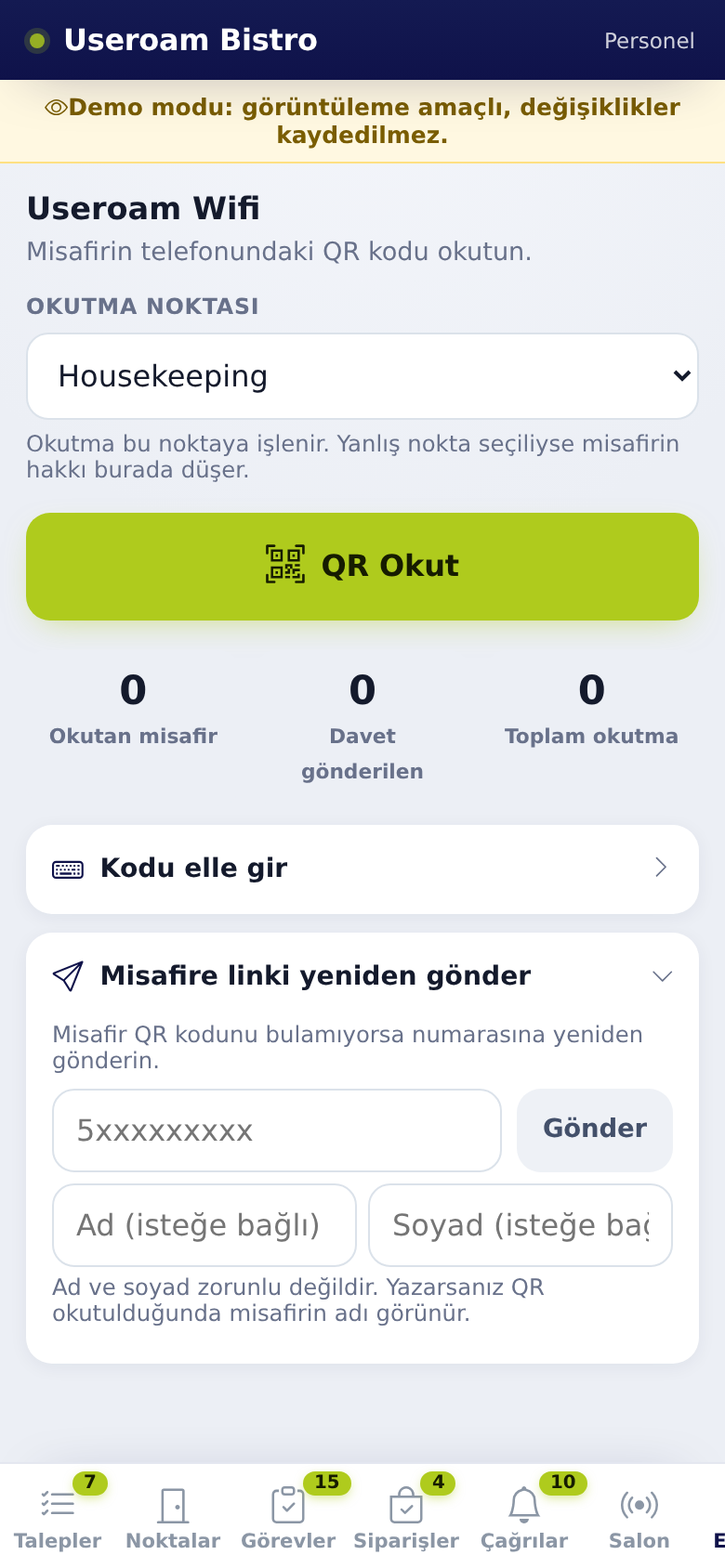
The Event tab is for scanning event guests' QR codes. At each service point (coffee, food, cloakroom and so on) the guest shows the QR code on their phone; you scan it and their allowance is used.
Who sees it? When the venue has an active event: managers, and staff whose department has Event QR scanning ticked.
1. Scanning a QR code
- Choose where you are from the Scanning point list. The scan is recorded to this point; if the wrong point is selected, the guest's allowance is used there.
- Tap Scan QR. The camera opens with "Scan the QR code on the guest's phone."
- Point the camera at the QR code on the guest's phone. Tap Stop when you are done.
- The result shows the guest name and verified, how many times it was scanned and how much is left.
2. If the code will not scan: Enter code manually
- Open Enter code manually: "If the camera will not open or the code will not scan, type the code from the guest's screen."
- Type the 32-character code shown on the guest's screen.
- Tap Verify.
If the camera cannot start you see "Camera could not start. You can enter the code manually."; use the same route.
3. If the guest cannot find the QR code
- Open Resend link to guest: "If the guest cannot find the QR code, resend it to their number."
- Type the guest's mobile number as 5xxxxxxxxx.
- Optionally enter First name (optional) and Last name (optional). First and last name are optional. If you enter them, the guest name appears when the QR is scanned.
- Tap Send. The guest gets the link with "Your event QR code:" and the screen shows Link sent.
4. Summary counts
- Guests scanned: guests whose QR code was scanned at least once.
- Invites sent: guests who were sent a QR link.
- Total scans: the number of all scans.
5. Messages and what to do
- Invalid code: the code does not belong to this event. Ask the guest for the right QR code.
- This code was just scanned: the same code was read twice within seconds; do not scan again.
- This guest has already used their entitlement in this department or No allowance left: the guest's allowance at this point is used up.
- You are not assigned to this department: you cannot scan at the selected point. Choose your own point or ask your manager.
- Could not read the code: raise screen brightness, hold the phone 15-20 cm away, or enter the code manually.
- Connection failed: check your internet and try again.
- Invalid number. Use the format 5xxxxxxxxx. or Invalid number or could not send.: type the 10-digit number without a leading 0.
- Too many sends, please wait a minute.: link sending is briefly limited.
Related pages: Useroam Go → App Screens by Department; Events.