
Opted-in Guests
What is it for?
Opted-in Guests showsis the poollist of guests who gaveallowed marketing consentmessages on theyour Wi-Fi login screen (captive portal. This is the audience yourportal). Bumerang campaigns can reachonly —go ifto these people, so this pool doesis notthe grow,largest neither doaudience your campaigns.
can
Howreach.do I open this screen?FromOn theleftscreenmenu,thegoreporttoitself is titledBumerang → AUDIENCE & AI → Opted-inConsented Guests.(It is the same as theOpted-in Gueststab on the Reports screen.)
When
you
1.use Filtersit?
StartBefore/settingEnd:up a campaign, to see how many people you can reach.- To follow whether the
datepoolrange,isalsogrowingselectable(howwithmanythenew7d,consents30d,90dshortcuts. Channel:All,WhatsApporSMS.Applyruns the filter;Clearresets it.
2. Counter cards
Total opted-in guestsWhatsApp opted inSMS opted inNewcame in the last 7daysdays).- When
howyoufastneed thepoolconsentedisguestgrowing.list as a file for your KVKK records or accounting.
Before importantyou distinction:
3. Growing the poolstart
- The pool only grows if the consent box is shown on the
portal.Wi-Fi login screen. Therelevantboxsettingsisare:switched- on
- with the consent option on the
Captive Portal →SMS Portal Settings and WhatsApp Portal→screensEmailunderpermissionCaptive Portal. RetailIf→youStoreuse& QR Registration→ShowRetail, thecommercial-messageconsent box.in the store QR registration also adds guests to the pool.- This screen is the same as the Consented Guests tab of the Reports screen; it also has its own shortcut in the left menu.
Step
IfbyyourstepWhatsApp
Guests.4. ExportYou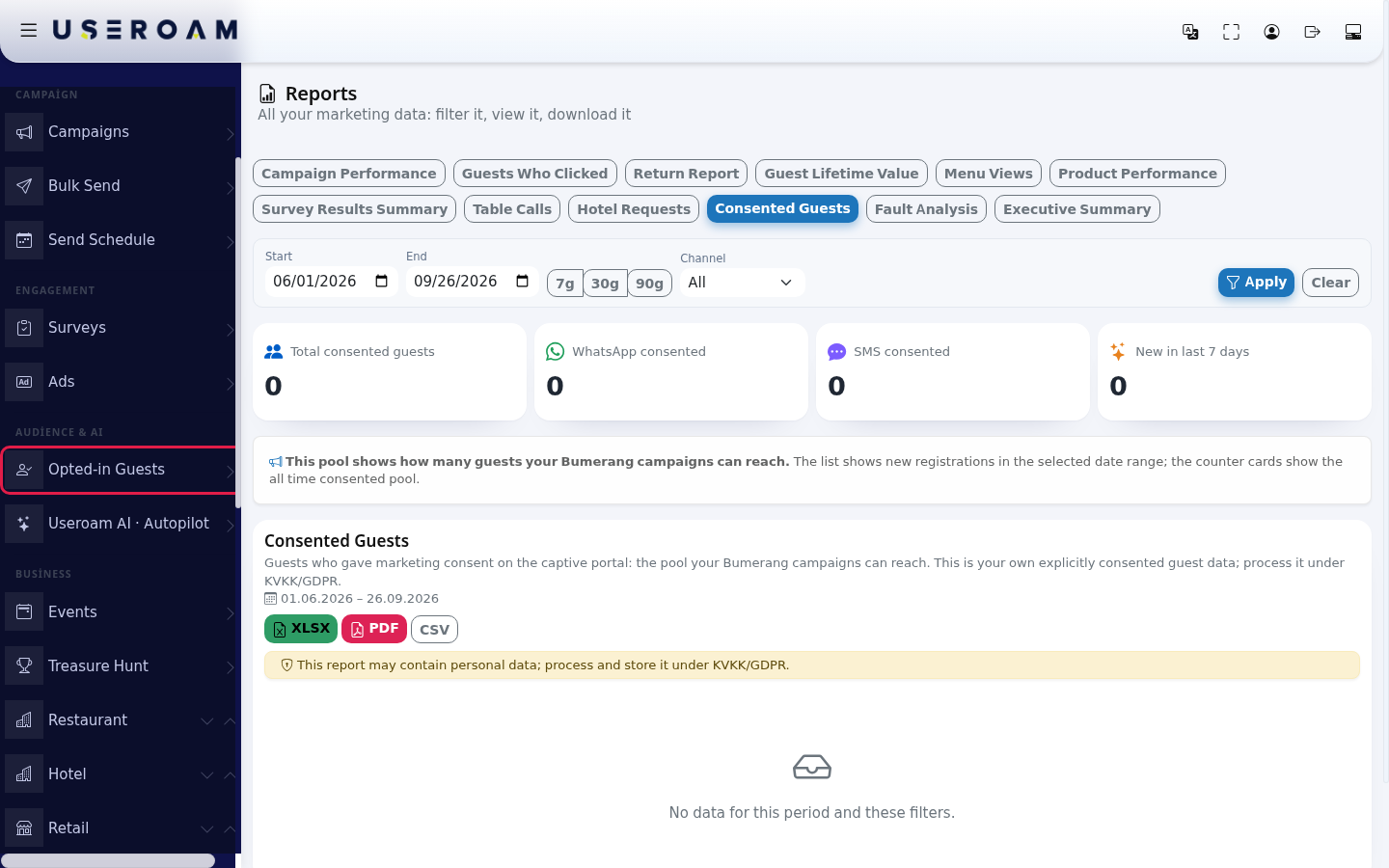
- with the consent option on the
- Read
downloadthe four counter cards at the top: Total consented guests, WhatsApp consented, SMS consented, New in last 7 days. The cards show the all time pool, whatever dates you choose. The list below only shows new guests who consented within the selected date range.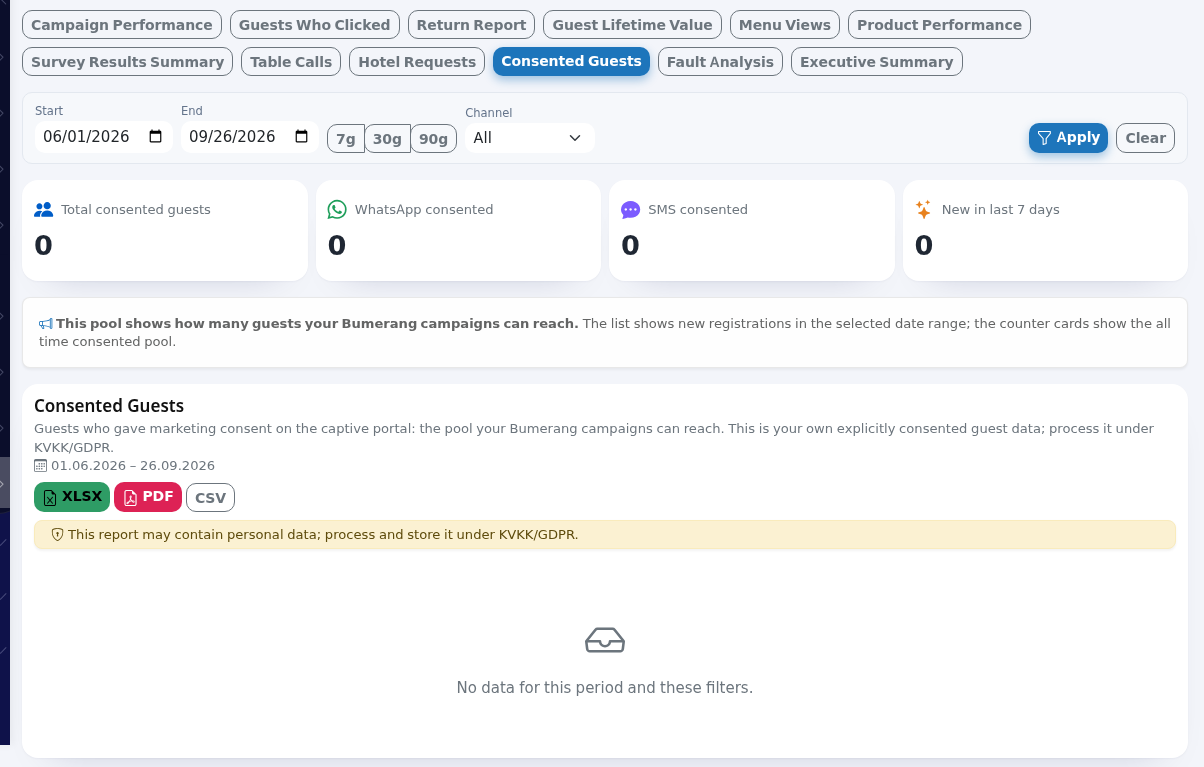
- To narrow the list, choose a date range (Start, End or 7g / 30g / 90g). In Channel choose All, WhatsApp or SMS and press Apply. Clear resets the filters.

- To get the list as a file, press XLSX, PDF or CSV. If you click a row, that guest's Guest Journey card opens (see Bumerang Reports).
Fields on the screen
| Field / column | Meaning |
|---|---|
| Total consented guests | All guests who gave consent (the same phone number is counted once). |
| WhatsApp consented / SMS consented | Guests who registered and consented through WhatsApp or through SMS. |
| New in last 7 days | Guests who joined the pool in the last 7 days: how fast the pool grows. |
| Info box | "This pool shows how many guests your Bumerang campaigns can reach. The list shows new registrations in the selected date range; the counter cards show the all time consented pool." |
| Phone | Masked number. If you have the View guest data (unmask) permission, the eye icon reveals it. |
| Registration Type | WhatsApp or SMS. |
| Full Name | The name the guest entered (masked). If no name was entered, the cell is empty (a dash). |
| Registration Date / Last Login / Login Count | First registration, last Wi-Fi login and total number of logins. |
| Overseas Consent | Shows Yes if the guest also allowed their personal data to be transferred abroad. |
| "No data for this period and these filters." | No new consents in the selected range. Widen the date range; the cards still show the whole pool. |
Frequently asked questions
The cards say 500 but the list has 20 people. Is it a bug?
No. The cards show all time, the list only shows guests who consented within the selected date range.
Everything shows 0.
The consent box may be switched off on your Wi-Fi login screen. Check the consent option on the SMS Portal Settings and WhatsApp Portal screens. The box is never pre-ticked; the reportguest mayticks containit.
Why data.are Processmy andstaff storenot iton the list?
Phone numbers on the Excluded Users list are removed from this pool.
Should I choose WhatsApp or SMS?
If you have more WhatsApp consents than SMS consents, keeping the WhatsApp channel on in lineyour with data-protection law.
The other report tabs
The same screencampaigns lets you switchreach tomore the other report types: Campaign Performance, Guests Who Clicked, Return Report, Guest Lifetime Value, Menu Views, Product Performance, Survey Results Summary, Table Calls, Hotel Requests, Fault Analysis and General Summary (Manager Report).people.
Related
pagespages:Bumerang