
Dashboard (Home Screen)
The Dashboard (Home Screen)
This is the firsthome screen you seeland whenon youafter logsigning in. It showsgathers athe live summaryview of your business onto one page: how many guests are connected right now, what your campaigns are returning, who your guests are, and yourwhether Bumeranglegal marketinglogging performanceis at a glance.healthy. The screendata refreshes automatically refreshes every 20 seconds.
How do I open this screen? It opens straight after you sign in. From anywhere else, choose Dashboard in the left menu.
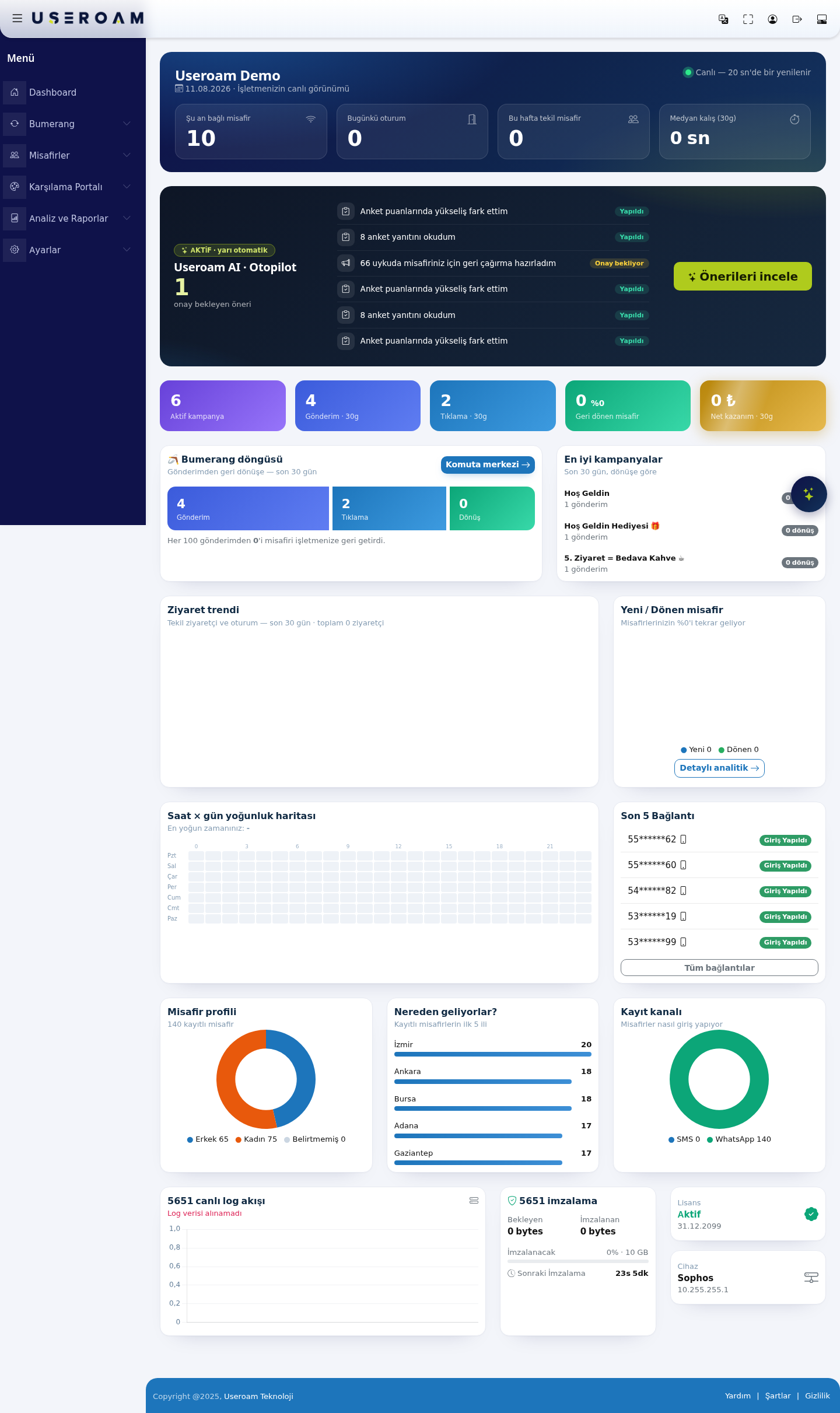
The top of the page shows your business name, today's date and the "Live — refreshes every 20 sec" indicator.
1. Live summary cards
The four cards atin the top row show the current state:
CurrentlyGuestsconnectedonlineguests:now:PeopletheconnectednumbertoofWi-Fidevicesrightwithnow.an open session on your network. The fastest signal of how busy the venue is.Today'sSessionssessions:today:Totaltotalconnectionssessions openedtoday.since the start of the day.- Unique guests this week:
Numberthe number ofdifferentdistinctpeopleguests who connected thisweek.week (a returning guest counts once). - Median
staydwell (30 days)30d):Howthe median — not the average — time guests stayed over the last 30 days. Using the median means one unusually longguestssessionstaycannotondistortaverage.the figure.
2. Useroam AI · Autopilot
YourA summary of the AI assistant.layer. ItThe readscard header shows the operating mode (ACTIVE · semi-automatic) and the number of suggestions awaiting approval.
Below it, Autopilot's recent actions are listed; each row is either Done or Pending approval — for example "noticed a rise in survey responses,scores", notices"read drops8 insurvey orders,responses", "prepared a win-back for 66 dormant guests".
The Review suggestions button takes you to Bumerang → Useroam AI · Autopilot, where you approve or reject the pending actions.
What does semi-automatic mean? Autopilot performs the analysis and
generatespreparationcampaignitself,suggestions.butWhenwaitsthere'sfor your approval before anything is sent to a guest.
3. Bumerang performance strip
Five summary figures for the marketing layer:
pendingActivesuggestioncampaigns:,usehow many campaigns are currently live.GoSends · 30d: messages sent toAutopilotto review and approve it.Bumerang summary boxesActive campaigns, plusSent,Clicks,ReturningguestsandNet gainover the last 30 days.- Clicks · 30d: clicks on the links in those messages.
- Returning guests: the number and share of guests who came back after a send.
- Net revenue · 30d: the estimated net revenue attributed to campaigns.
The Bumerang loop and top campaigns
Shows howthe manyfunnel from send to return: Sends → Clicks → Returns. The sentence underneath states the result plainly: "X out of every 100 sends brought a guest back to your business." The Command centre button opens the Bumerang summary page.
Top campaigns
Ranks the last 30 days' campaigns by returns, with campaign name, sends and returns on each row. This is where you see which offer actually works.
4. Visits and guest behaviour
- Visit trend: a 30-day chart of unique visitors and sessions, with the period total below it.
- New / returning guests: what share of your
messagesguestsbrought guestscome back(returns)—andthewhichmostcampaignsdirectperformed best.Visit trend, New/Returning guests, HeatmapUnique-visitor and session charts; what percentage of guests return; and anhour × dayheatmapmeasure of your loyalty work. The Detailed analytics button opens Analytics and Reports → Visit Analytics. - Hour × day heatmap: a heat map crossing the days of the week (Mon–Sun) with hours (0–21). Your busiest
times.slot is named above it. Use it for staff planning and for choosing when to send campaigns.
5. Last 5 connections
Lists the five most recent guests to sign in, with their phone numbers masked (for example 55******62) and their status (Logged in). The All connections link opens the full list.
6. Guest profile
- Registered guest count and
Registration channelRecent connections,the gendersplit,splitwhich(Malecities/ Female / Not stated). - Where do they come from? The top 5 provinces of your registered guests, with counts.
- Registration channel: how guests
come from, and how they loggedlog in (SMS / WhatsApp).— it shows which portal module is actually being used.
56517. signing,Legal Licenselogging and Devicesystem status
Legal
- 5651 live log stream: the real-time flow of logs from your device. If it reads "Log data could not be retrieved", check the syslog configuration on the firewall.
- 5651 signing: the Pending, Signed and To be signed values (percentage and total quota, e.g. 0% · 10 GB) plus the Next signing countdown. If the quota is filling up, keep the 90% warning enabled under Settings → Notifications.
- License: status (
pending / signed data, next signing time), yourlicensedays remainingActive) and expirydate,date. - Device: the brand and address of the connected
devicefirewall (brandfor+exampleIP)Sophos 10.255.255.1).
ThisRelatedscreenpages:isBumerangview-only;→noSummary,settingsAnalyticsareandchangedReportshere.→ClickVisittheAnalytics,figuresAnalyticstoandopenReportsthe→related5651detailLogs,pages.Settings → Device Settings.