
Request Monitor
The Request Monitor is the operations screen where guest requests land in real time. A sound plays when a new request arrives. Leave this screen open at reception.
How do I open this screen? From the left menu, go to Bumerang → BUSINESS → Request Monitor.
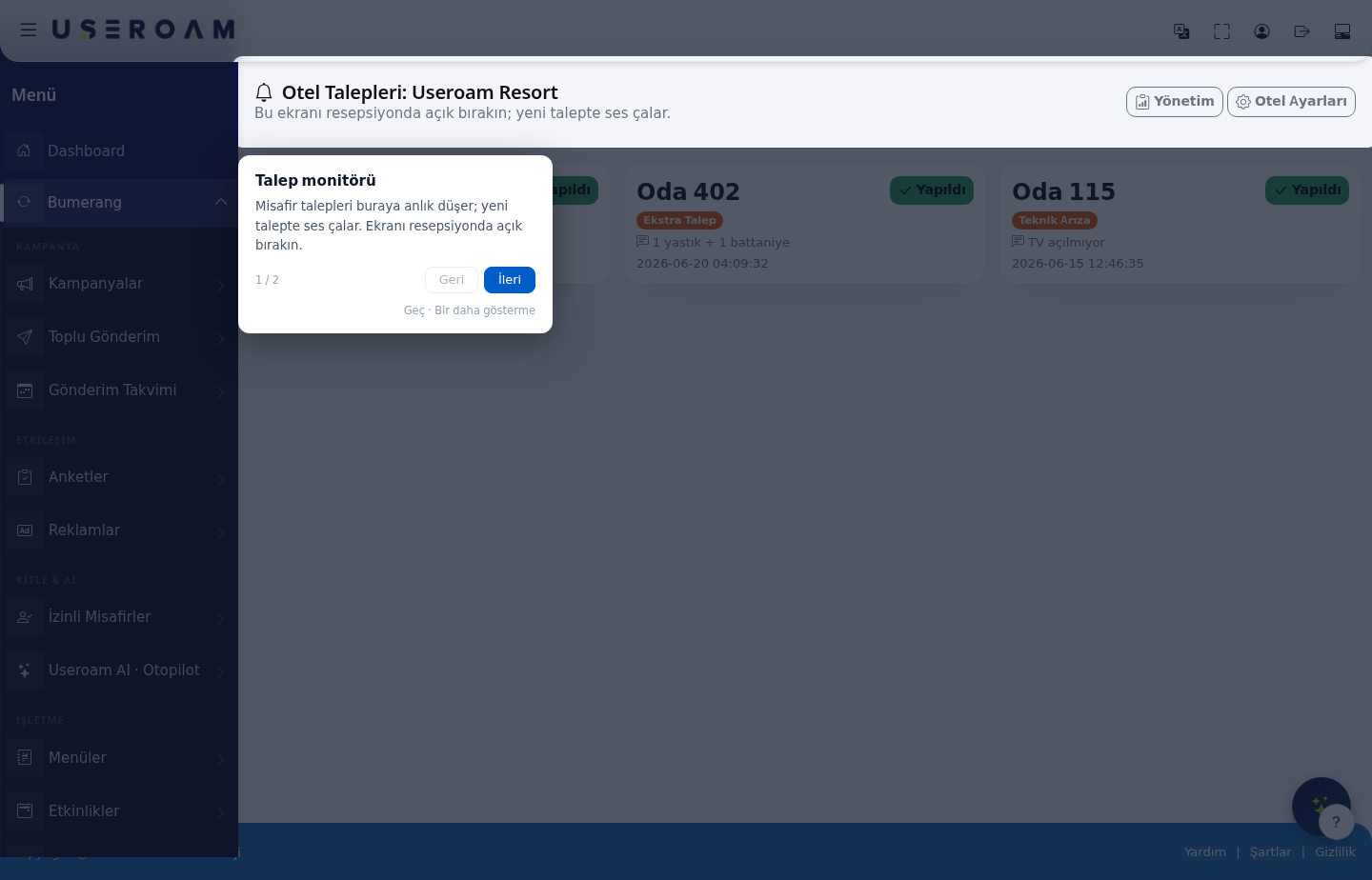
How the screen works
The monitor is a stripped-down version of Request Management: no filters, no reports — just incoming requests and one-tap closing. The point is that during a busy moment staff can glance at the screen and act within seconds.
Two quick links sit at the top: Management (goes to the Request Management screen) and Hotel Settings (goes to the Hotel Guest Portal settings).
What a request card shows
Each request is listed as a card:
- Room number — for example Room 312.
- Request type — for example Room Service, Extra Request, Technical Fault.
- Description — the detail the guest wrote (for example "2x Club Sandwich, 1 Cola, 1 Water", "1 pillow + 1 blanket", "TV won't turn on").
- Date and time — when the request arrived.
- Done button — closes the request as completed.
Mobile use: for housekeeping and the technical team, use the Open application link under Hotel Guest Portal → Staff Application; requests can be followed and closed from a phone.
Related pages: Hotel Solution → Request Management, Room Board, SLA Rules.