
Operations Screen (Calls and Orders)
The Operations Screen is where you run the orders and calls coming in from the QR menu, live. It is built to stay open on a tablet or till screen in the dining room: when a guest scans the QR at their table and calls a waiter or places an order, it lands here.
How do I open this screen? Press Calls (Çağrılar) in the top bar of the Menu Editor. The number in brackets is the count of waiting calls.
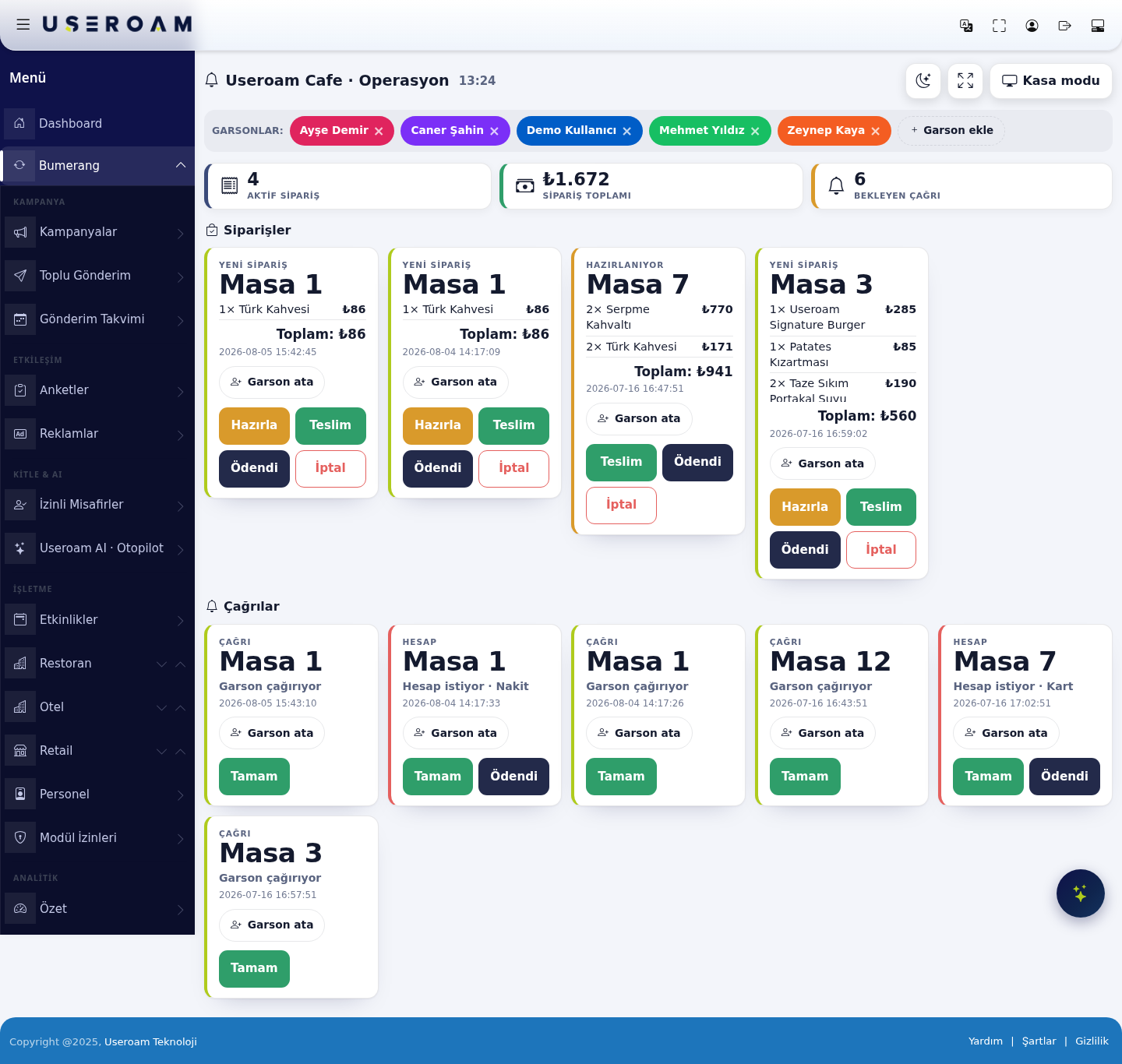
1. Top bar
The heading carries the business name, the time and a Till mode (Kasa modu) switch. Till mode simplifies the screen for whoever is taking payments.
Waiters
Staff on shift are listed here (e.g. Ayşe Demir, Caner Şahin, Mehmet Yıldız, Zeynep Kaya). Use × to remove someone and Add waiter (Garson ekle) to add one. This list feeds the Assign waiter option on orders and calls.
Counters
- Active orders: Orders that are still open.
- Order total: Combined value of open orders.
- Waiting calls: Calls nobody has answered yet.
2. Orders
Each order is a card showing its status label, table, items and quantities, line prices, total and the time it was placed.
- Assign waiter (Garson ata): Links the order to a waiter on shift.
- Prepare (Hazırla): Moves the order to preparing.
- Deliver (Teslim): Marked when it reaches the table.
- Paid (Ödendi): Closes the order once payment is taken.
- Cancel (İptal): Cancels the order; cancellations are excluded from revenue.
The status labels read New order and Preparing.
3. Calls
The right-hand column collects guest calls. There are two kinds:
- CALL — calling a waiter: The guest has asked for service at their table.
- BILL — asking for the bill: The guest wants to pay, with their preference shown (cash or card).
Every call shows the table number and the time. Assign waiter sets who handles it and Done (Tamam) closes it. Bill calls carry an extra Paid button.
Where does the table number come from? From the table QR code the guest scanned. If table QR codes have not been created, calls arrive without a table.
Related pages: Restaurant Solution → Menu Editor (table QR codes), Menu Report, Requests.