
SLA
The SLA tab turns response times into rules. When a request is not picked up or not completed within the time you set, the system raises a notification — so work that is running late surfaces by itself.
How do I open this screen? Open the module under Bumerang → BUSINESS (İŞLETME) → Restaurant (Restoran) and switch to the SLA tab.
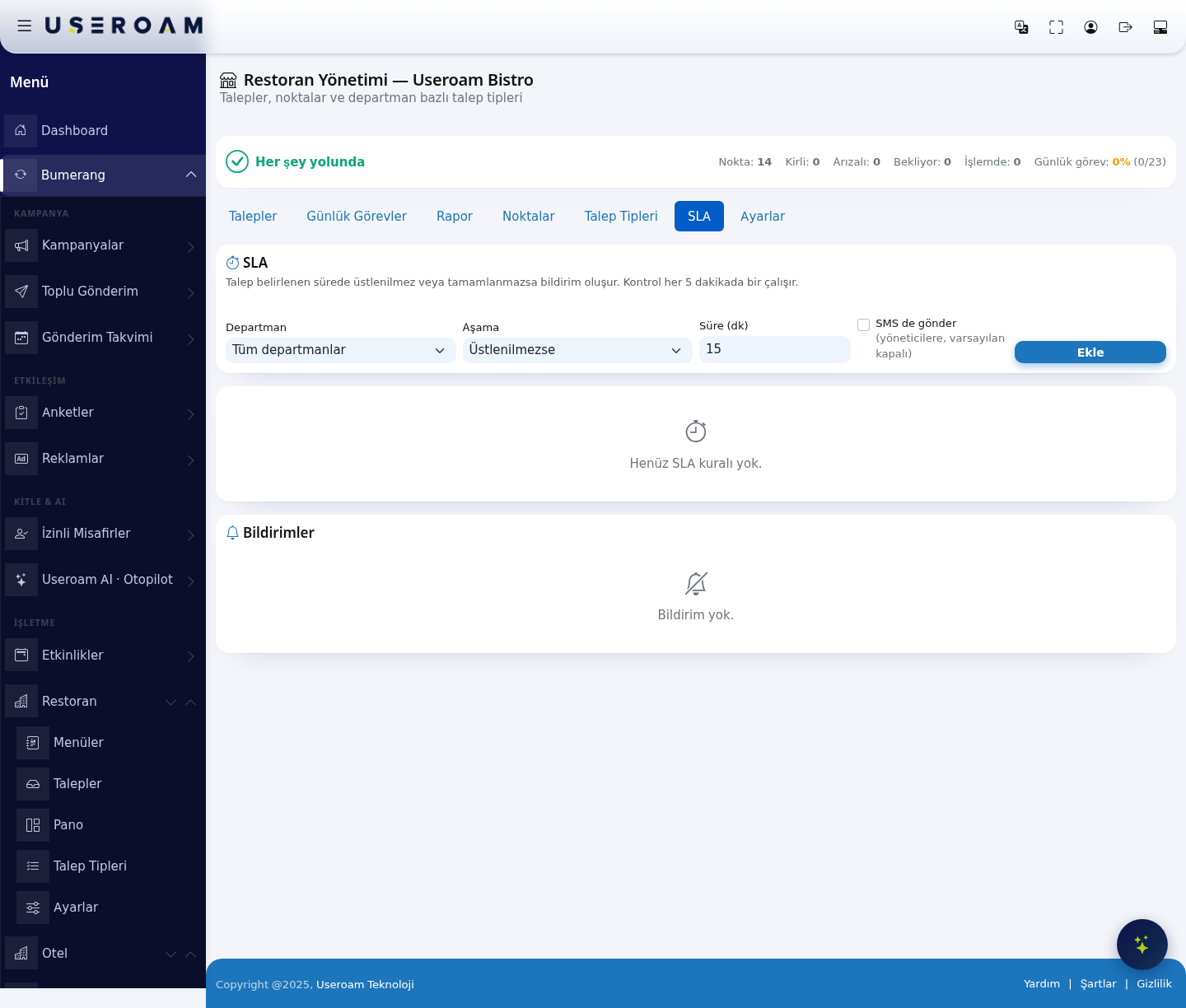
1. Adding a rule
- Department: All departments or a single one (in the demo business Temizlik / cleaning, Teknik / technical, Garson / waiting staff, Mutfak / kitchen). The rule applies only to that department's requests.
- Stage: Not picked up starts the clock while no one has taken the request; Not completed applies once it has been picked up but not finished.
- Time (min): Minutes to wait before a notification is raised.
- Also send SMS: When ticked, the notification is also sent to managers by SMS. Off by default.
Add writes the rule to the list. With no rules defined the list reads "No SLA rules yet."
Check frequency: The check runs every 5 minutes. With thresholds under five minutes, the notification may therefore appear a few minutes after the threshold has passed.
2. Notifications
The lower section lists the notifications raised by these rules. With none it reads "No notifications." This list is the quickest way to see which department is falling behind during the day.
Related pages: Restaurant Solution → Requests, Request Types, Settings.