
Retail Reports
Retail Reports shows all the data collected by the store module on one screen: how many registrations came in, which QR point is working, how many wheel prizes were handed out, whether the coupons were redeemed. The detailed customer list and CSV export live here too.
How do I open this screen? From the left menu, go to Bumerang → Retail → Reports.
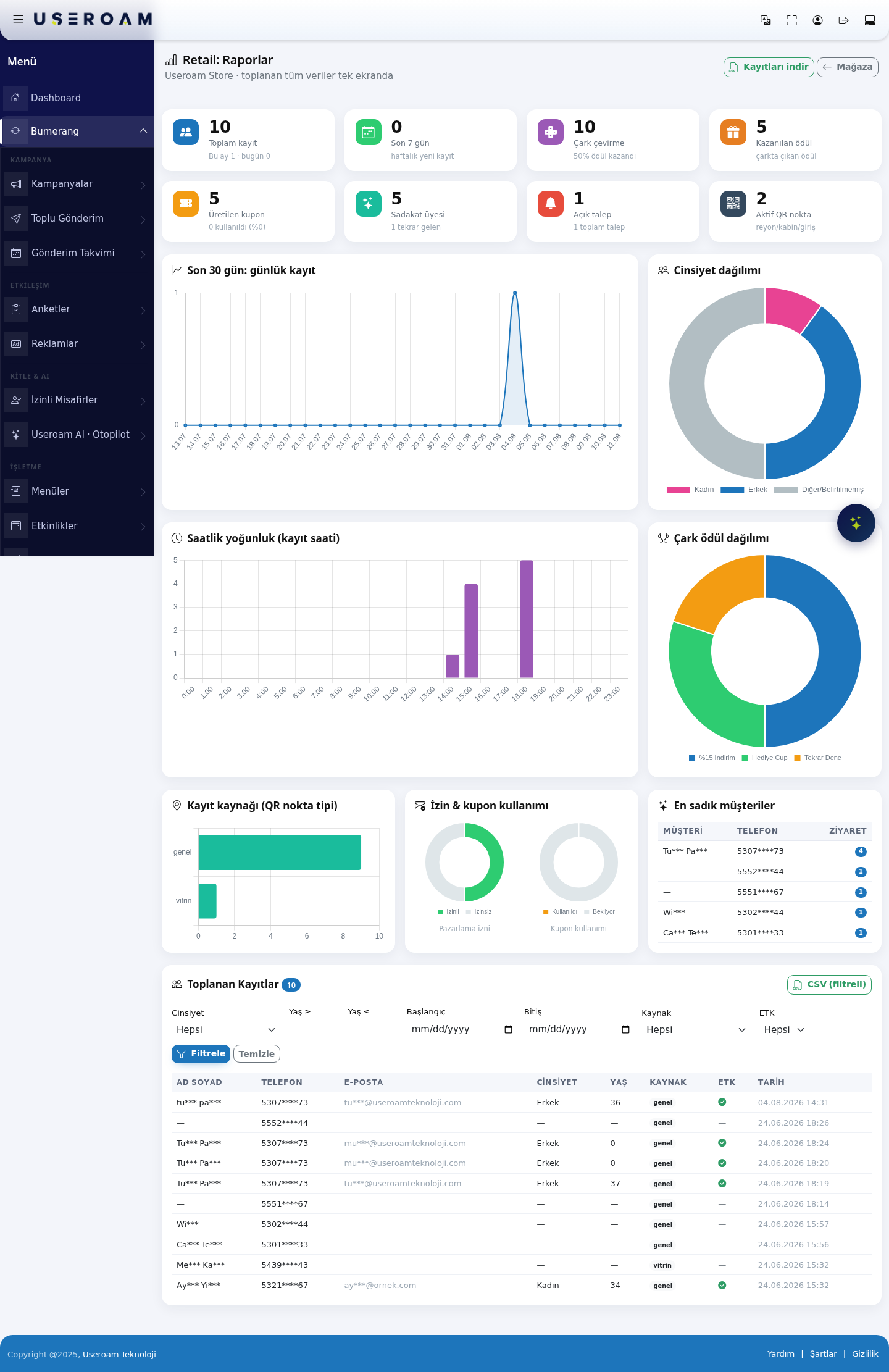
1. Summary figures
- Total records: customer records collected, with this month's and today's counts underneath.
- Last 7 days: new registrations this week.
- Wheel spins: how many times the wheel was spun and what share won a prize.
- Prizes won: the number of prizes the wheel produced.
- Coupons generated: how many coupons were created and what share was redeemed. This is the number that measures the campaign's real effect — high generation with low redemption means a weak offer.
- Loyalty members: the number of members and how many returned.
- Open requests: pending and total requests.
- Active QR points: the number of aisle / cabin / entrance points.
2. Charts
- Last 30 days: daily registrations — how registration flow moves day by day.
- Gender split — the profile of your customer base.
- Hourly density (registration time) — what time of day registrations happen. Use it for staff planning and campaign timing.
- Wheel prize distribution — which prize came up how often. This is how you verify that your wheel weights behave as intended.
- Registration source (QR point type) — which point registrations come from. Window or fitting room? The answer is here.
- Consent & coupon usage — the marketing-consent rate and the coupon redemption rate.
- Most loyal customers — your most frequent visitors, with CUSTOMER, PHONE and VISITS columns.
3. Collected Records and filters
Filter the detailed customer list with:
- Gender: All / Female / Male / Other.
- Age ≥ and Age ≤: the age range.
- Start / End: the date range.
- Source: the QR point type the record came from.
- Consent: commercial-message consent — All, Consented or No.
Filter applies your selection; Clear resets it.
Table columns: NAME, PHONE, E-MAIL, GENDER, AGE, SOURCE, CONSENT, DATE. Personal data is masked for data-protection reasons.
4. Export
- CSV (filtered): downloads the records matching the current filter as CSV.
- Download records: downloads all records.
Data-protection responsibility: the downloaded file contains unmasked personal data. Mind your obligations as data controller when you share, store and delete it.
Related pages: Retail → Store & QR Registration, Segments, Coupons & Wheel, Automation.