
Notifications
Notification Settings determine which events the system notifies you about by SMS or email. Because a silent failure in the 5651 log-signing process creates legal exposure, we recommend keeping the signing and log-flow notifications switched on.
How do I open this screen? From the left menu, go to Settings → Notifications.
Note: the field labels on this screen are still shown in Turkish; the Turkish label is given in brackets so you can find each switch.
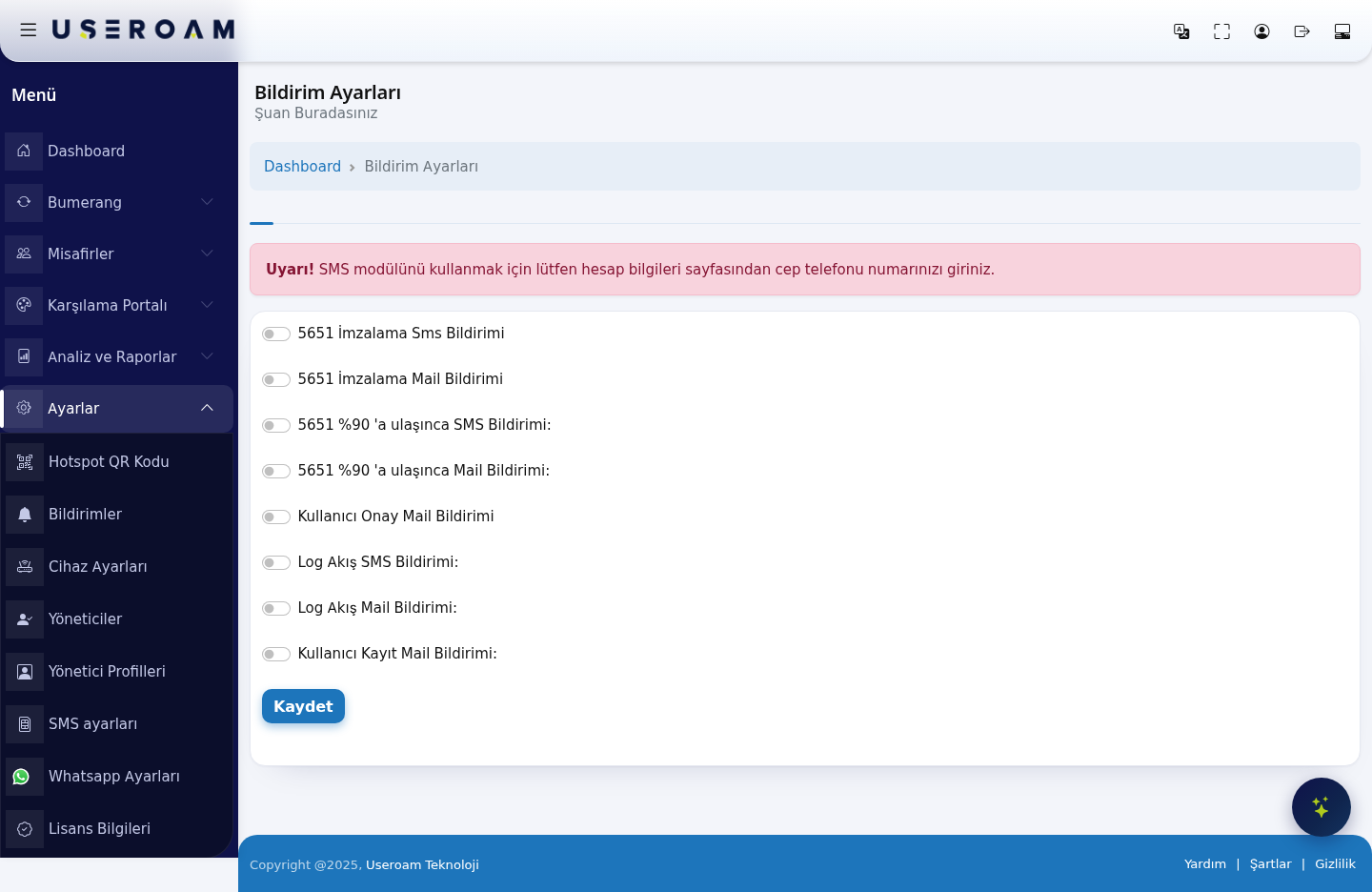
Prerequisite: if the screen shows the warning "Uyarı! SMS modülünü kullanmak için lütfen hesap bilgileri sayfasından cep telefonu numarınızı giriniz." (please enter your mobile number on the account information page), SMS notifications will not reach you. Add a mobile number to your account details first.
Notification types
There are eight separate switches; each can be turned on or off independently.
5651 signing
- 5651 signing SMS notification (5651 İmzalama Sms Bildirimi): sends an SMS to your mobile when the log-signing job completes — or fails.
- 5651 signing email notification (5651 İmzalama Mail Bildirimi): the same information by email.
Capacity warning
- SMS notification at 90% of 5651 capacity (5651 %90'a ulaşınca SMS Bildirimi): sends an SMS when the log storage to be signed reaches 90% of the allocated quota, so you can act before the space fills and logs are lost.
- Email notification at 90% of 5651 capacity (5651 %90'a ulaşınca Mail Bildirimi): the same warning by email.
Log flow
- Log flow SMS notification (Log Akış SMS Bildirimi): sends an SMS when the log stream from your firewall to Useroam stops. This is the first signal you get if the syslog configuration on the firewall breaks.
- Log flow email notification (Log Akış Mail Bildirimi): the same warning by email.
User events
- User approval email notification (Kullanıcı Onay Mail Bildirimi): sends an email when a user registration needs approval, reminding you to review Guests → Pending Approval.
- User registration email notification (Kullanıcı Kayıt Mail Bildirimi): sends an email whenever a new guest registers on the portal. We recommend leaving this off at busy locations.
Confirm your selection with Save.
Related pages: Analytics and Reports → 5651 Logs (signing status), Guests → Pending Approval, Settings → SMS Settings.