
WhatsApp Settings
WhatsApp Settings define the format of the password generated for the "Log in with WhatsApp" flow, the group the guest is added to, and the message text that is sent. If you enabled the module on the WhatsApp Portal page, this page must be configured as well.
How do I open this screen? From the left menu, go to Settings → WhatsApp Settings.
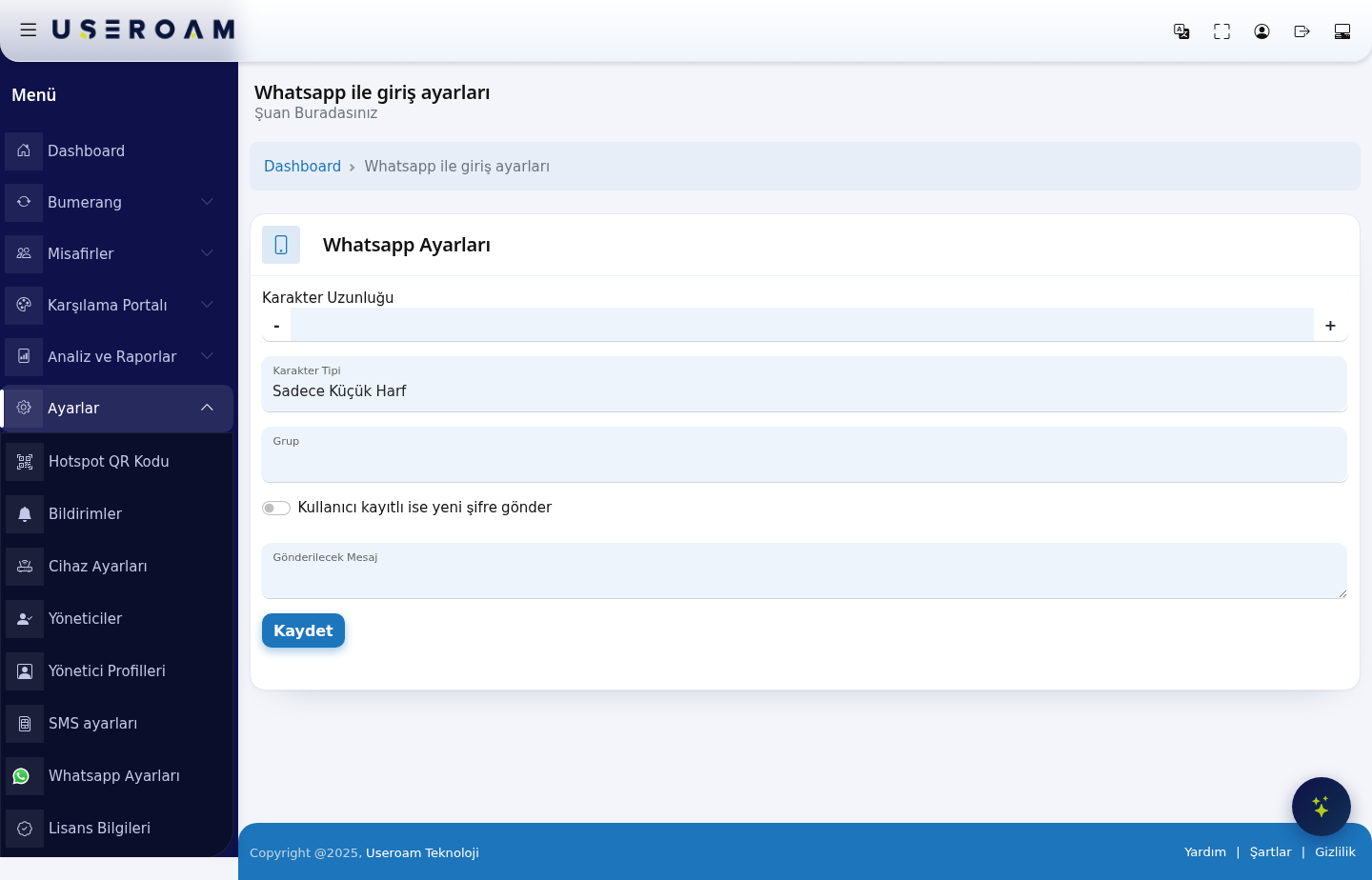
1. Password generation and guest placement
- Character Length: how many characters the generated password has; adjust with the - and + buttons.
- Character Type: Lowercase Letters Only, Uppercase Letters Only, Letters Only, Numbers Only or All.
- Group: the user group that guests registering over WhatsApp are added to. The group's quota and duration rules apply to them (Guests → Groups).
- If the user is registered, send a new password: generates a new password when an already-registered number logs in again.
- Message to be Sent: the text delivered to the guest over WhatsApp. Keep the password placeholder in the text.
2. Service / API settings
The advanced section defines the delivery service:
- Provider: Mobilişim (Ekomesaj) is a ready-made integration; choosing Other means defining the parameters yourself.
- URL and HTTP Method (GET / POST): the service endpoint and request type.
- Use country code / Add leading zero: number formatting. Choose only the one your service expects.
- Response value: the value the service is expected to return on a successful send.
- Username, Password, Header: the service account credentials.
- Request parameters: Parameter / Parameter Value rows, managed with + and -.
Confirm your changes with Save.
Remember: for the WhatsApp flow to work on the guest side, your firewall must allow the WhatsApp domains (
*.wa.me, *.whatsapp.com, *.whatsapp.net and others). Details are in the Installation Guides.Related pages: Captive Portal → WhatsApp Portal, Guests → Groups, Analytics and Reports → SMS / WhatsApp Reports.