
Request Types
What is it for?
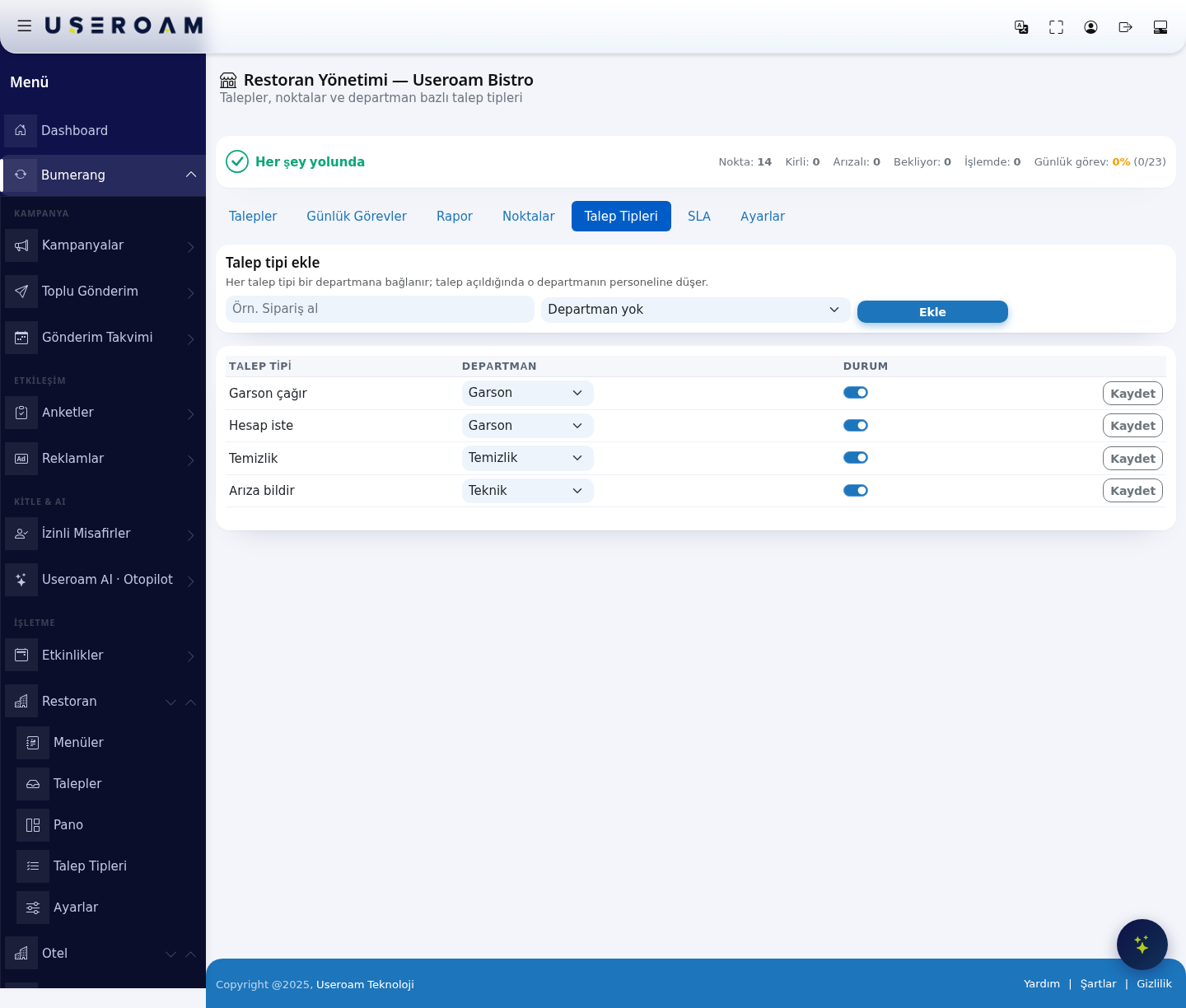
The Request Types tabis defineswhere you set the job headings guests and staffthat can raisebe aopened requestin under,your restaurant (for example Call waiter, Cleaning, Fault) and which department each heading goes to. This is where the module's routingRouting is set up:up here: request type → department → that department's staff.
How do I open this screen? In the left menu go to
Bumerang → BUSINESS (İŞLETME) →Restaurant(Restoran)→ Request Types. Or on Restaurant Management click the Settings tab, then the Request Types sub-tab.
When do I use it?
- When you first set up the restaurant, to link the 4 ready types (Call waiter, Request bill, Cleaning, Fault) to departments.
- To add a new job heading (for example
Refill water,High chair). - To send a job to a different team.
- To take a type you no longer use off the list (make it inactive).
1.Before Addingyou start
- Departments are defined on the Staff screen or in the setup wizard. With no departments the screen shows "You have not defined any departments yet." and an Add them on the Staff page link.
Step by step: add a new request type
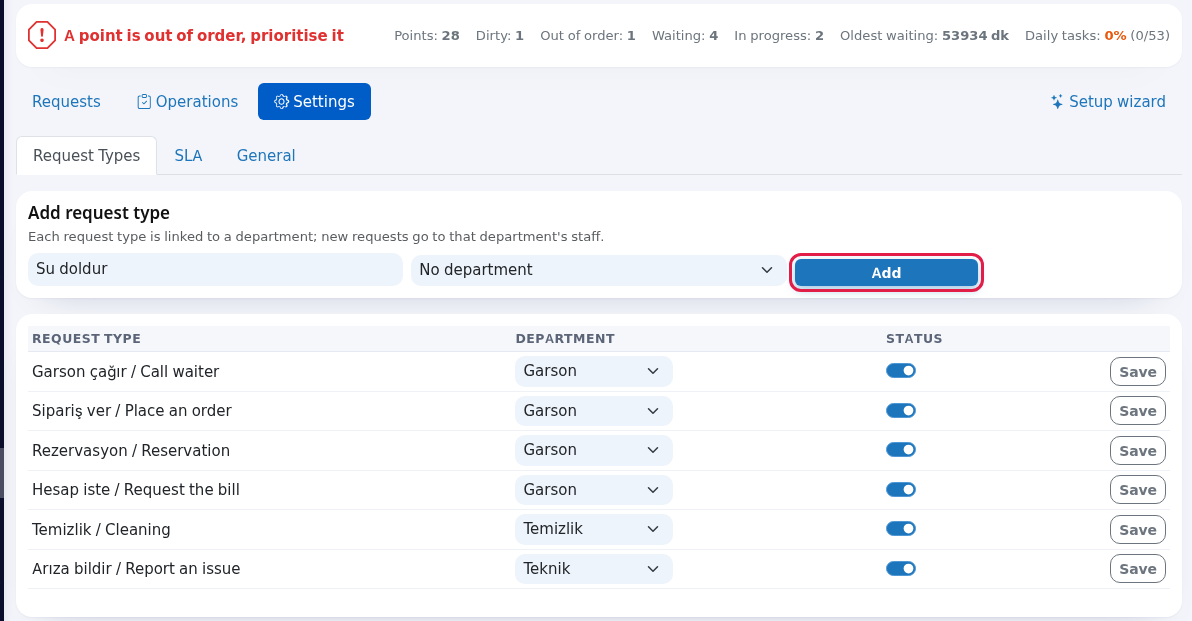
- In the Add request type card, type the name in e.g. Take order (for example
Refill water), choose the department next to it (for exampleWaiter) and click Add. Therowtop says "Request type added." and the type is added at thetopend of thepagelist.defines
Step by step: change the department or turn a type off
- On the type's row, choose the new department in the Department box. To stop using the type, switch off the Status toggle. Then click Save on the same row. The top says "Saved."

An inactive type cannot be chosen for new requests; past requests and reports are unaffected. There is no delete button for types on this screen; switch off the ones you do not use.
Every field and button
| Field / Button | What it does | Example |
|---|---|---|
| Add request type card, e.g. Take order box | Name of the new type (up to 120 characters). | Refill water |
| Department box | Where the type goes. With No department the request goes to the least busy person among all staff. | Waiter |
| Add | Adds the type. | - |
| List: Request type | The type's name (it cannot be renamed; add a new
| Call waiter |
| List: Department | The type's department. | Waiter |
| List: Status toggle | On: usable. Off: hidden from new requests. | On |
| Save | Saves the | - |
The note under the demo businesscard: Temizlik (cleaning), Teknik (technical), Garson (waiting staff), Mutfak (kitchen).
Add puts the type in the list. As the screen states, every"Each request type is linked to a department; new requests go to that department's staff."
Messages 2.you Existingmay typessee
| Message | Meaning and what to do |
|---|---|
| Request type added. | The |
| Saved. | The row change was saved. |
| Request type name cannot be empty. | Fill in the name. |
| No request types | Add your first type, or use step 3 of the wizard. |
| You have not defined any departments yet. | Create departments with the |
Frequently asked questions
Where do guests see request types?
They appear when staff open a request in the app and in Department1. What happened? in the panel's New request window. Automation rules also use them. The Call waiter and Status. The demo business has four: Garson çağır (call waiter), Hesap iste (ask forRequest the bill), Temizlik (cleaning), Arıza bildir (report a fault).
Department:billChanged from the dropdown. WithNo departmentselected the request is not routed to any team and staysbuttons in thewaitingQRlist.menu Status:areTurning the switch off hides the typeseparate fromthethisrequestlist;forms.theyPastarriverequestsasare not deleted.
Note:Departments are definedcalls on theStaffOperationsscreen. A department added there becomes selectable here.Screen.
Why
can't I rename a type?
RelatedThe pages:name stays fixed so past requests and reports keep it. Add a type with the new name and switch the old one off with Restaurant Solution → Requests, SLA; Bumerang → StaffStatus.
Can several types go to the same department?
Yes. For example Call waiter, Request bill and Refill water can all go to Waiter.