
Automation
Retail Automation
What is theit rulefor?
On that sendsRetail automaticAutomation SMS,you couponscreate and campaigns "when datathis ishappens, collected.do Youthat" setrules. itFor upexample: once and the system then acts on its own — onsend a birthday,welcome on a wheel prize, orSMS when a customer driftsfills away.in the form, send a consolation coupon by SMS to those who lose on the wheel, send a birthday greeting, or send a comeback coupon to a customer who has not visited for 45 days.
When
to use it
- When you want every new sign-up to get a message automatically.
- When you want to reward customers who reach a certain number of visits.
- When you want to call back long-absent customers automatically.
Before you start
- Sending SMS needs an SMS package and a Bumerang (marketing) licence.
- For a coupon rule, first create an
How do I open this screen?ActiveFromcoupon on Coupons & Wheel.- A rule starts working the moment it is on and sends SMS to real customers. To try one, save it first with Rule active off, check the text, then turn it on.
Step by step
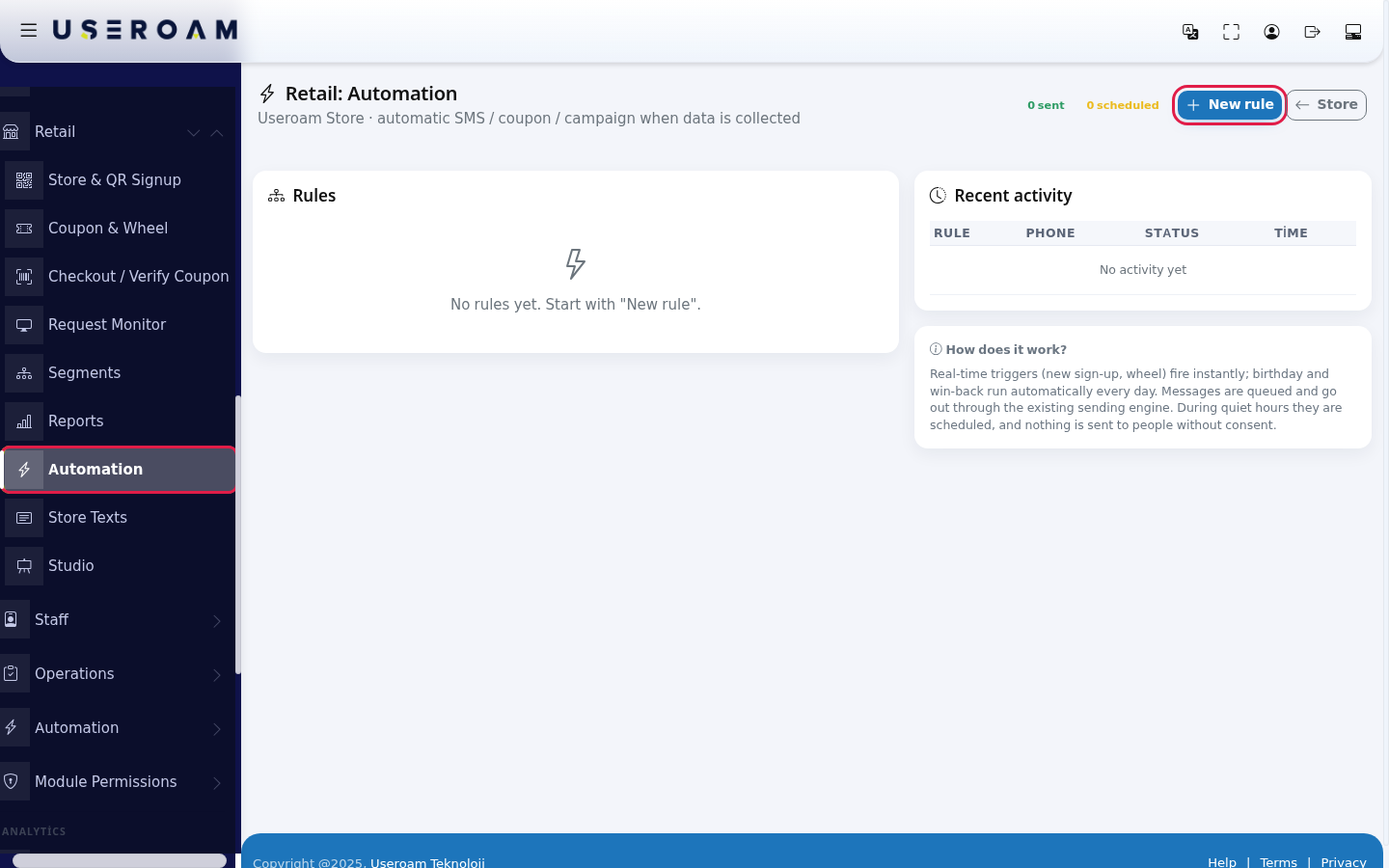
- Open Retail > Automation in the left
menu,menu.goWithtono rules it says "No rules yet. Start with "New rule"." PressBumerangNew→ Retail → Automationrule.
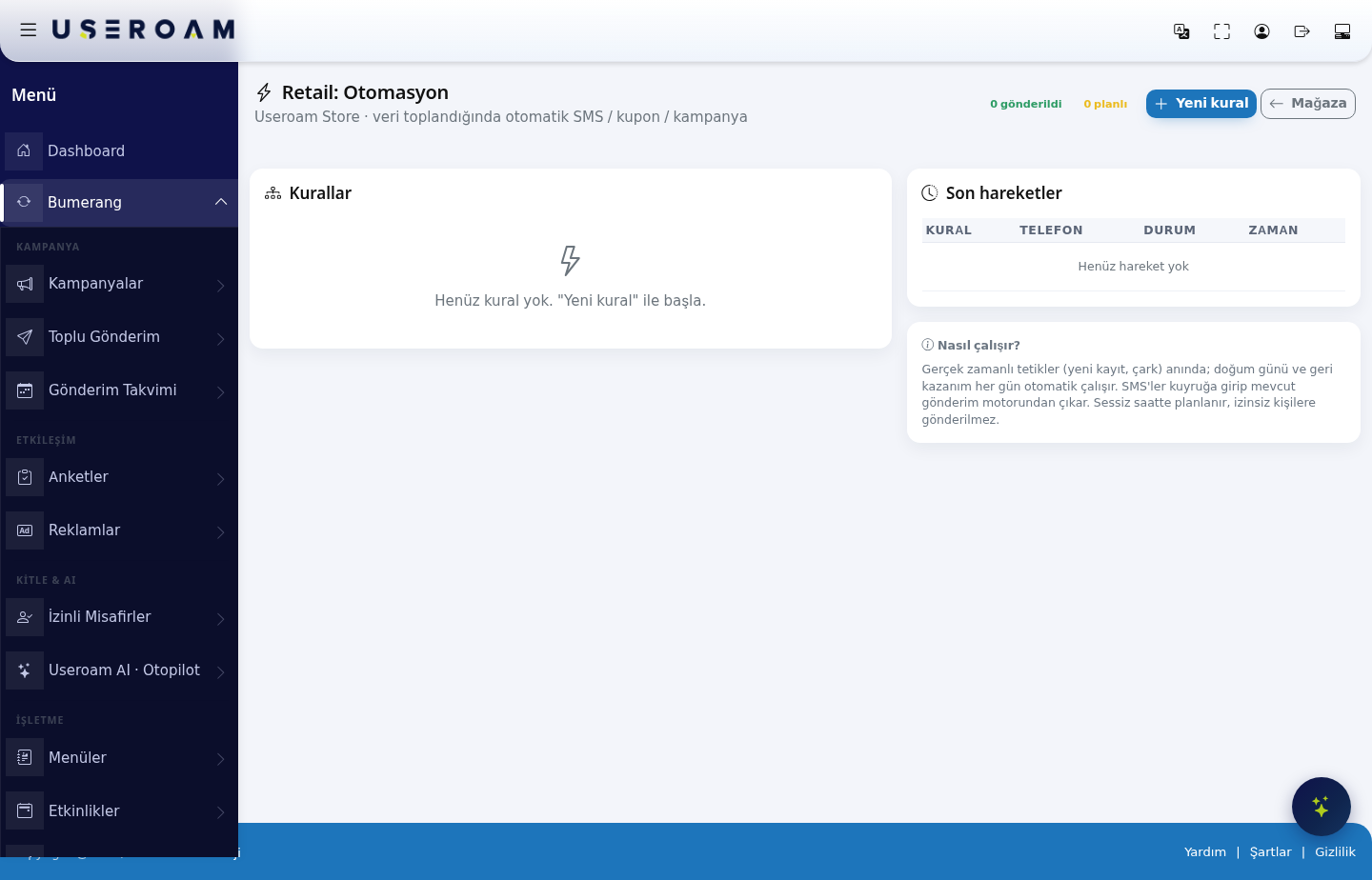
The sent and scheduled counts appear at the top.top right.
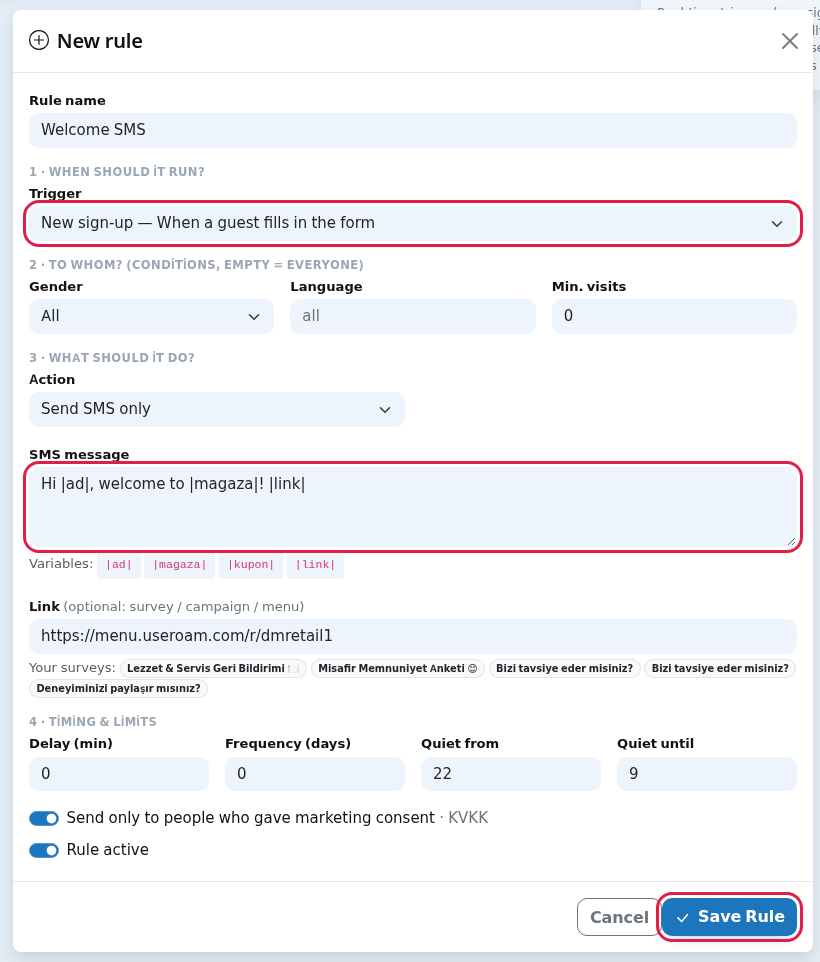
Howthe window, type the Rule name. Under 1 · When should it worksrun? choose the Trigger. Under 2 · To whom? optionally narrow by gender, language or minimum visits (empty means everyone). Under 3 · What should it do? choose the Action and write the SMS message. Set 4 · Timing & limits and press Save Rule.
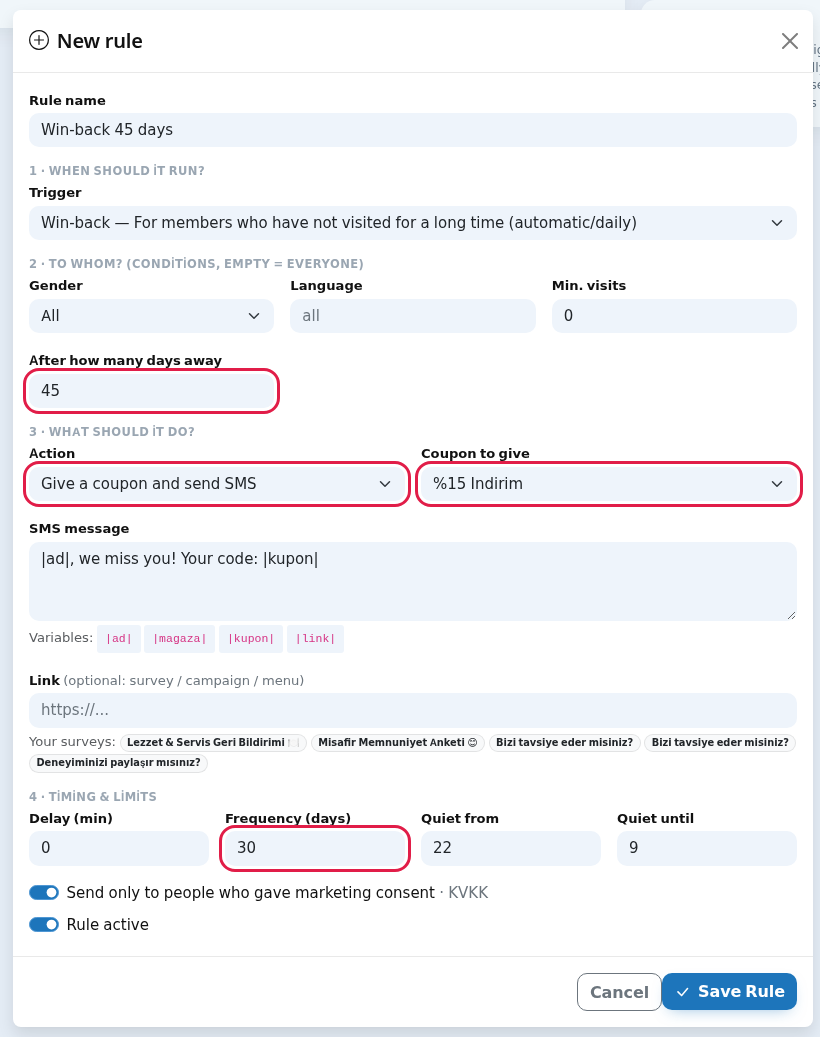
|kupon| in the message is replaced by the code.
Triggers
Trigger When it runs New sign-up When a guest fills in the form, immediately. Won a prize on the wheel When the wheel gives a coupon code, immediately. Did not win on the wheel When the wheel shows "try again" (consolation), immediately. Loyalty visit threshold When the customer reaches the number of sign-ups in Visit threshold (which visit) (example: the 3rd visit). If the threshold is empty it runs on every repeat visit. Birthday Automatically every day, for members whose birthday is today. The date of birth is the one entered at the member's first sign-up. Win-back Automatically every day, for members whose last visit was exactly the number of days in After how many days away ago (default 30). Every field in the window
Field What it does Example Rule name Name shown in the list. If empty, "Otomasyon". Welcome SMSGender All, Female, Male. All Language Two-letter language code; only people who signed up in that language. Empty = all. enMin. visits Only people with at least this many sign-ups. 2Action Send SMS only or Give a coupon and send SMS. Coupon to give Lists active coupons (Select…). %15 Indirim SMS message Text to send. Variables: |ad|(customer name),|magaza|(store name),|kupon|(issued code),|link|(the link below). An empty message is not sent.Hi |ad|, welcome to |magaza|!Link (optional: survey / campaign / menu) Address put in place of |link|. Your surveys: lists your survey titles (information only; paste the link yourself).https://...Delay (min) Minutes after the trigger before sending. 0Frequency (days) How often at most one person can get an automation message from this store (hover text: "shortest interval per person"). 0 = no limit. 30Quiet from / Quiet until No messages between these hours; they are scheduled for the end of the quiet period (0-23). 22/9Send only to people who gave marketing consent · KVKK When on, nothing is sent to people without commercial message consent. Keep it on for campaign messages. On Rule active When off, the rule does not run. Cancel / Save Rule Closes / saves. Top indicators and Recent activity
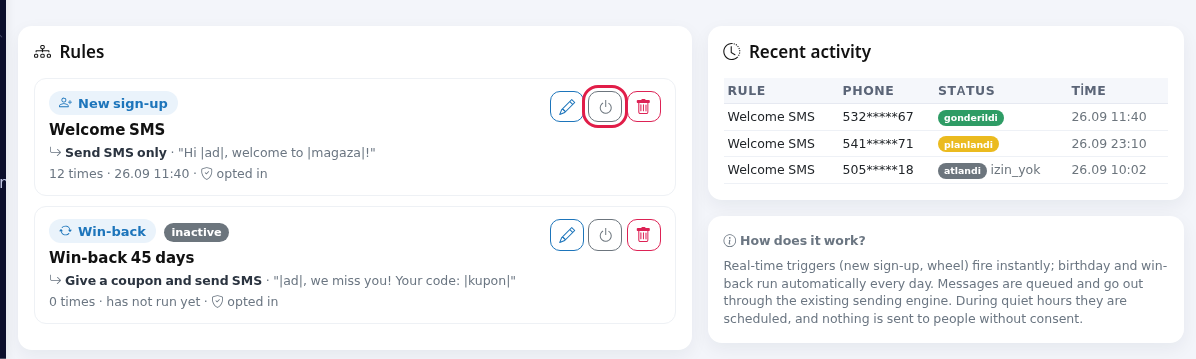
Item Meaning X sent / X scheduled Messages that entered the sending queue / waiting because of quiet hours or delay. Rule, Phone, Status, Time The last 15 events. Status: green gonderildi(sent), yellowplanlandi(scheduled), greyatlandi(skipped, with reason), redhata(error).Skip reasons izin_yok: no ETK consent ·frekans: frequency period not over ·telefon_yok: no valid number ·kupon_uretilemedi: coupon passive or not selected ·mesaj_bos: empty message ·lisans: no marketing licence.How does it work? box Real-time triggers (new registration, wheel)fireimmediately;instantly, birthday and win-backrulesrunautomaticallydaily;everymessagesday.areMessages enter a queuequeued andleavesentthroughby theexistingsendingdeliveryengine;engine. Theythey arerescheduledscheduledaroundduring quiet hours and never sentto peoplewithout consent.No
activity yetNothing has triggered yet.
NewMessages you may see
Message Meaning Rule added. / Rule updated. The rule was saved. Status updated. The rule was turned on or off. Rule deleted. The rule was removed. Frequently asked questions
1. Definition and trigger
- gender/language
Rule name:a name identifyingDo therule.Trigger:conditionswhenworkthe rule fires:
New registration— when a guest submits the form.Won a wheel prize— when the spin-to-win produces a prize.Did not win on the wheel— when the wheel lands on "try again" (a consolation message).Loyalty visit threshold— when a certain visit count is reached.Birthday— on the member'sfor birthday(automatic/daily).Win-back— to members who have not visited in a long time (automatic/daily).
2. Audience conditionssigns
Gender:All / Female / Male.Language:the customer's language.Min. visits:the minimum number of visits required.Visit threshold (which visit):for the loyalty trigger, which visit fires the rule.- number
Days without a visit:for theand win-backtrigger,rules?
No. These two daily triggers currently ignore Gender, Language and Min. visits and go to all eligible members. Consent (ETK), frequency and quiet hours still apply.I left frequency at 0. Is that a problem?
0 means no limit. If theinactivitysameperiod.
3.upAction
Action:Send SMS onlyorGive coupon + send SMS.Coupon to give:which coupon, if one is given (chosen from those defined on theCoupons & Wheelscreen).SMS message:the text to send.Link (optional):a survey, campaign or menu link.again,
4. Timingagain andlimits
Delay (min):how many minutes after the trigger thea message goesout.outAeach time. Give campaign rules a frequency of at least a fewminutes'days.delayThe
onstatusasaysnewsentregistrationbut the customer did not get it.
"gonderildi" means the messagearrives whileentered thecustomersendingisqueue.stillFor carrier delivery see SMS / WhatsApp Reports.Phones in Recent activity are shown in full.
Yes, this table currently shows numbers unmasked. Do not leave the screen open where others can see it.Related pages
- Segments (one-off bulk SMS)
- Coupons & Wheel
- Creating a survey (for the link in the
store.Frequency (days):how often at most this rule may apply to the same customer.Always set this so you do not overwhelm people.Quiet start/Quiet end:the hours during which nothing is sent (overnight, for example). Messages falling in this window are postponed.Send only to those with marketing consent · GDPR/KVKK:blocks sending to customers without consent.We recommend keeping it on.Rule active:publishes or pauses the rule.message)
Save Rulestores it;Cancelcloses the form.
Rules and Recent activity
Defined rules appear in the list above; with none defined it reads"No rules yet."TheRecent activitytable shows what has been sent, withRULE,PHONE,STATUSandTIMEcolumns.
Related pages:Retail → Segments,Coupons & Wheel,Retail Reports,Settings → SMS Settings.