
Automation
What is it for?
On Retail Automation you create "when this happens, do that" rules. For example: send a welcome SMS when a customer fills in the form, send a consolation coupon by SMS to those who lose on the wheel, send a birthday greeting, or send a comeback coupon to a customer who has not visited for 45 days.
The subtitle under the screen title reads "Store name · automatic SMS / coupon / campaign when data is collected".
When to use it
- When you want every new sign-up to get a message automatically.
- When you want to reward customers who reach a certain number of visits.
- When you want to call back long-absent customers automatically.
Before you start
- Sending SMS needs an SMS package and a Bumerang (marketing) licence.
- For a coupon rule, first create an Active coupon on Coupons & Wheel.
- A rule starts working the moment it is on and sends SMS to real customers. To try one, save it first with Rule active off, check the text, then turn it on.
Step by step
- Open Retail > Automation in the left menu. With no rules it says "No rules yet. Start with "New rule"." Press New rule at the top right.
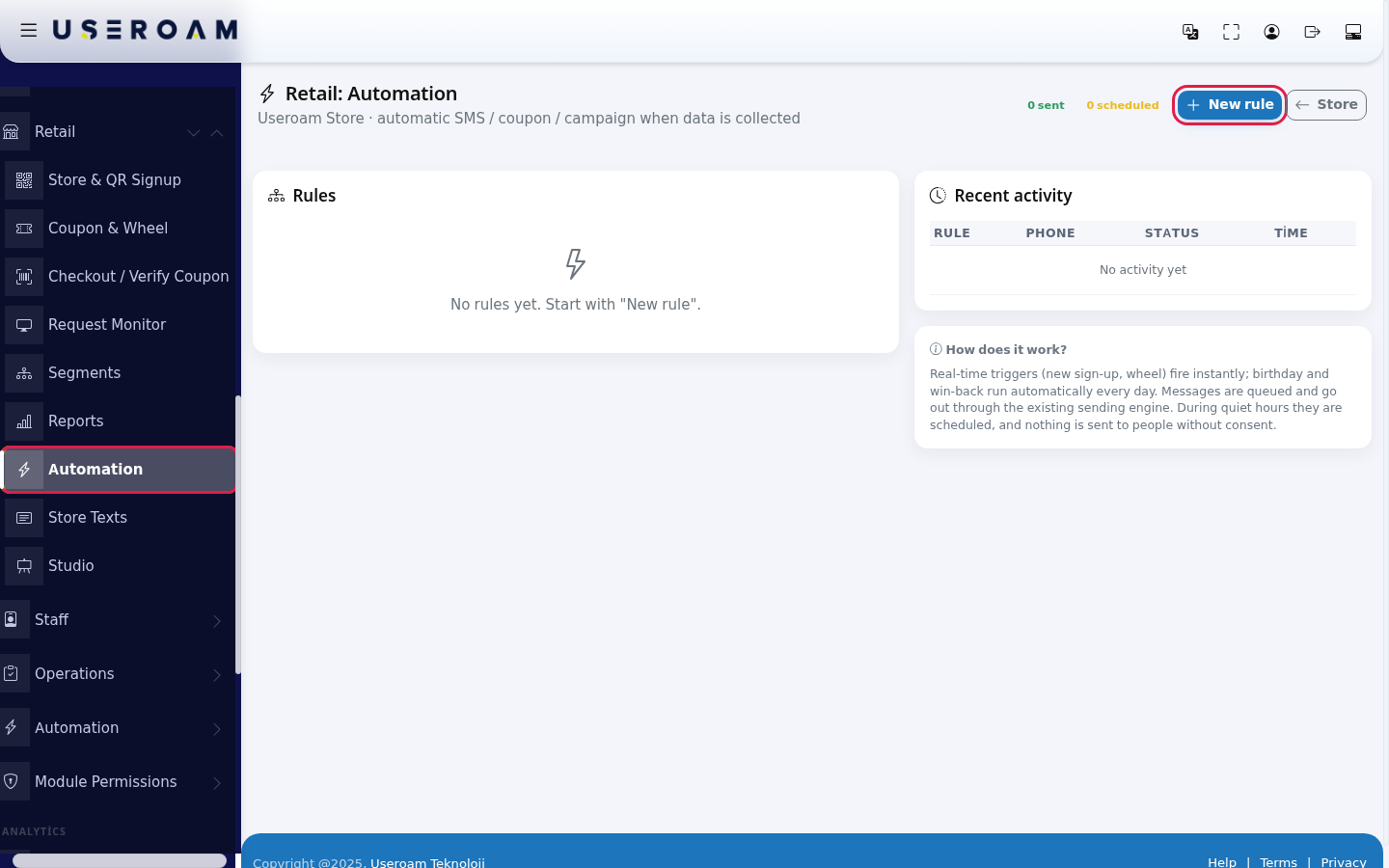
- In the window, type the Rule name. Under 1 · When should it run? choose the Trigger. Under 2 · To whom? (conditions, empty = everyone) optionally narrow by gender, language or minimum visits (empty means everyone). Under 3 · What should it do? choose the Action and write the SMS message. Set 4 · Timing & limits and press Save Rule.
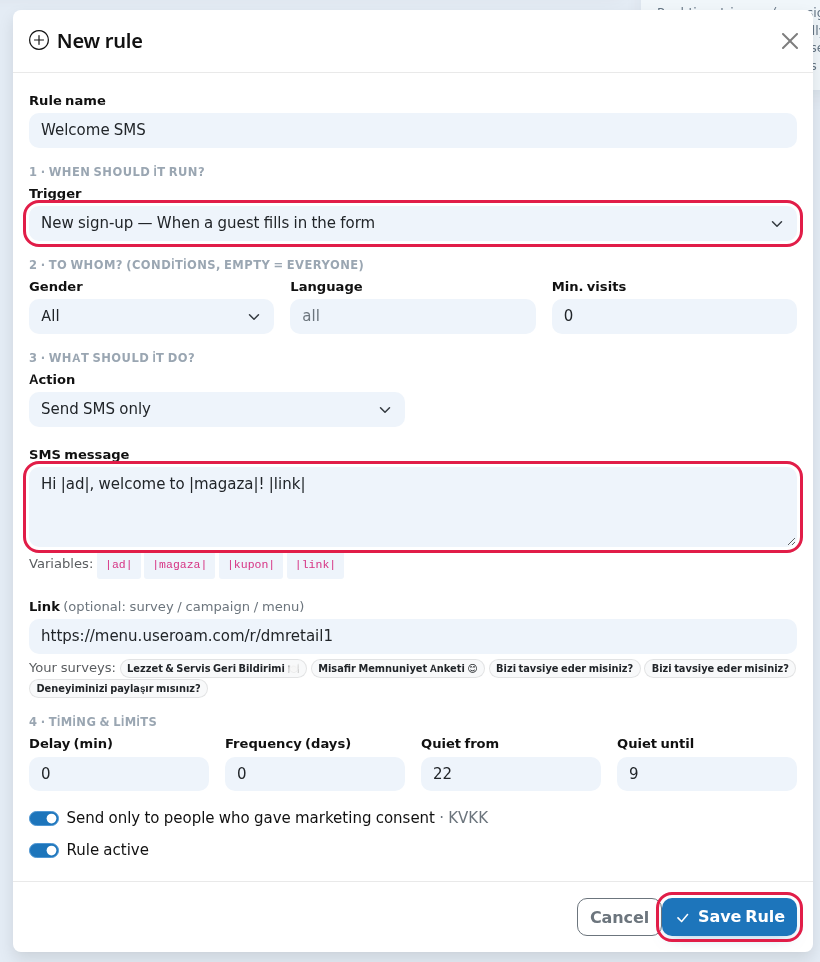
- Some triggers add a field: Win-back shows After how many days away, Loyalty visit threshold shows Visit threshold (which visit). The Give a coupon and send SMS action shows Coupon to give;
|kupon|in the message is replaced by the code.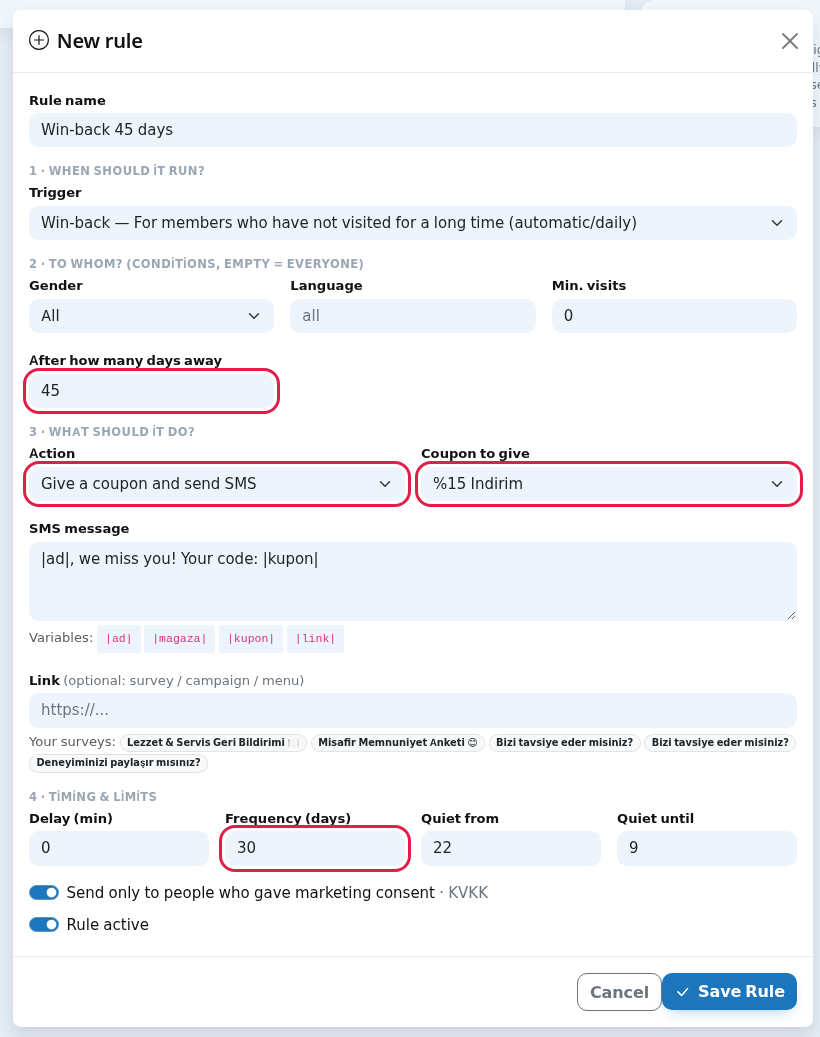
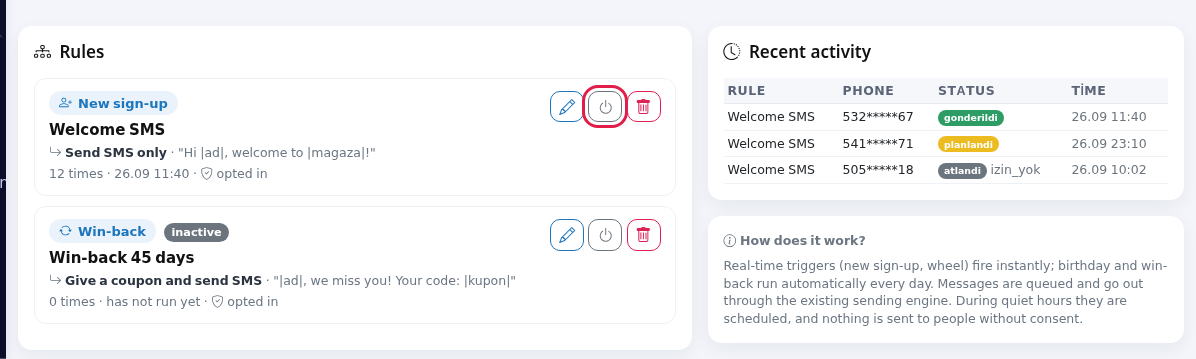
- A saved rule appears in the list: trigger badge, name, action and the start of the message, how many times it ran ("X times"), when it last ran or "has not run yet", and "opted in" with a shield icon if consent is required. The pencil opens the window titled Edit rule, the power icon turns it on/off (an off rule shows a grey inactive badge), the bin deletes after "Delete this rule?". Recent activity on the right shows the last 15 sends with their status.
Triggers
| Trigger | When it runs |
|---|---|
| New sign-up | When a guest fills in the form, immediately. |
| Won a prize on the wheel | "When a spin-to-win prize comes up": when the wheel gives a coupon code, immediately. |
| Did not win on the wheel | When the wheel shows "try again" (consolation), immediately. |
| Loyalty visit threshold | "When a certain visit count is reached": when the customer reaches the number of sign-ups in Visit threshold (which visit) (example: the 3rd visit). If the threshold is empty it runs on every repeat visit. |
| Birthday | "On the member birthday (automatic/daily)". Automatically every day, for members whose birthday is today. The date of birth is the one entered at the member's first sign-up. |
| Win-back | "For members who have not visited for a long time (automatic/daily)". Automatically every day, for members whose last visit was exactly the number of days in After how many days away ago (default 30). |
Every field in the window
| Field | What it does | Example |
|---|---|---|
| Rule name | Name shown in the list. If empty, "Otomasyon". | Welcome SMS |
| Gender | All, Female, Male. | All |
| Language | Two-letter language code; only people who signed up in that language. Empty = all. | en |
| Min. visits | Only people with at least this many sign-ups. | 2 |
| Action | Send SMS only or Give a coupon and send SMS. | |
| Coupon to give | Lists active coupons (Select…). | %15 Indirim |
| SMS message | Text to send. Grey sample: "Hi |ad|, just for you from |magaza|: |kupon| 🎁 |link|". Variables: |ad| (customer name), |magaza| (store name), |kupon| (issued code), |link| (the link below). An empty message is not sent. | Hi |ad|, welcome to |magaza|! |
| Link (optional: survey / campaign / menu) | Address put in place of |link|. Your surveys: lists your survey titles (information only; paste the link yourself). | https://... |
| Delay (min) | Minutes after the trigger before sending. | 0 |
| Frequency (days) | How often at most one person can get an automation message from this store (hover text: "shortest interval per person"). 0 = no limit. | 30 |
| Quiet from / Quiet until | No messages between these hours; they are scheduled for the end of the quiet period (0-23). | 22 / 9 |
| Send only to people who gave marketing consent · KVKK | When on, nothing is sent to people without commercial message consent. Keep it on for campaign messages. | On |
| Rule active | When off, the rule does not run. | |
| Cancel / Save Rule | Closes / saves. |
Top indicators and Recent activity
| Item | Meaning |
|---|---|
| X sent / X scheduled | Messages that entered the sending queue / waiting because of quiet hours or delay. |
| Rule, Phone, Status, Time | The last 15 events. Status: green gonderildi (sent), yellow planlandi (scheduled), grey atlandi (skipped, with reason), red hata (error). |
| Skip reasons | izin_yok: no ETK consent · frekans: frequency period not over · telefon_yok: no valid number · kupon_uretilemedi: coupon passive or not selected · mesaj_bos: empty message · lisans: no marketing licence. |
| How does it work? box | "Real-time triggers (new sign-up, wheel) fire instantly; birthday and win-back run automatically every day. Messages are queued and go out through the existing sending engine. During quiet hours they are scheduled, and nothing is sent to people without consent." In short: real-time triggers fire instantly, birthday and win-back run daily; messages are queued and sent by the sending engine; they are scheduled during quiet hours and never sent without consent. |
| No activity yet | Nothing has triggered yet. |
Messages you may see
| Message | Meaning |
|---|---|
| Rule added. / Rule updated. | The rule was saved. |
| Status updated. | The rule was turned on or off. |
| Rule deleted. | The rule was removed. |
Frequently asked questions
Do the gender/language conditions work for birthday and win-back rules?
No. These two daily triggers currently ignore Gender, Language and Min. visits and go to all eligible members. Consent (ETK), frequency and quiet hours still apply.
I left frequency at 0. Is that a problem?
0 means no limit. If the same number signs up again and again, a message goes out each time. Give campaign rules a frequency of at least a few days.
The status says sent but the customer did not get it.
"gonderildi" means the message entered the sending queue. For carrier delivery see SMS / WhatsApp Reports.
Phones in Recent activity are shown in full.
Yes, this table currently shows numbers unmasked. Do not leave the screen open where others can see it.
Related pages
- Segments (one-off bulk SMS)
- Coupons & Wheel
- Creating a survey (for the link in the message)