
Surveys
What is it for?
Surveys let you sendThe Surveys screen lists the satisfaction and feedback formssurveys you show to yourguests guests.and Product-shows their results. A survey can open on the Wi-Fi login screen, or go to the guest as a link by SMS / WhatsApp. It can send satisfied guests on to review sites such as Google. Product rating questions also appear as star badges on your digital menumenu.
If soyou are setting up a new survey, go to Creating a survey. doesThis notpage onlycovers measure,reading the list and a survey's results, and exporting them.
When do you use it?
- When you want to follow guest satisfaction (NPS, star rating).
- When you want to read the comments guests wrote.
- When you need survey results as Excel, CSV or PDF.
Before you start
- Surveys are part of the Bumerang marketing package. Without it
enrichesthe screen says "Marketing Module Inactive": "A Marketing Pro license upgrade is required to use surveys, Google Review redirection and guest satisfaction measurement tools. Please contact yourmenureseller."
The list opens: Survey, Status, Questions, Responses, Completion, Created, Actions.Step
Howbydostep:Ireadopensurveythisresultsscreen?
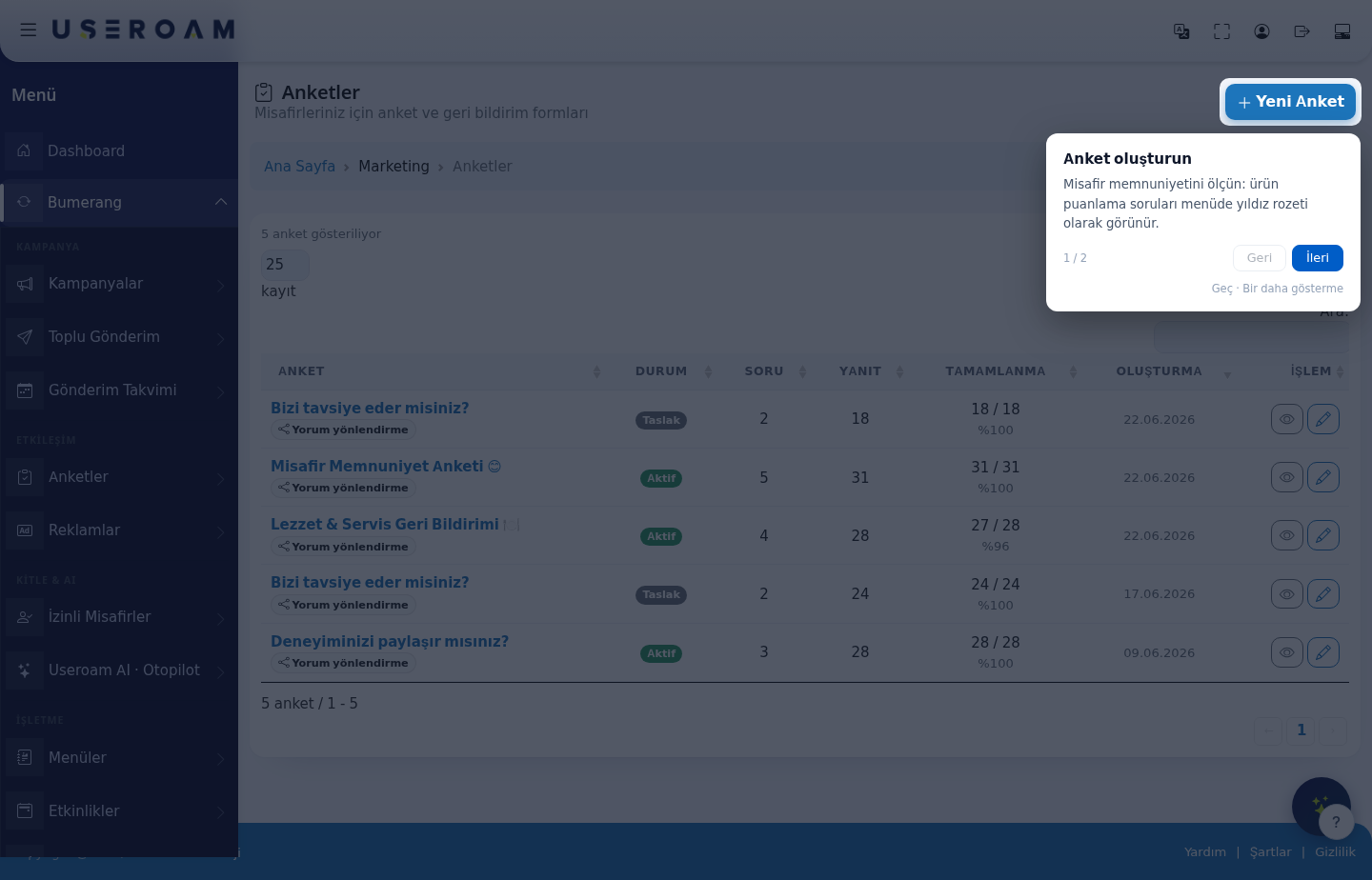
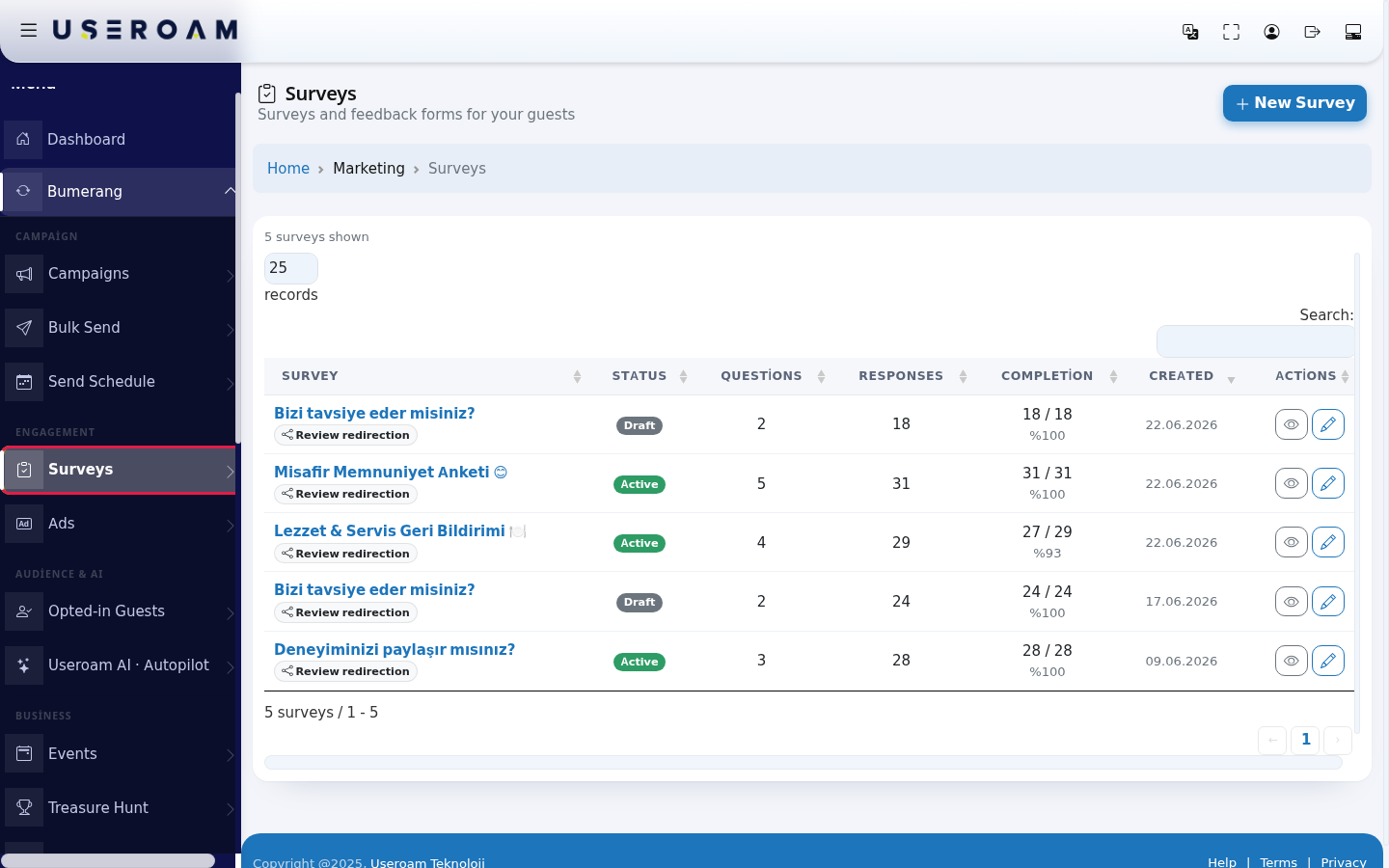
Table columns
SURVEY:Press the eye icon (Details) on a survey'sname,row.withTheitspenciltypeiconbeneath(Edit) edits the survey. The Review redirection badge under the survey name shows that redirection to a review site is on for that survey.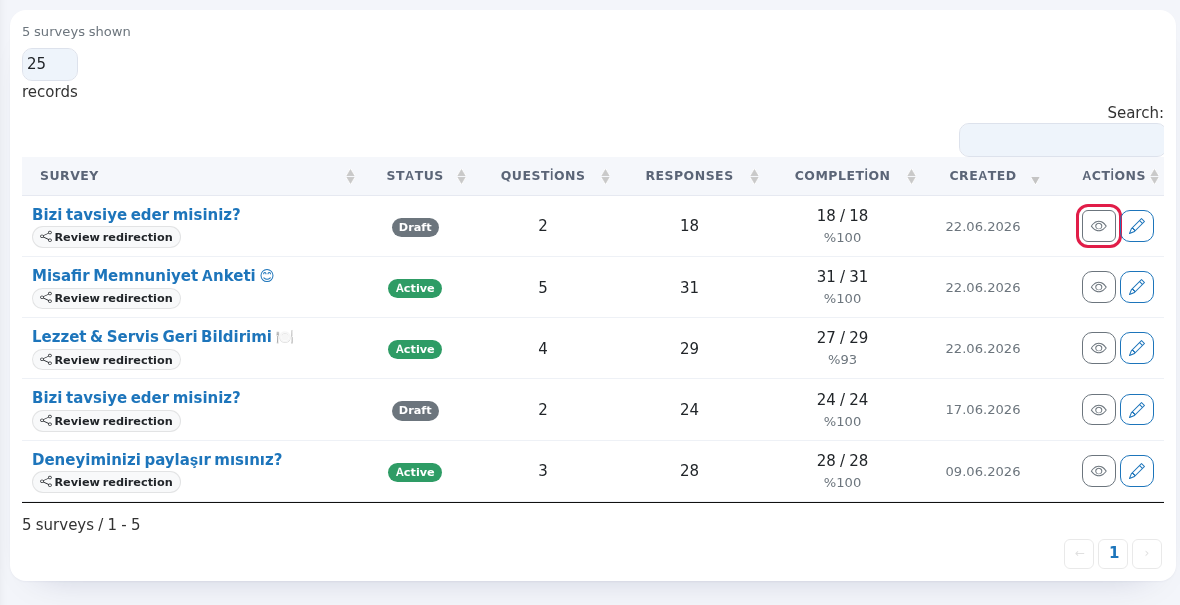
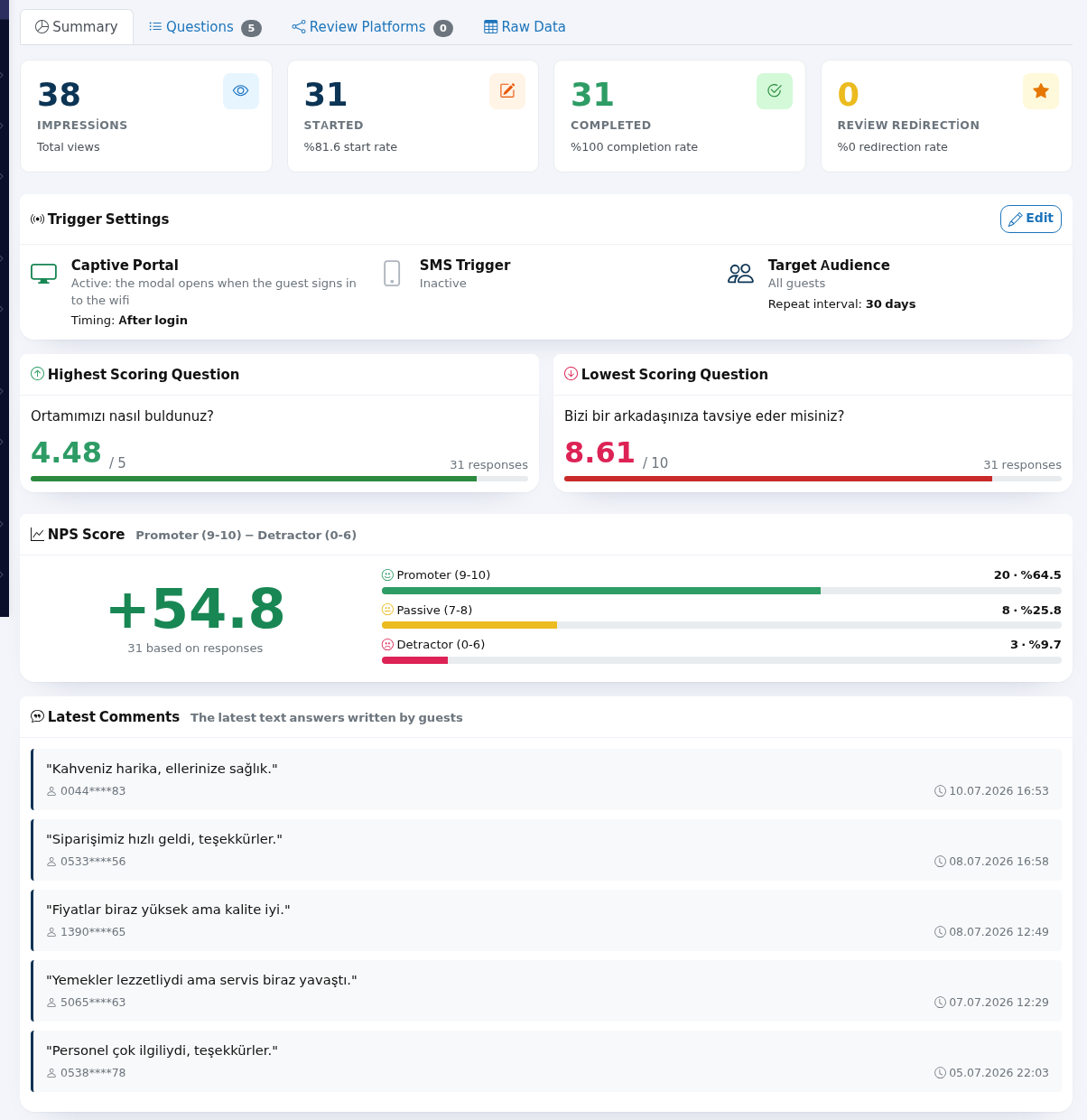
- The details screen opens on the Summary tab. At the top, four boxes: Impressions (total views), Started (start rate), Completed (completion rate), Review Redirection (redirection rate). Below: Trigger Settings, Highest Scoring Question, Lowest Scoring Question, NPS Score and Latest Comments.
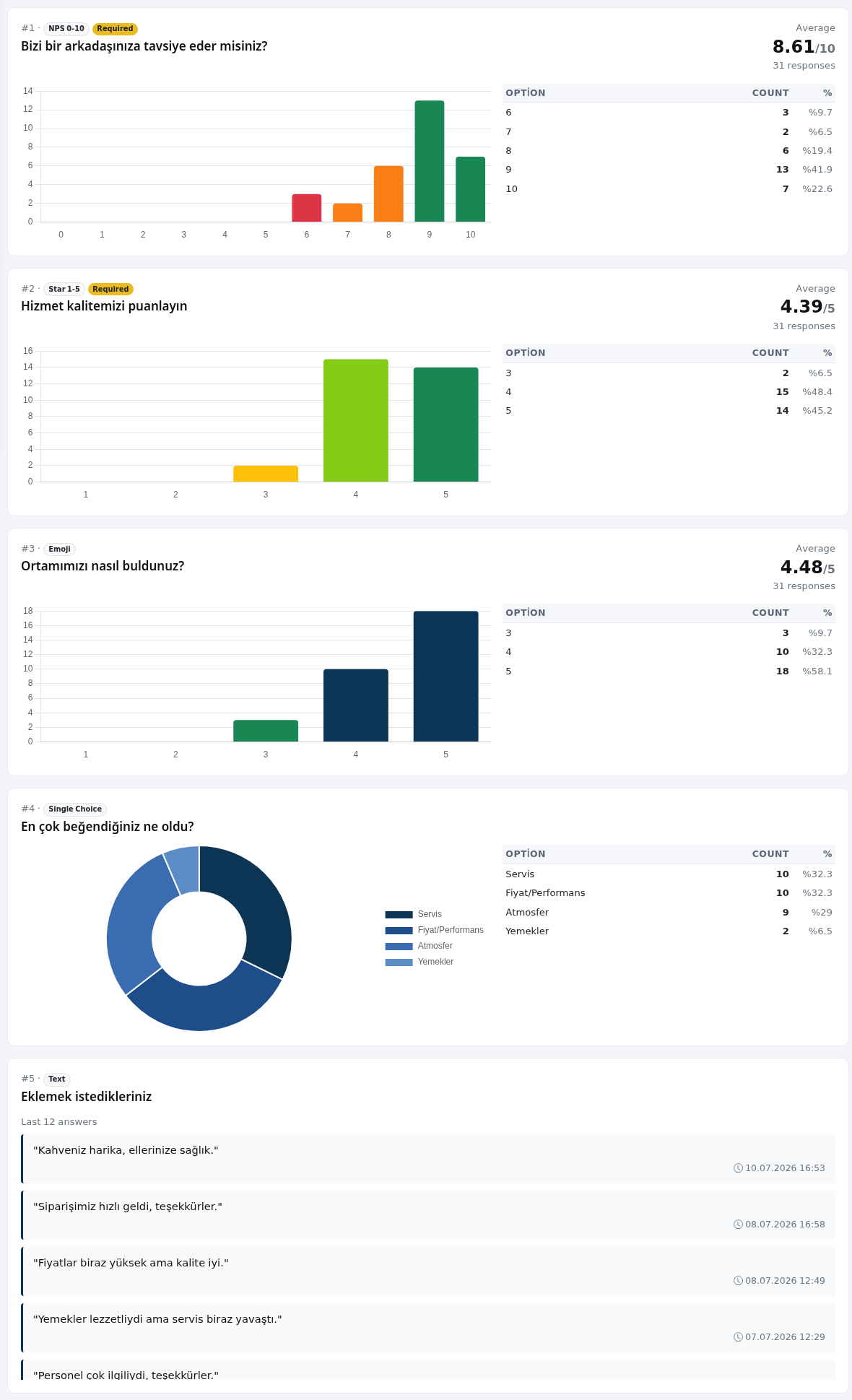
- The Questions tab has a chart for each question: Average and distribution for score questions, Option / Count for choice questions, the latest answers for text questions.
- The Review Platforms tab shows how many times satisfied guests clicked each review site (Platform Click Statistics). Press Add / Edit Platform to add one.

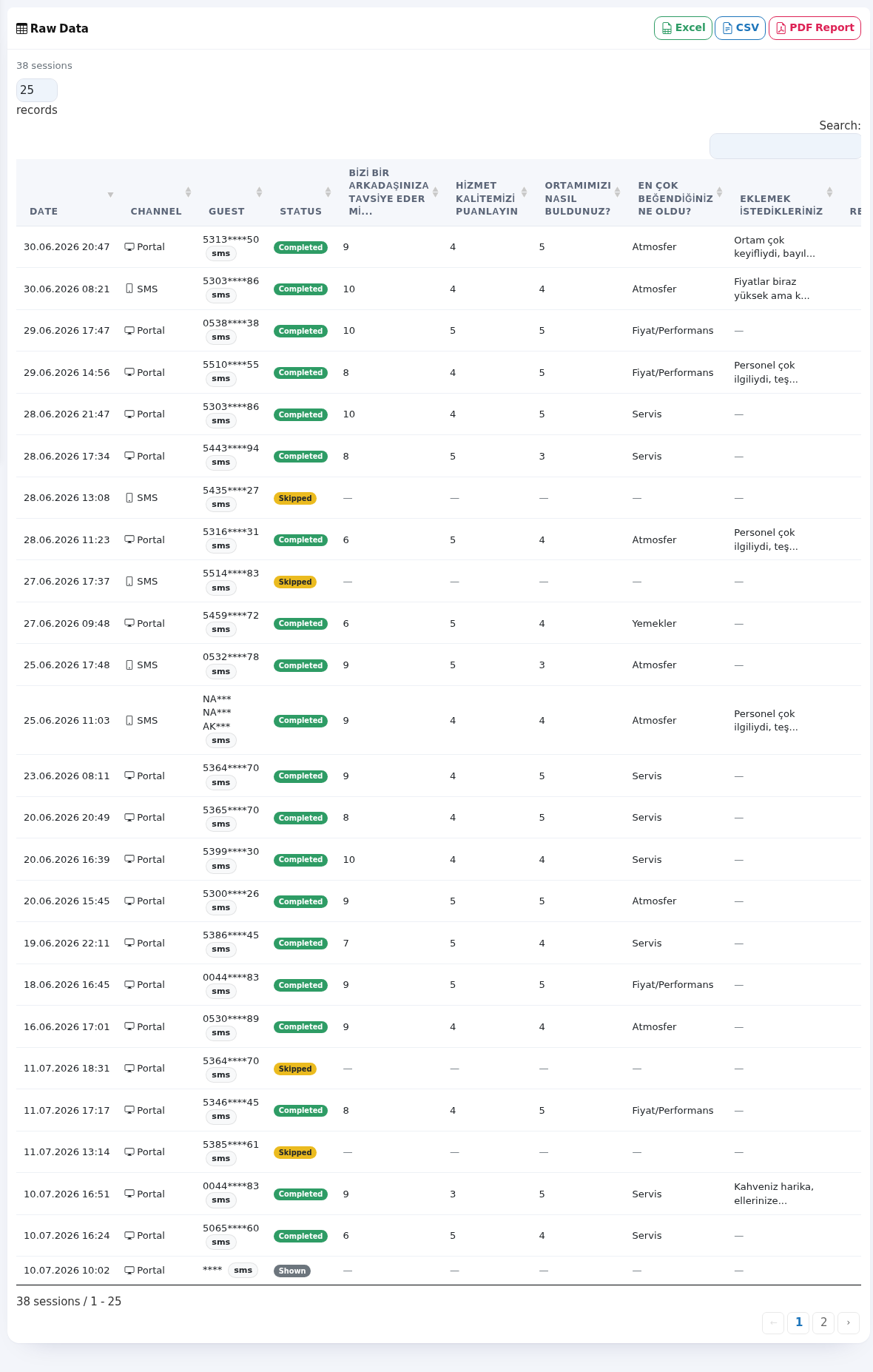
- The Raw Data tab shows each survey session on one row: Date, Channel, Guest (masked), Status, the answer to each question and Redir. (whether the guest was sent to a review site). Use the search box to filter.
- To get the results as a file, press Export at the top right: Excel, CSV or Full Report (PDF). The PDF report opens as a PDF file in a new tab; you can download or print it
(forthere.examplereview routing).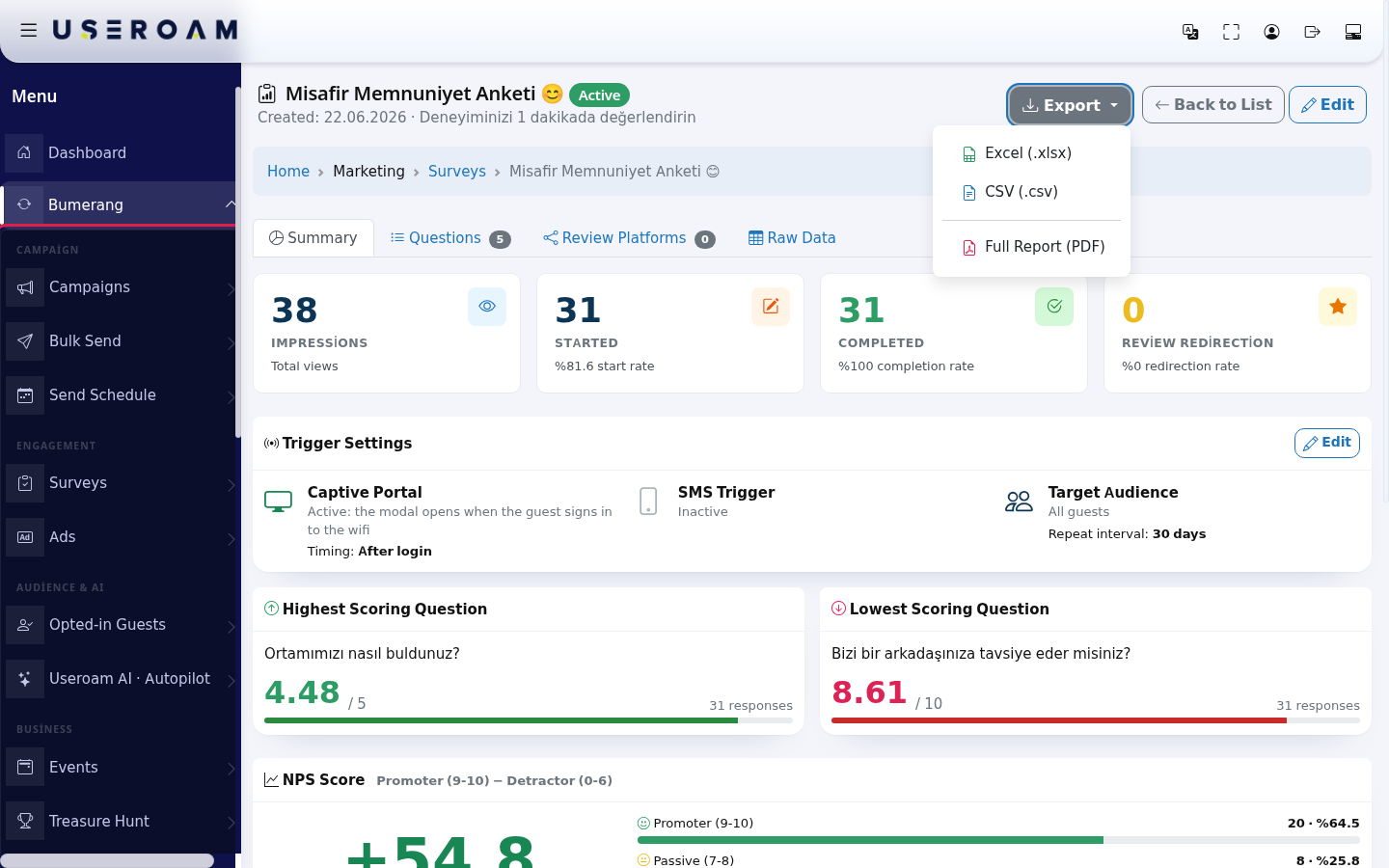
STATUS:Items on the list screen
Item Meaning Status badges Draft (not shown to guests), Active or(published),DraftPaused, Completed, Archive.OnlyTitle "Surveys and feedback forms for your guests". Without the package the top says "This module is not active surveysyet".areSMS shown to guests.QUESTIONS:how many questionstimingIn the surveySMShas.triggerRESPONSES:box on thetotaldetailsnumber of responses.COMPLETION:how many responses were filled in toscreen theend,send time is written as "… minutes later", "… hours later", "… days later", "… weeks later" or "… months later".Completion Completed / started sessions and thea percentage (forexample:example27 /2829,·%93).96%).List tools "… surveys shown", records per page (… records, A low rate meansAll), thesurvey is too longSearch:—box,reduceand "… surveys / 1 - 5" at thenumberbottom.ofWithquestions.noCREATED:results:when"Nothesurveys found" or "No surveys".Empty list "No Surveys Yet": "Create your first survey wastocreated.measureACTION:guestthesatisfaction,editincrease your Google Review count or improve your service." andview-results"Youbuttons.
in
clickNew1SurveyThewith ready templates: NPS, Star, Star+Comment...". PressNewCreate My First Survey.buttonPage createstourCreate a survey.surveyGive("Measureitguestasatisfaction:nameproductand add the questions.Product-rating questions appear as star badges on themenumenu.") and Your surveys ("Response volume and status are here. Use the buttons in the row for details and export.").Items on the details screen
Item Meaning Title row Survey name, status badge, Created: date and description. On the right: Export, soBack to List, Edit.With no answers "No Responses Yet": "This survey has not received any responses yet." If it paysis a draft: "The survey is in Draft status; set the status toask"Active"questionstothatpublishmatchit."; if live: "Your survey is live. It will be shown when your guests connect to theproductwifinamesoronclickyourthemenu.SMSlink."
and an
KeepEdititSurveyshort:button.Trigger Settings Captive Portal: "Active: the modal opens when the guest signs in to the wifi" or Inactive; Timing: Before login / After login. SMS Trigger: "Active: automatic SMS is fillingbeing sent", Sent: and clicks; the send time (Immediately (as soon as login finishes), … minutes / hours / days / weeks / months later). Target Audience: All guests, First-time visitors or Returning guests; Min. logins:, Repeat interval: … days, "Mandatory: cannot be skipped", Display/SMS time range:. Edit on the right opens the settings.NPS Score "Promoter (9-10) − Detractor (0-6)": the share of guests scoring 9-10 minus the share scoring 0-6. Below it: Promoter (9-10), Passive (7-8), Detractor (0-6) counts and "based on … responses". Latest Comments "The latest text answers written by guests", with masked phone and date. Question types Star 1-5, NPS 0-10, Emoji, Single Choice, Multiple Choice, Yes/No, Text. Required questions have a Required badge. With no answers: "This question has not been answered yet." or "Question charts cannot be shown because there are no answers yet.". Text questions show "Last … answers". Platform table Platform, Status, Clicks; the main target has a Primary badge; with no address it says "URL empty". Total redirection clicks:. With no platform: "No review platform has been added to this insurveywhileyet."connecting to Wi-Fi or paying the bill. Three to five questions usually gives the highest completion rate.Navigating the listTheand25Add/Platform.50Raw /Data100statusesShown, /Started,AllCompleted,selectorSkipped,sets records per page andExpired; theSearchRedir.boxcolumnfiltersshowsinstantly.Yes / No or "Redirected (no platform information)". Channel: Portal, SMS. At the top: "… sessions"; the screen shows a limited number of rows ("(first … shown; download "Excel" or "CSV" for all)"). With no sessions: "No sessions yet. Once the survey is published and answers start arriving, you can see the detail of every session here." List tools: "… sessions / 1 - 25", "No records", "No sessions". Top right: Excel, CSV, PDF Report.PDF report (Survey Report)
Full Report (PDF) or PDF Report produces a PDF file: Report Date:, Survey Created:, General Statistics (Impressions, Started, Completed, Review Redirection), NPS Score, Question Details (for choice questions Option, Count, Distribution; for text questions "text answers (at most 50 shown)") and Review Platform Redirections (Platform, Status Active / Inactive, Clicks). The
totalbottomandsays "All rights reserved". If you try to open another account's survey you see "Unauthorized access" or "Survey not found".Frequently asked questions
My survey is never shown.
Its status may be Draft; use Edit to set it to Active (published). Check thepagetriggerarrowssettingssitasbelowwell (see Creating a survey).Many impressions, few completions.
Guests may be skipping thetable.survey (Skipped in Raw Data). Try fewer questions.RelatedMypages:NPS is negative.
More guests scored 0-6 than 9-10. Look at the complaints inRestaurantLatestSolution → Online Menu(star badges),Useroam AI · Autopilot(reads survey responses and produces suggestions),Bumerang ReportsComments.Why are phone numbers starred?
Guest phone numbers are masked under KVKK.Related pages
- Creating a survey
- Bumerang Reports (Survey Results Summary)
- Sending Calendar