
SLA
What is it for?
The SLA tab(delay turnsrules) responseis timeswhere intoyou rules.set Whenhow quickly a request must be picked up or finished. When the time runs out and the request is still not picked up or not completed within the time you set,finished, the system raiseswrites a notification —and sosends workan thatapp isnotification runningto latemanagers' surfacesphones; SMS too if you want. Forgotten jobs surface by itself.themselves.
How do I open this screen?
OpenOn Restaurant Management, click themodule underBumerang → BUSINESS (İŞLETME) → Restaurant (Restoran)Settingsandtab,switch tothen the SLA sub-tab. Step 5 of the setup wizard adds the same rule.
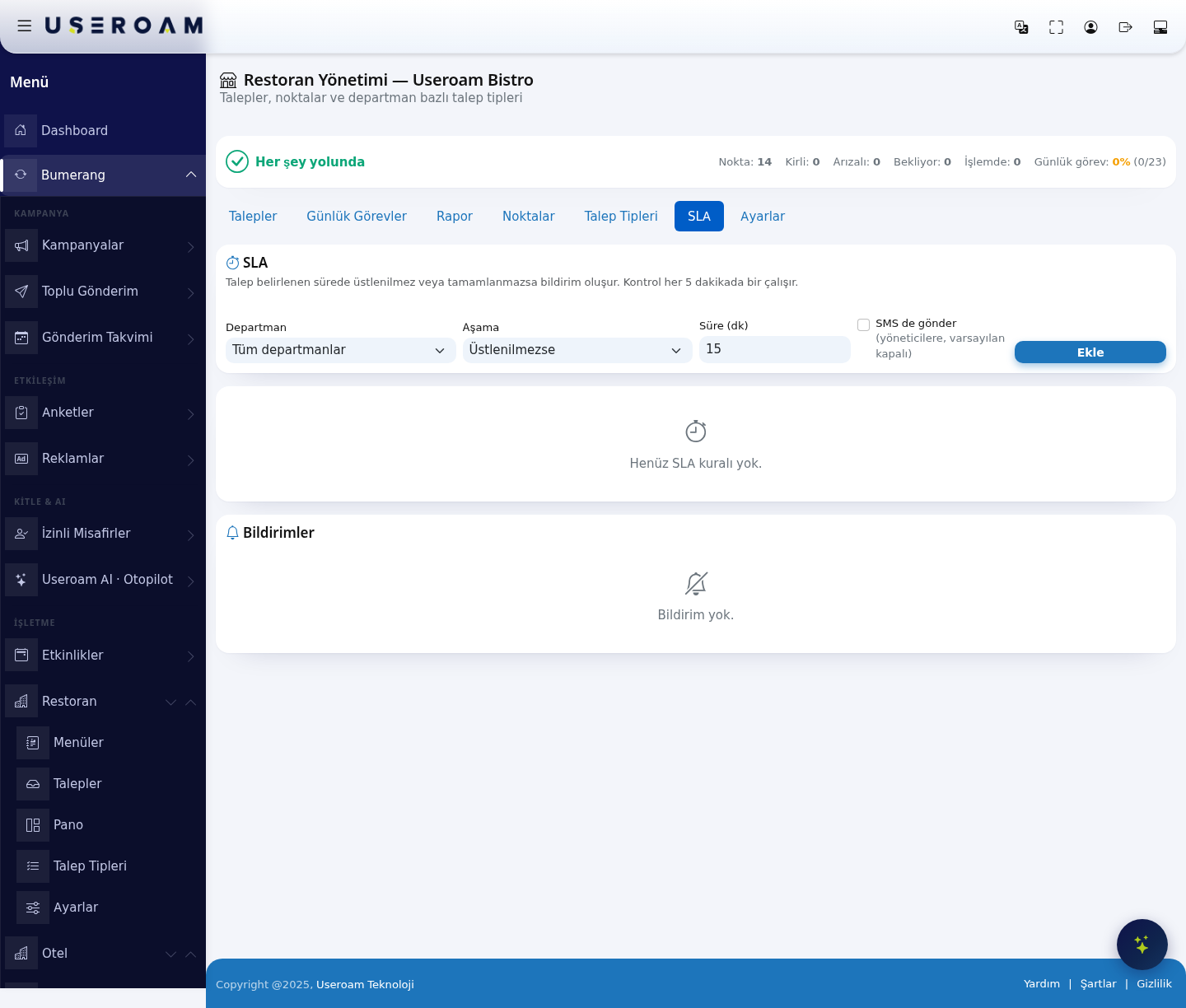
When
do I use it?
- When waiter calls should be taken within, say, 5 minutes.
- To notice faults that are not fixed within a set time.
- So managers see waiting jobs straight away at busy times.
1.Before Addingyou start
- Notifications go to managers: at least one person on the Staff screen must have the Manager role.
- Without rules no notifications are created. The check runs every 5 minutes, so a notification can arrive a few minutes late.
Step by step: add a rule
- Fill in the form and click Add. The top says "Saved." and the rule appears in the list.
Department:Department: where the rule applies. All departmentsorcoversaeverything,singleincludingonerequests(inwiththenodemo businessTemizlik/ cleaning,Teknik/ technical,Garson/ waiting staff,Mutfak/ kitchen). The rule applies only to that department's requests.department.Stage:Stage: Not picked up (the request is still Waitingstartswhenthetimeclockrunswhileout)noorone has taken the request;Not completedapplies(stillonceopen,itwaitinghasorbeeninpicked up but not finished.progress).- Time (min):
Minutesminutes (for example10; 1 towait1440,beforeemptyameansnotification15).isTimeraised.counts from when the request was opened. - Also send
SMS:SMSWhen ticked,with thenotificationnoteis"(toalsomanagers,sentoff by default)": sends an SMS to managersbytoo,SMS.usingOffyourbySMSdefault.credits.
Add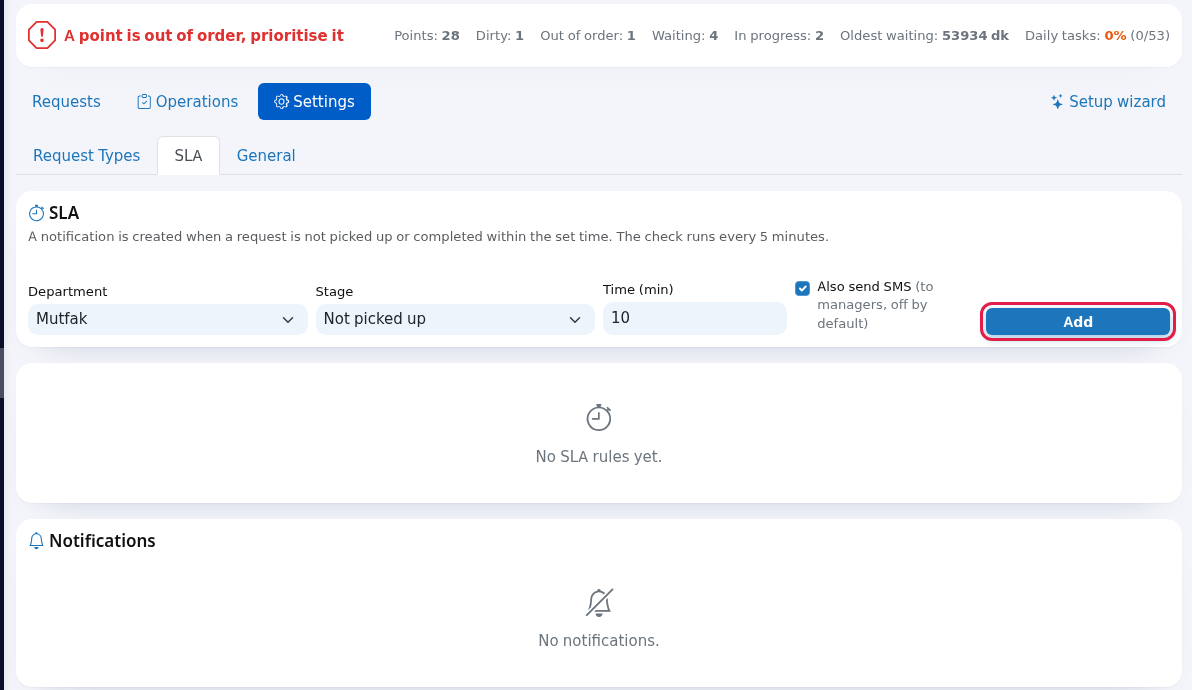
Rule list
Without rules the rulecard to the list. With no rules defined the list readssays "No SLA rules yet." Once you add a rule a table appears:
(General)
Column / Button What it shows / does CheckDepartmentThe frequency:rule's department or All departments.Stage Not picked up / Not completed. Time (min) A badge such as 10 min. SMS Green phone icon: SMS goes too. Dash: app notification only. Status Green Active Theorcheck runsgreyevery 5 minutesOff.WithAnthresholdsinactiveunderrulefivelooksminutes,faded.Enable / disable button Stops the notificationrulemaywithoutthereforedeletingappearit,aorfewturnsminutesit back on.Delete button (bin) Deletes the rule after the threshold"Deletehasthis?"passed.confirmation.
2.NotificationsThe
lowerNotificationssectioncard at the bottom lists thenotificationsalertsraisedthebyrulesthesecreatedrules.(newest 100). Unread ones have a red stripe and bold text; each row shows the alert text, the time and Request status: (the request's current status). Withnoneunread items, a Mark all as read button appears at the top right. With none, itreadssays "No notifications."ThisA
samelistrequest isthenotifiedquickestonlywayoncetoperseerule.whichManagersdepartment is falling behind duringreceive theday.
New:alertapp notification
For requests that break an SLA rule, managers now also getas a notification in thestaffUseroamappGo app.Every field and button
Field / Button What it does Example Department Where the rule applies. Kitchen Stage Not picked up / Not completed. Not picked up Time (min) Waiting limit in additionminutes.10Also send SMS Also sends an SMS to SMS,managers.Off soAdd Saves the rule. - Mark all as read Marks all notifications as read. - Frequently asked questions
I added a
managerrulewithbut no notifications arrive.Rules only look at open requests and run every 5 minutes. The request's department must match the rule (or the rule must be All departments). If the venue has no active manager, there is nobody to receive the app
opennotificationseesor SMS; thedelayalertrightstillaway.shows in this list.Does
the wizard's test request create a notification?No. The test request is created closed, so rules ignore it.
Will I get repeated SMS for the same request?
No. Each request is notified once per rule.
Related
pages:pagesRestaurant
Solution- Requests
→·Requests,Request Types,· Settings.