
Settings
What is it for?
The General settings set the restaurant module's name, whether it is on or off, and where staff can use the app from.
How do I open this screen? In the left menu go to Restaurant → Settings, then the General sub-tab. Or Restaurant Management → Settings → General.
When do I use it?
- To change the business name.
- To turn the restaurant module off for a while.
- To let staff use the app only on the venue's Wi-Fi.
Step by step
- Change the field you need (for example type
Sea Cafe Kadikoyin Business name, or flip a switch) and click Save. The top says "Saved."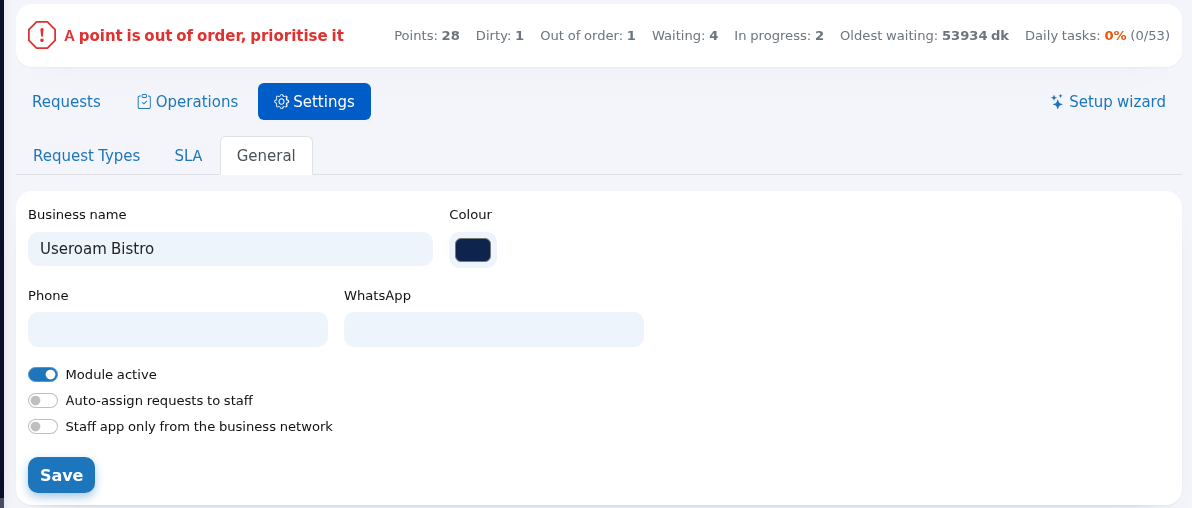
Every field and button
| Field / Button | What it does | Example |
|---|---|---|
| Business name | Shown in the Restaurant Management title, in the staff app and in automation e-mails. Cannot be empty. | Useroam Bistro |
| Colour | Colour picker. The value is saved but not used by the current panel or guest screens. | #0F244D |
| Phone | The venue's phone. Shown only on the old restaurant guest request page (menu.useroam.com/rs/...) as a call button. | 0212 555 00 00 |
| The value is saved but currently not used on any screen. | - | |
| Module active | Turning it off makes the restaurant module inactive (it is the same switch as Restaurant Portal in Settings → Module Permissions). The restaurant tabs disappear from the staff app. | On |
| Auto-assign requests to staff | Legacy setting with no effect now: requests are always assigned to the least busy person in the department, whatever this switch says. | - |
| Staff app only from the business network | When on, staff who are not managers can use Useroam Go only while connected to the venue network. Off by default. | Off |
| Save | Saves the form. | - |
Messages you may see
| Message | Meaning and what to do |
|---|---|
| Saved. | The settings were saved. |
| Business name cannot be empty. | Fill in the name and save again. |
Frequently asked questions
I turned the module off. Is my data deleted?
No. Requests, points, tasks and settings stay; they come back as they were when you turn the switch on again.
Staff cannot use the app when they are outside.
Staff app only from the business network is on. Staff must be on the venue's Wi-Fi, or you turn the switch off. Managers are exempt.
Where do I find the guest request page address for the restaurant?
The panel no longer shows a separate guest request page for restaurants; the guest surface is the QR menu. Details: Setting up the QR menu from start to finish.