
Segments
What is it for?
SmartSegments Segmentssplits groupsthe customers who signed up on your store customerspage automaticallyinto usingsix RFMgroups analysisby how often and letshow yourecently they came: Champions, Loyal, New, At risk, Dormant, Lost. You can send an SMS to eacha group inwith one click. InsteadSMS ofonly workinggoes outto customers who shouldgave receivecommercial whatmessage andconsent when, you send the offer that suits the group the system has identified.(ETK).
How do I open this screen?From the left menu, goWhen to
Bumeranguse→ Retail → Segments.
1. The segmentsit
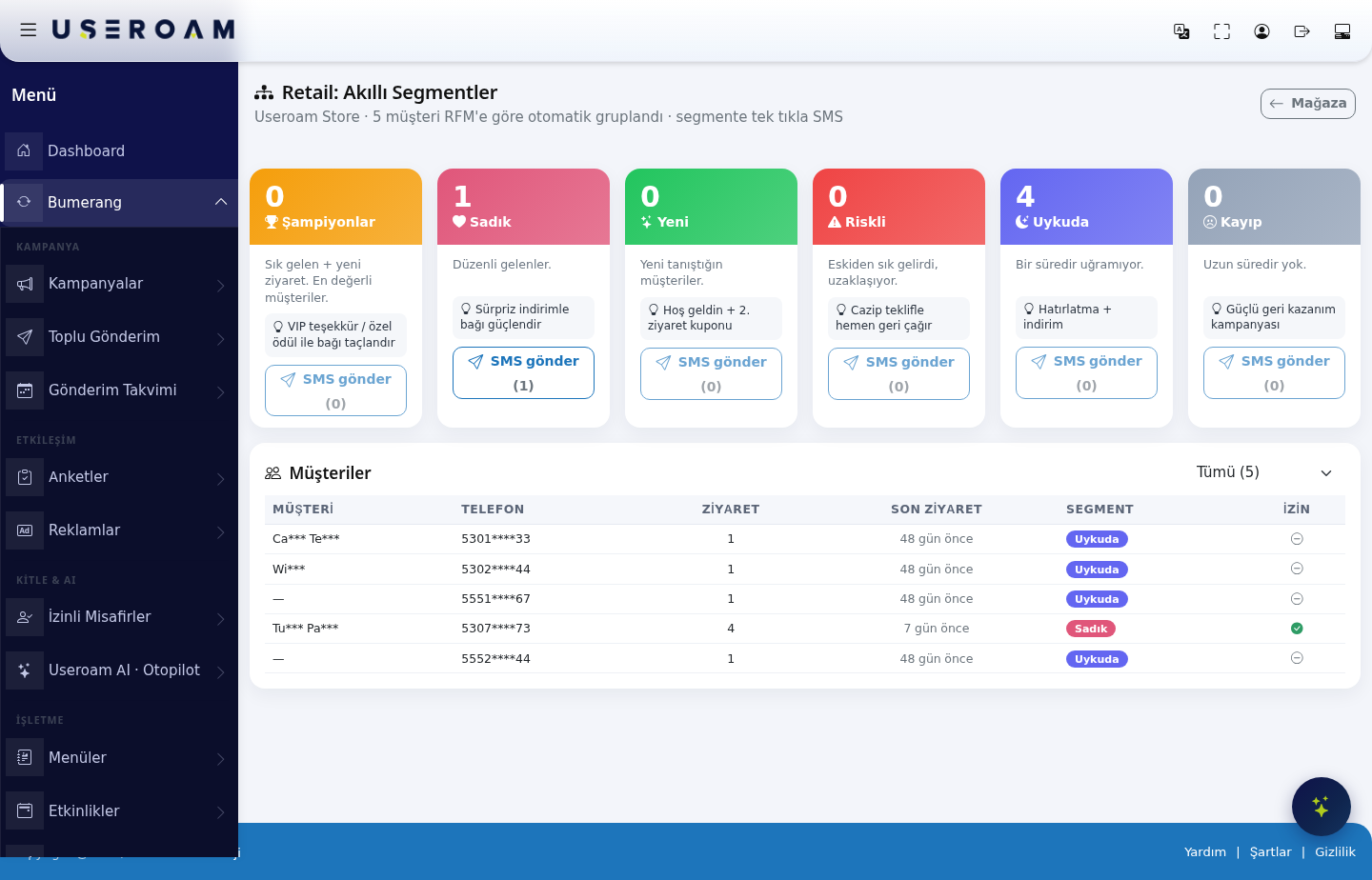
Customers are split into six groups by visit frequency and recency. Each card shows the customer count, the definition of the group and the recommended action:
Champions:Whenfrequentyouvisitorswantwithto bring back customers who have not come for arecentwhilevisit(At—risk, Dormant, Lost).- When you want to thank your most valuable
customers.customersRecommended:(Champions). - When you want to see how your customer base is spread.
Before you start
- Segments build automatically from customers who leave a phone number on the store form. Each new sign-up with the same number counts as a visit.
- You need an SMS package to send. Messages are queued immediately and go out within minutes.
- Segment SMS cannot be recalled. Read the message carefully before sending.
Step by step
- Open Retail > Segments in the left menu. Six segment cards are at the top. The big number is the number of customers in the segment; below it are the segment's description and a suggestion with a light bulb. The number in brackets on Send SMS is the number of consenting (ETK) customers; if there are none, the button is faded and cannot be pressed.
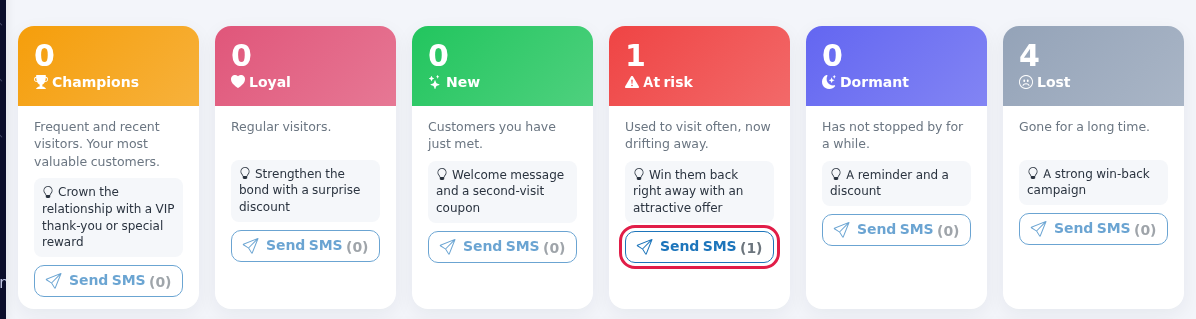
- The Customers table below shows each customer's segment. Use the box at the top right to show one segment only (All shows everyone).
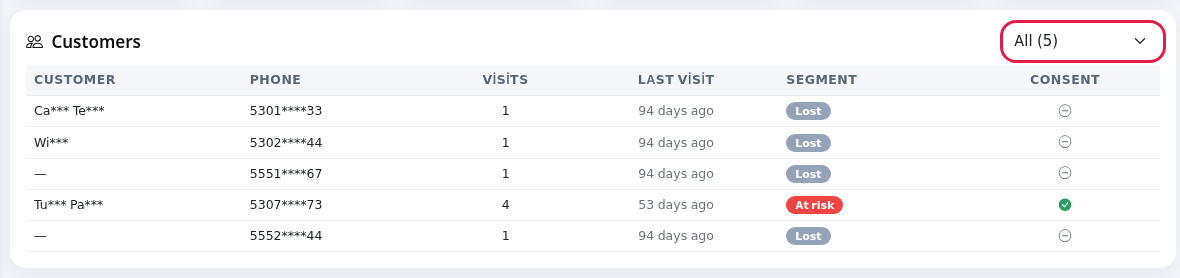
- Press a segment's Send SMS. The window says "Will be sent to X opted-in people." Write the text in Message;
|ad|is replaced by the customer's name,|magaza|by the store name. Press Send, or Cancel to leave.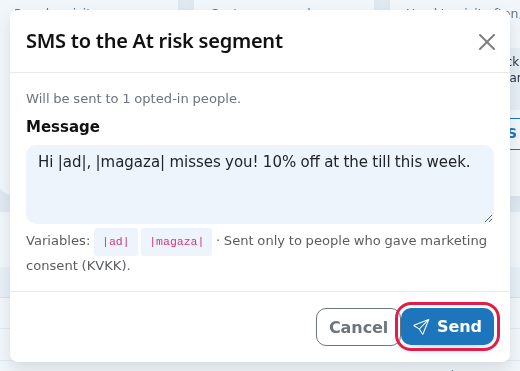
- After sending, a message such as "'At risk' segment: X SMS queued" appears. People without consent or a valid number are skipped and "X people skipped (no consent / bad number)" is added.
How segments are decided
| Segment | Rule (visits and days since last visit) | Suggestion on screen |
|---|---|---|
| Champions | At least 5 visits and visited within the last 15 days. | Crown the relationship with a VIP thank-you or special reward |
| New | One visit, within the last 21 days. | Welcome message and a |
| At | Strengthen the bond with a surprise | |
| At | At | Win them back |
| Away for | A reminder and a | |
| Away for | A strong win-back |
TheSingle-visit customers away for 22-30 days currently count as SendLoyal.
Table columns
| Column | Shows |
|---|---|
| Customer | Name, masked for KVKK (example: Ay*** Yı***). A short dash if there is no name. |
| Phone | Masked number (example: 5321****67). |
| Visits | Number of sign-ups. |
| Last visit | "X days ago". |
| Segment | Segment badge. |
| Consent | Green tick: has commercial message consent. Grey: no. |
Messages you may see
| Message | Meaning / what to do |
|---|---|
| 'X' segment: N SMS queued | The messages are in the sending queue. |
| · N people skipped ( | These |
| Segment and message are required. | Fill in the message. |
| Sending engine could not be loaded. | System error; contact our support team. |
| No loyalty members yet. Segments will build automatically as customers sign up from the store QR. | No sign-ups with a phone number yet. |
Frequently asked questions
Can the same customer get two messages?
Yes. Segment SMS has no frequency limit; if you send to the Nsame customerssegment twice, the customer gets two messages. For automatic, limited sending use an Automation rule.
Where can I see whether the SMS went out?
Segment sends also appear in thatRecent segment.
2. SMS to a segment
Pressing the send button opens the message dialog:
Message:activitywrite the text to send.Sendstarts the delivery;Cancelcloses the dialog.
Why are my Wi-Fi guests not in the listsegments?
This canscreen differ.only Youcounts enablepeople who signed up with the consent box on the Store &store QR Registrationform. screen.
Wi-Fi
3.guests Customerssee table
Guest Use the selector at the top to filter the list by segment: All, Champions, Loyal, New, At risk, Dormant, Lost (each with its customer count)360
Table
Related columns:pages
CUSTOMER:the customer's name (masked for data protection).AutomationPHONE:Retailthe phone number (masked).VISITS:total number of visits.LAST VISIT:when they last came (for example"48 days ago").SEGMENT:which group they fall into.CONSENT:whether they gave commercial-message consent.Reports
Related pages:Retail → Automation(segment-based automatic sending),Retail → Coupons & Wheel,Bumerang → Guest 360°.