
SMS Settings
What is it for?
The SMS Settings definescreen decides how the verification/password messagesa sentguest receives when logging in to guestsWi-Fi areby generatedSMS is generated, the SMS text, and which servicegroup deliversthe them.guest is added to. If you enabledwant theto moduleuse onyour theown SMS Portalprovider, Settingsyou page,enter thisits pageconnection mustdetails alsohere be filled in correctly before a guest can receive a code.too.
How do I open
this screen?it?FromIn the left menu,go toclick Settings → SMS Settings. To offer SMS login to guests, also use SMS Portal Settings.
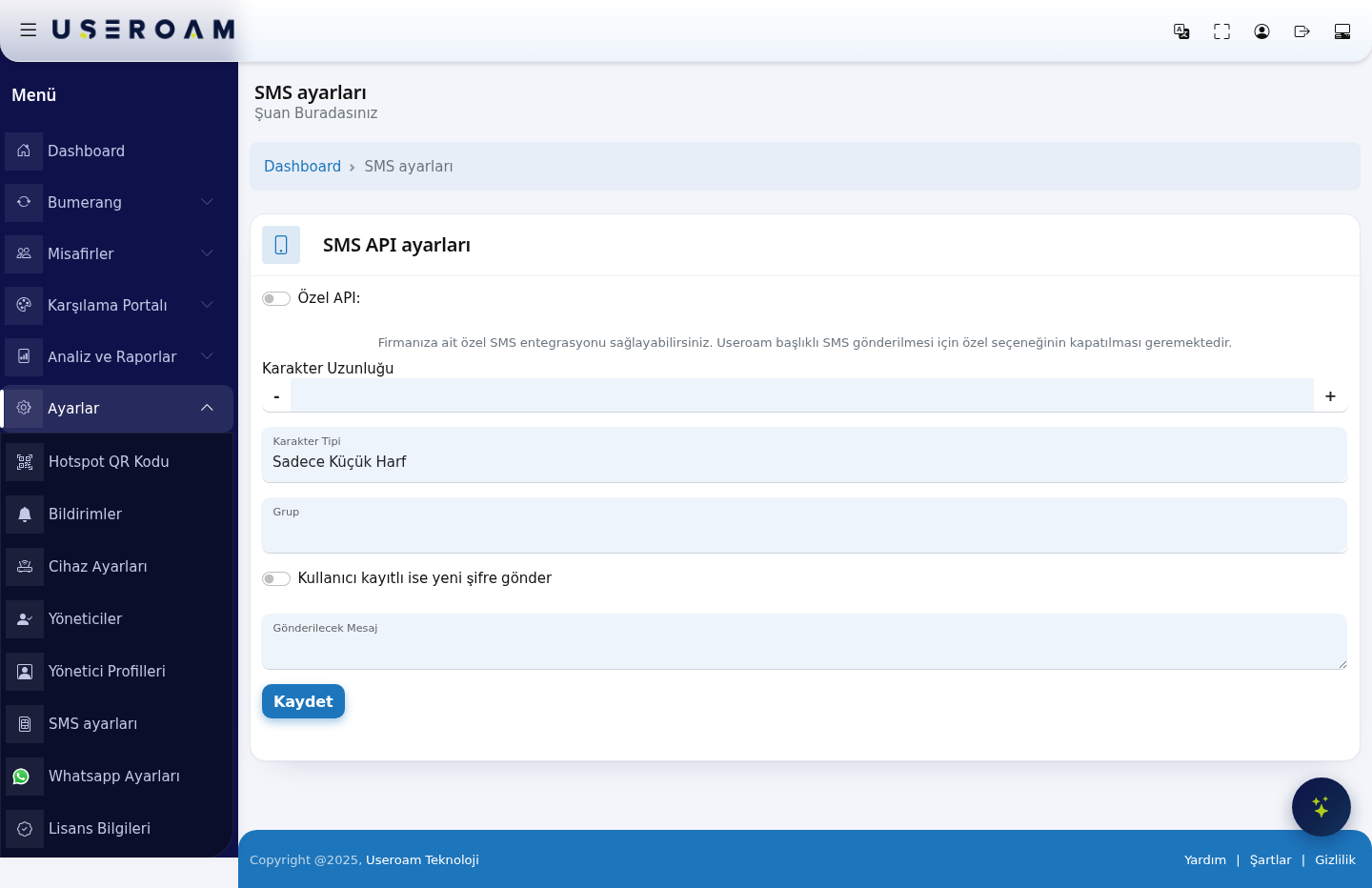
When 1.do SMSI APIuse Settingsit?
CustomYou APIare (on screen: Özel API): turnturning on SMS login for the first time and want to set the password format and message text.- You want guests who log in by SMS to be added to a different group (speed, duration, quota rules).
- You want to send with your own company's SMS account and sender title instead of Useroam's.
Before you start
- Create the guest group first on Groups; the Group list only shows this device's groups.
- If you use your own SMS
integration.provider, To send messages underget the Useroamsending senderaddress name,(URL), thisusername, optionpassword mustand stayparameter off.names In short: turn it on to send under your own brand header, leave it off to usefrom the shared Useroam header.provider.
Step by step
EnablingIn the customleft menu, click Settings → SMS Settings. The SMS API revealsSettings thesecard fields:opens.
SMS Provider: Mobilişim (Ekomesaj) is a ready-made integration; choosing Other means you define every request parameter yourself.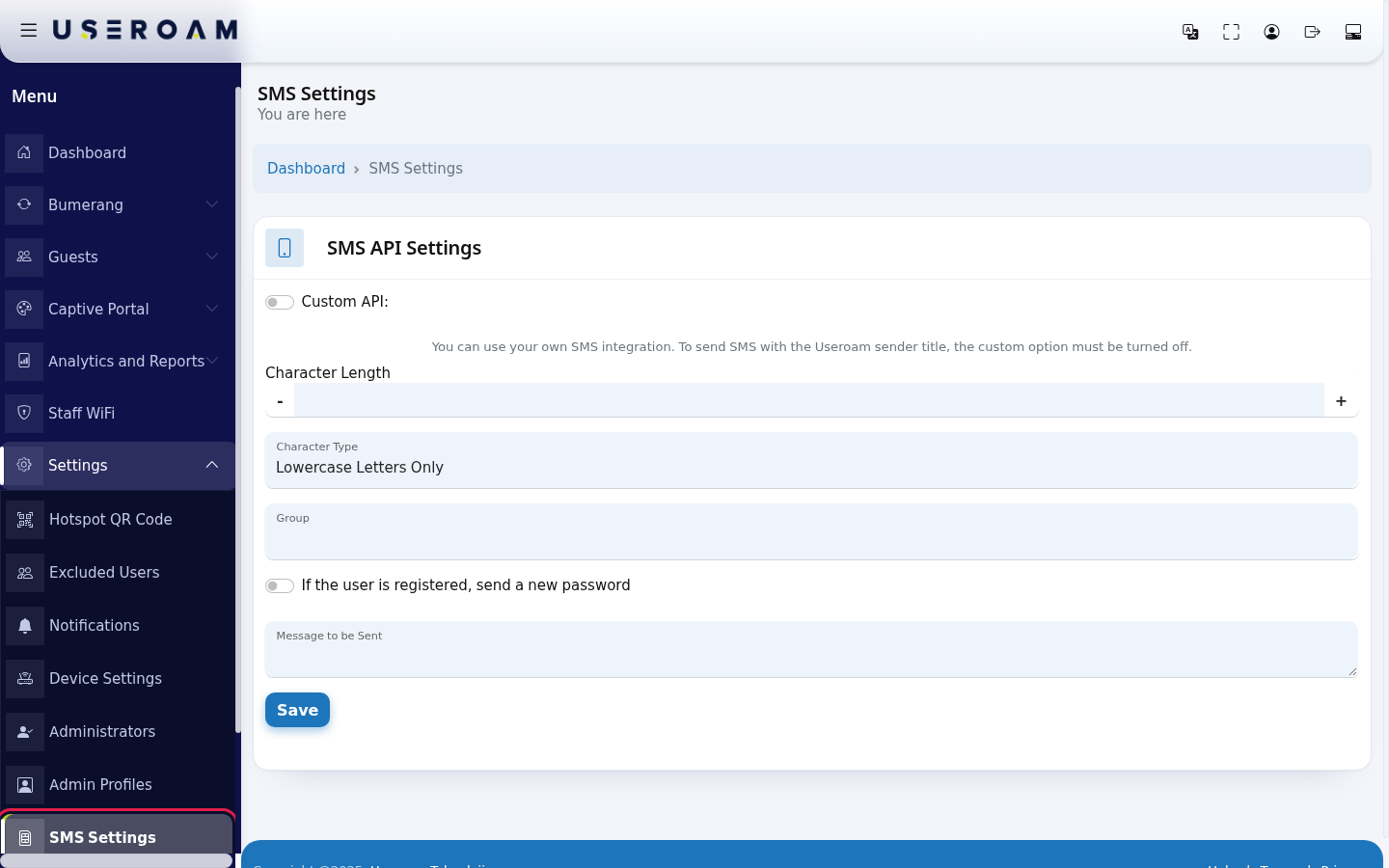
URL:Set up the provider's send endpoint.
HTTP Method: GET or POST — pick whichever the provider's documentation requires.
Use country code: numbers are sent with the country code (e.g. 90) prefixed.
Add leading zero: prefixes the number with 0. It is not used together with the country code — pick whichever format your provider expects.
Response value: the value the provider returns on a successful send. The system uses it to decide whether a message counts as delivered.
Username, Password, Header: the account credentialspassword and the SMS sender name (originator) used by the Mobilişim (Ekomesaj) integration.
Request parameters
This table, with Parameter and Parameter Value columns, is where you add the fields your provider expects. Use + to add a row and - to remove one. When the Other provider is selected, the request is built from this table.message:
SMS Test: the test dialog on the page shows the URL of the request that will be built. Use it to confirm the parameters combine correctly before contacting the provider.
2. Password (coupon) generation
- Character
Length:Length: how many characters the code sent to the guestpassword has. Use the - and + buttonsor totype adjust.the Anumber short(e.g. code is easier to type; a long one is harder to guess.6).
- Character
Type:Type: Lowercase Letters Only, Uppercase Letters Only, Letters Only, Numbers Only or All. Since guests type it on a phone, Numbers Only is usually the most practical.easiest.
Group:Group: the user group that guests registeringwho log in by SMS are added to. The group's quota, speed and duration rules apply to them. Groups are managed on the Guests → Groups page.- If the user is registered, send a new
password:password: whenif on, a previouslynumber that registered numberbefore logs in again,gets a new password iswhen generatedit andlogs sent.in If off, the guest continues with their existing password.again.
- Message to be
Sent:Sent: the SMS texttext, deliveredat most 160 characters. Write {password} where the password should go; add {username} for the username if you like. Example: Your Wi-Fi password: {password}
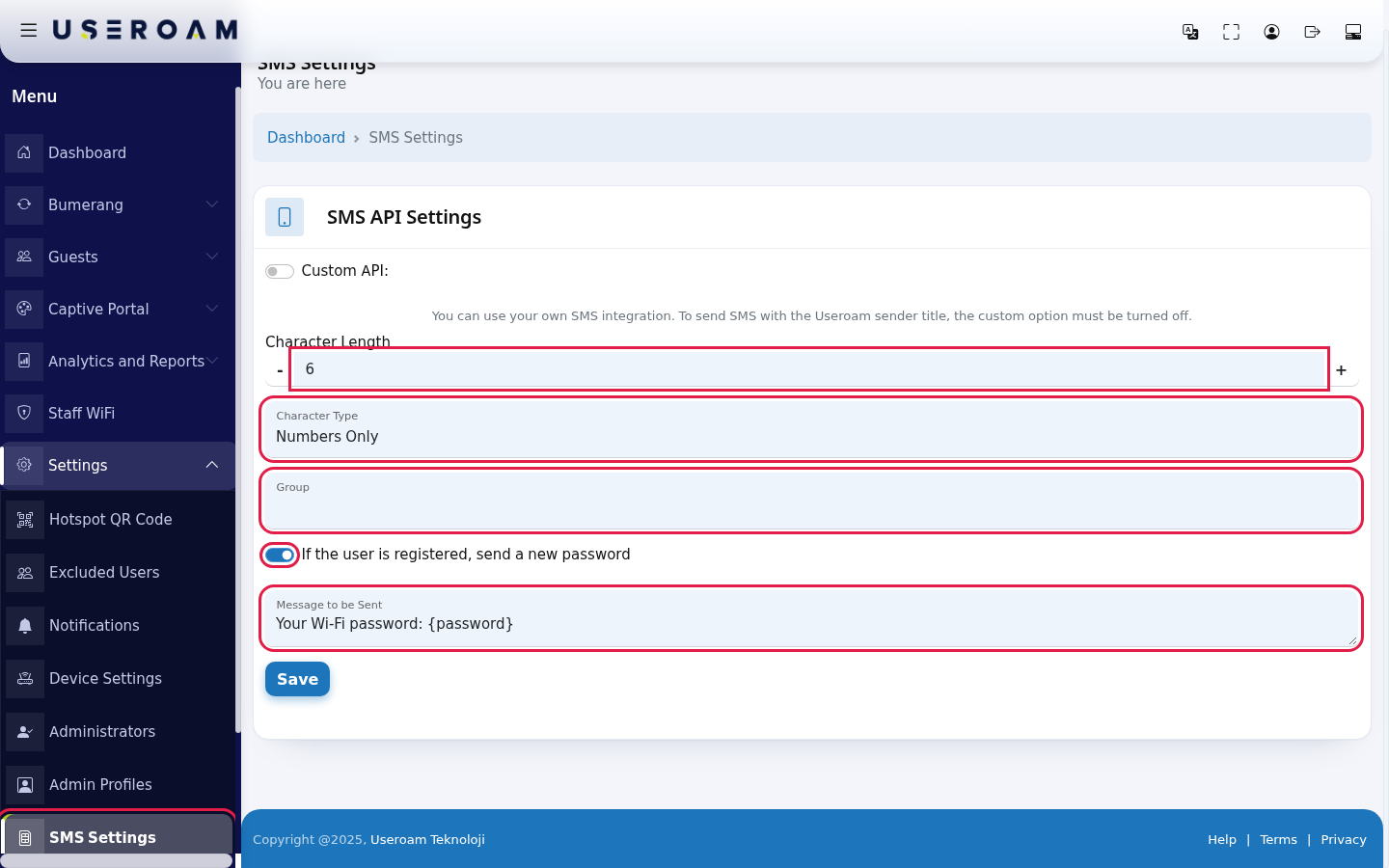
To use your own SMS provider, turn on Custom API:. If you choose Other in the SMS Provider list that opens, you enter the provider's details by hand:
- URL: the provider's sending address (e.g. https://sms.example.com/api/send?). The parameters are appended to this address.
- HTTP Method: GET or POST, whatever your provider requires.
- Use Country Code or Add Zero to the
guest.Beginning Keepof the placeholderNumber: the format of the number. Only one can be on; turning one on turns the other off.
- Send JSON body (application/json): turn this on if your provider expects JSON. The request is sent with a JSON body and Content-Type / Accept headers set to application/json.
- Request Parameters: add rows with the green + and delete them with the red -. In each row type the Parameter name and Parameter Value. Use {mobileno} for the phone number and {msg} for the message.
- Response Value: the value the provider returns on success (e.g. OK).
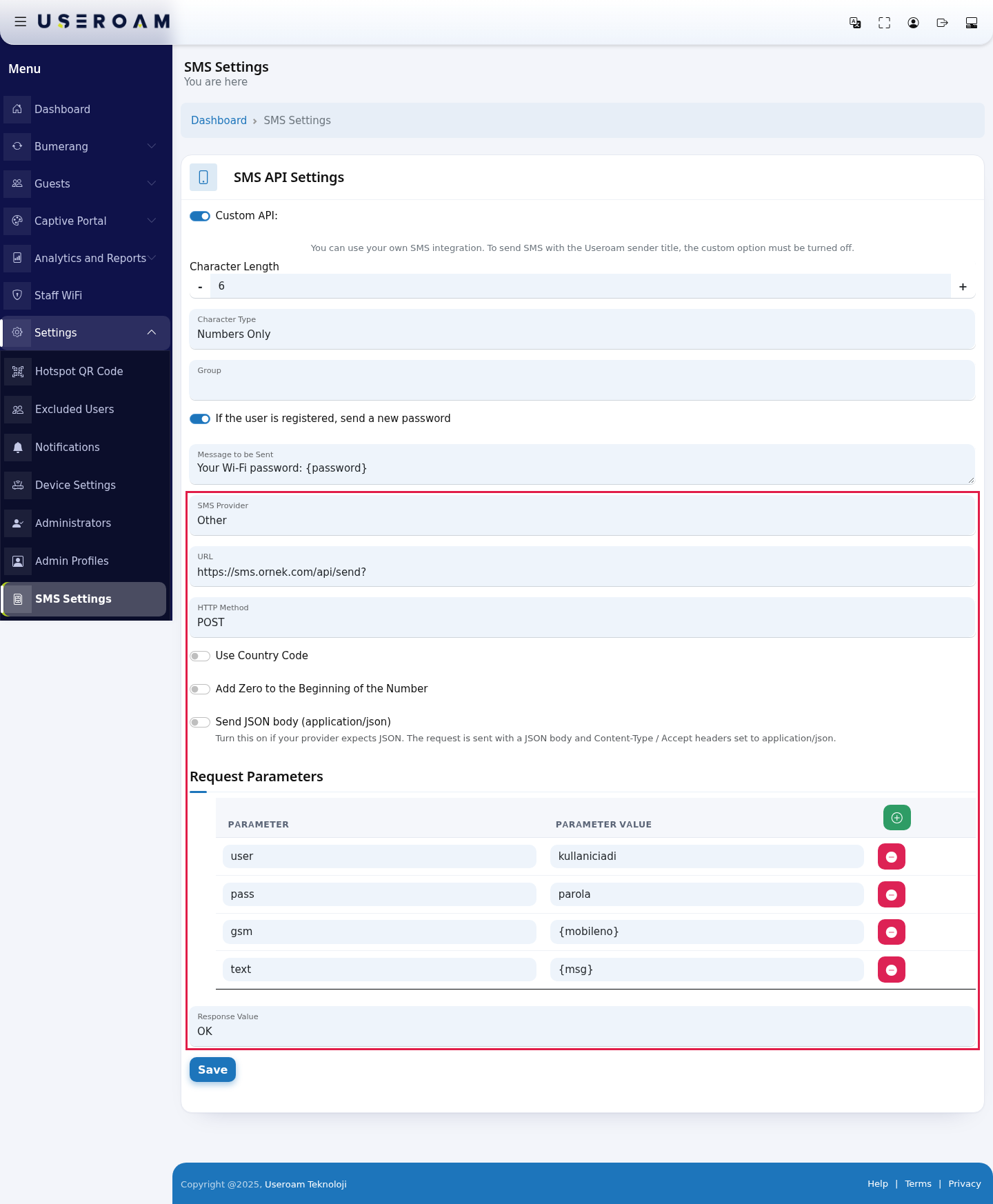
If you choose Mobilisim (Ekomesaj) as SMS Provider, you only enter your account's Username, Password and Sender Title at that carriesprovider.
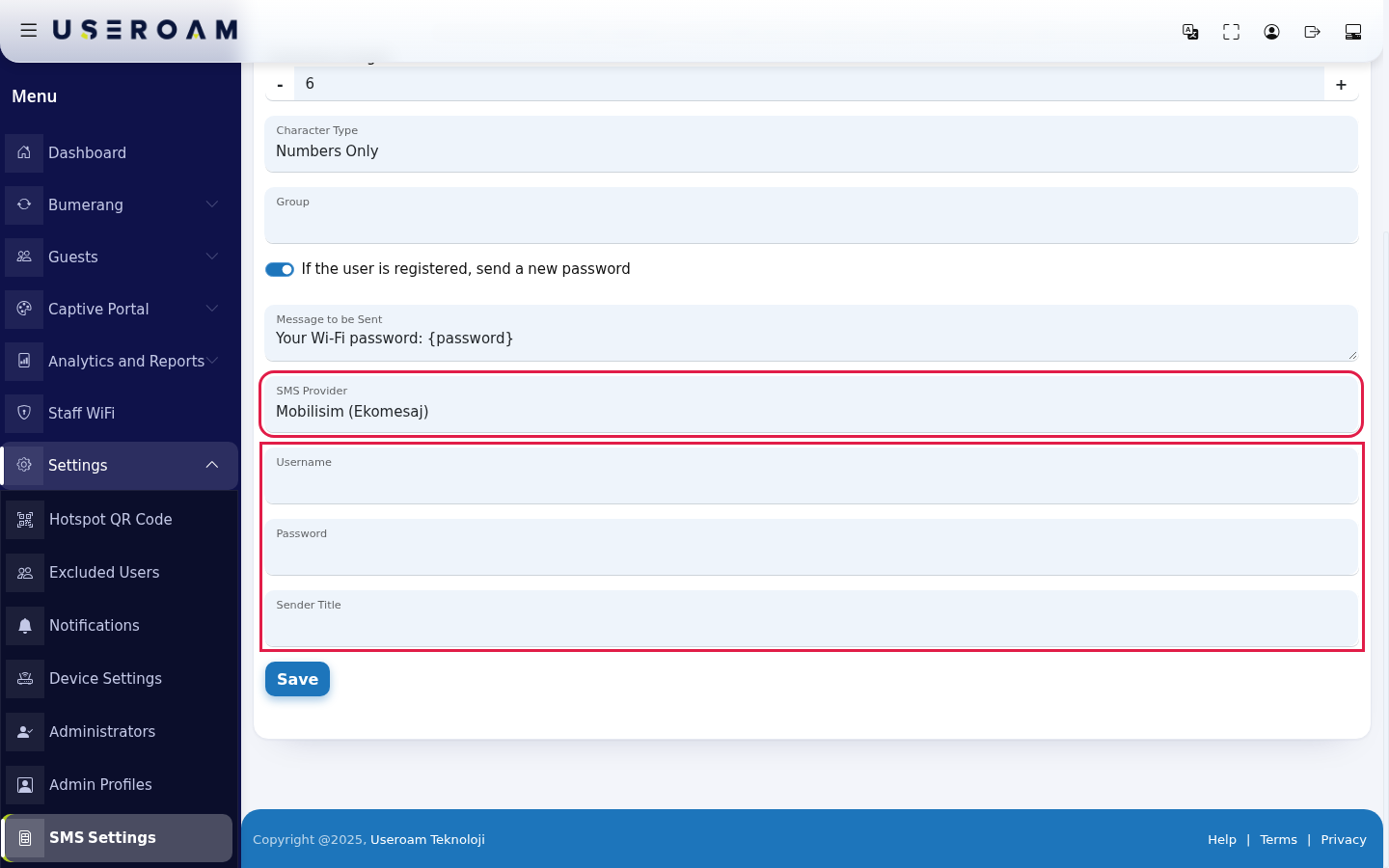
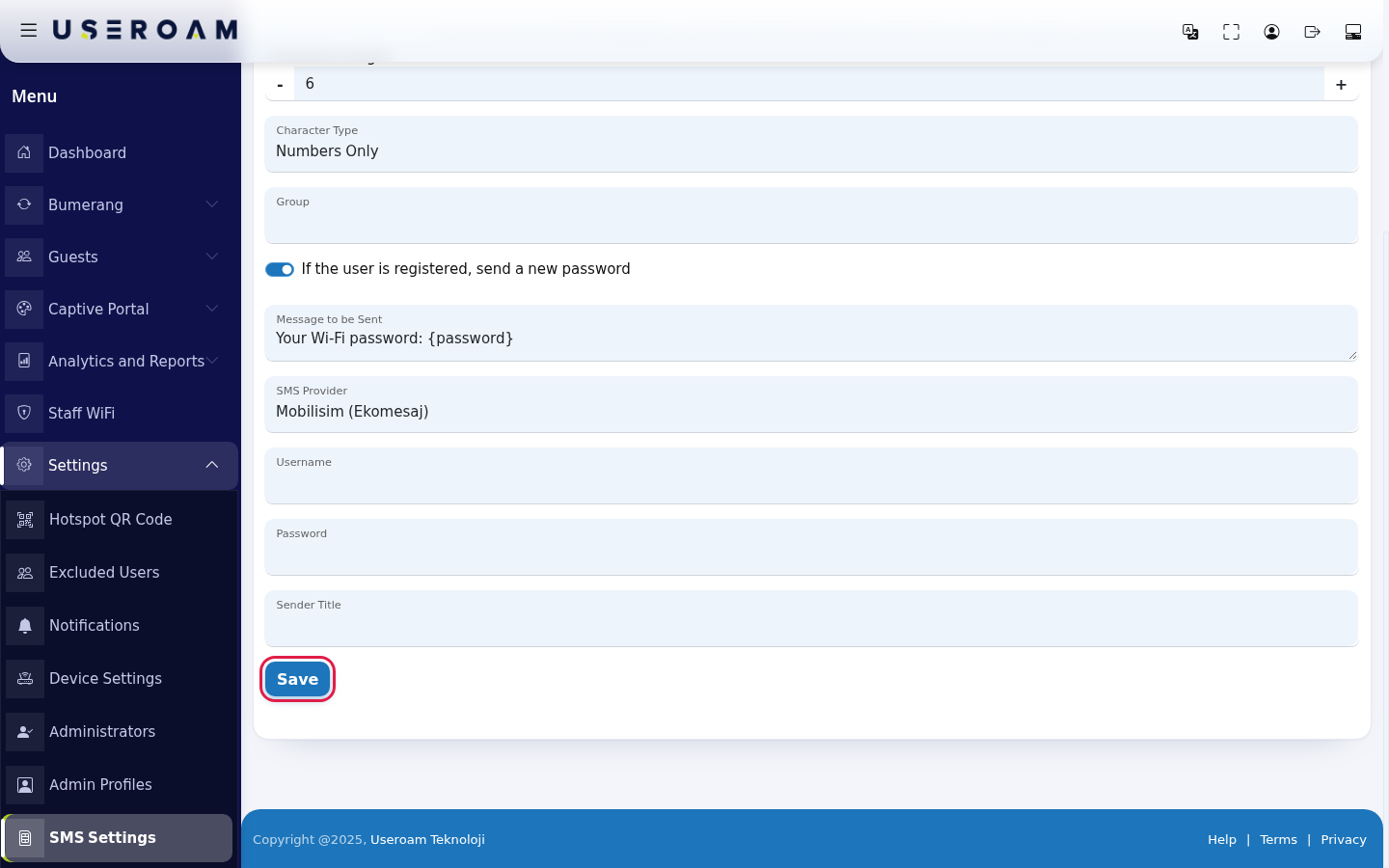
Click Save. The screen reloads and shows the values you saved; no separate confirmation message appears.
Every field and button on the screen
EnablingIn the customleft menu, click Settings → SMS Settings. The SMS API revealsSettings thesecard fields:opens.
SMS Provider:Mobilişim (Ekomesaj)is a ready-made integration; choosingOthermeans you define every request parameter yourself.URL:Set up the
provider's send endpoint.HTTP Method:GETorPOST— pick whichever the provider's documentation requires.Use country code:numbers are sent with the country code (e.g. 90) prefixed.Add leading zero:prefixes the number with0. It is not used together with the country code — pick whichever format your provider expects.Response value:the value the provider returns on a successful send. The system uses it to decide whether a message counts as delivered.Username,Password,Header:the account credentialspassword andthe SMS sender name (originator) used by the Mobilişim (Ekomesaj) integration.
Request parameters
This table, with Parameter and Parameter Value columns, is where you add the fields your provider expects. Use + to add a row and - to remove one. When the Other provider is selected, the request is built from this table.message:
SMS Test:the test dialog on the page shows the URL of the request that will be built. Use it to confirm the parameters combine correctly before contacting the provider.
2. Password (coupon) generation
- Character
Length:Length: how many characters thecode sent to the guestpassword has. Usethe- and +buttonsortotypeadjust.theAnumbershort(e.g.code is easier to type; a long one is harder to guess.6). - Character
Type:Type: Lowercase Letters Only, Uppercase Letters Only, Letters Only, Numbers Only or All. Since guests typeiton a phone, Numbers Only isusuallythemost practical.easiest. Group:Group: theusergroupthatguestsregisteringwho log in by SMS are added to.The group's quota, speed and duration rules apply to them. Groups are managed on theGuests → Groupspage.- If the user is registered, send a new
password:password:whenif on, apreviouslynumber that registerednumberbeforelogs in again,gets a new passwordiswhengenerateditandlogssent.inIf off, the guest continues with their existing password.again. - Message to be
Sent:Sent: the SMStexttext,deliveredat most 160 characters. Write {password} where the password should go; add {username} for the username if you like. Example: Your Wi-Fi password: {password}
To use your own SMS provider, turn on Custom API:. If you choose Other in the SMS Provider list that opens, you enter the provider's details by hand:
- URL: the provider's sending address (e.g. https://sms.example.com/api/send?). The parameters are appended to this address.
- HTTP Method: GET or POST, whatever your provider requires.
- Use Country Code or Add Zero to the
guest.BeginningKeepof theplaceholderNumber: the format of the number. Only one can be on; turning one on turns the other off. - Send JSON body (application/json): turn this on if your provider expects JSON. The request is sent with a JSON body and Content-Type / Accept headers set to application/json.
- Request Parameters: add rows with the green + and delete them with the red -. In each row type the Parameter name and Parameter Value. Use {mobileno} for the phone number and {msg} for the message.
- Response Value: the value the provider returns on success (e.g. OK).
If you choose Mobilisim (Ekomesaj) as SMS Provider, you only enter your account's Username, Password and Sender Title at that carriesprovider.
Click Save. The screen reloads and shows the values you saved; no separate confirmation message appears.
| Field / Button | What it does | Example |
|---|---|---|
| Custom API: | You can use your own SMS integration. To send SMS with the Useroam sender title, the custom option must be turned off. | Off |
| Character Length | Number of characters in the password. | 6 |
| Character Type | Which characters the password uses. | Numbers Only |
| Group | Group of guests who log in by SMS. | Guests |
| If the | Whether a registered number gets a new password. | On |
| Message to be Sent | SMS text, at most 160 characters. | Your Wi-Fi password: {password} |
| SMS Provider | Mobilisim (Ekomesaj) or Other. Shown only when Custom API is on. | Other |
| URL | The provider's sending address. | https://sms.example.com/api/send? |
| HTTP Method | GET or POST. | POST |
| Use Country Code | The number is sent with the country code. | |
| Add Zero to the Beginning of the Number | A 0 is added in front of the number. | |
| Send JSON body (application/json) | The request is sent with a JSON body. | |
| Request Parameters: Parameter, Parameter Value | The fields your provider expects. | gsm = {mobileno} |
| Response Value | Value returned on success. | OK |
| Username, Password, Sender Title | Your Mobilisim (Ekomesaj) account and SMS sender title. | |
| Save | Saves the settings. |
Frequently asked questions
The SMS the guest neverreceives seeshas no password.
Make sure Message to be Sent contains {password}, exactly like that, including the code.curly brackets.
ConfirmI want SMS to go out with our company name.
Turn on Custom API: and enter your changesown provider account. When it is off, SMS is sent with the Useroam sender title.
SaveThe group list is empty.
There is no group for this device yet. Create one on Groups.
RelatedSMSpages:is not sent through my own provider.
Check that the URL ends the way your provider expects (e.g. with ?), that the phone and message values contain {mobileno} andCaptive Portal → SMS Portal Settings{msg},Guests → Groups,AnalyticsandReportsthat→only one number format switch is on. See sending records on SMS / WhatsApp Reports.