
Device Reports
What is it for?
Device Reports lists the phones, tablets and computers that connect to your Wi-Fi, one row per device: which brands come in, how many times and on how many different days a device connected, how long it stayed and how much data it used. You can also open the full connection history of a single device with one click.
When do I use it?
- You want to see which devices your guests bring (Apple, Samsung and so on) and the device types.
- You want to find a device that connects very often or uses a lot of data.
- For a complaint or an investigation you need to check on which days and at what times a specific device connected.
- You want to export the list as Excel or CSV.
Before you start
- The screen is in the left menu under Analytics and Reports. You need the report permission; if you do not see it, an administrator can grant it on the Module Permissions screen.
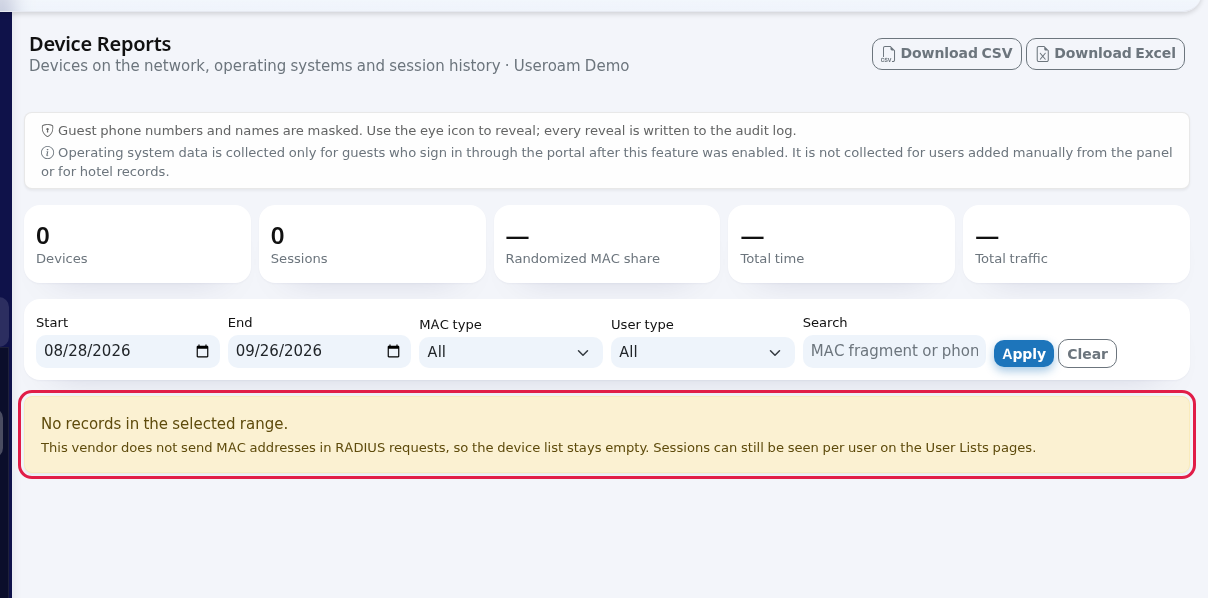
- The device list depends on your firewall sending the device address (MAC) in its connection records. Some brands and settings do not send it; then the list stays empty and the screen says "This vendor does not send MAC addresses in RADIUS requests, so the device list stays empty. Sessions can still be seen per user on the User Lists pages." In that case follow your guests on the Guests lists.
- Guest phone numbers and names are masked (Turkish data protection law, KVKK). Only the first half of the MAC address (the part that identifies the vendor) is visible.
Step by step: reading the device report
- In the left menu open Analytics and Reports and click Device Reports. The report shows the last 30 days when it opens.
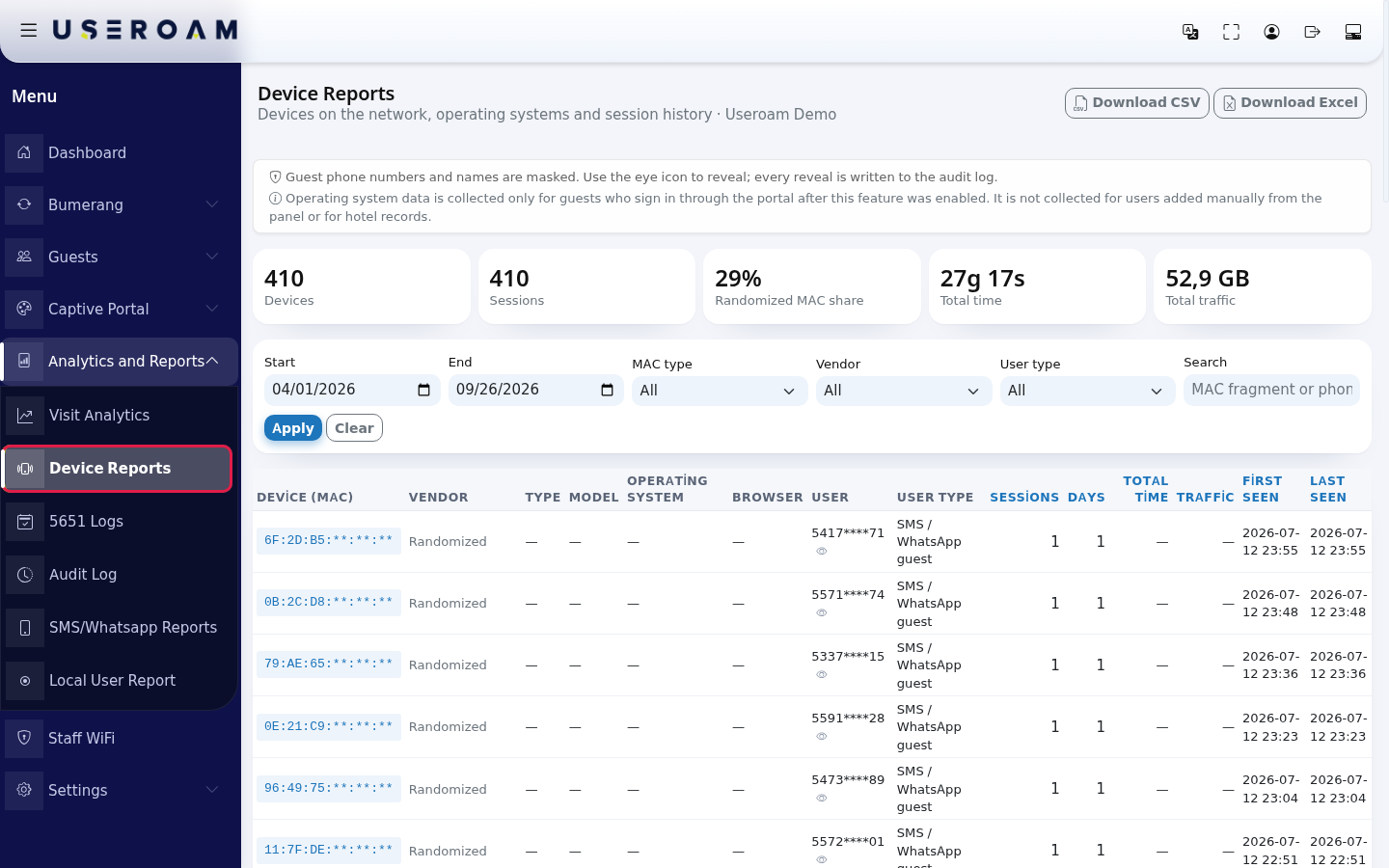
- In the filter card pick the Start and End dates. If needed choose MAC type, Vendor and User type, or type part of a MAC or a phone number in Search (example:
6F2Dor5417). Press Apply. Clear removes all filters. The range can be at most 180 days; if you choose a longer one, the start is moved to 180 days automatically.
- The boxes at the top summarise the selected range: Devices (number of different devices), Sessions (number of connections), Randomized MAC share, Total time, Total traffic.

- Each row of the table is one device. To change the order, click one of the blue column headings (Sessions, Days, Total time, Traffic, First seen, Last seen). Use Previous / Next at the bottom to move between pages (50 devices per page).
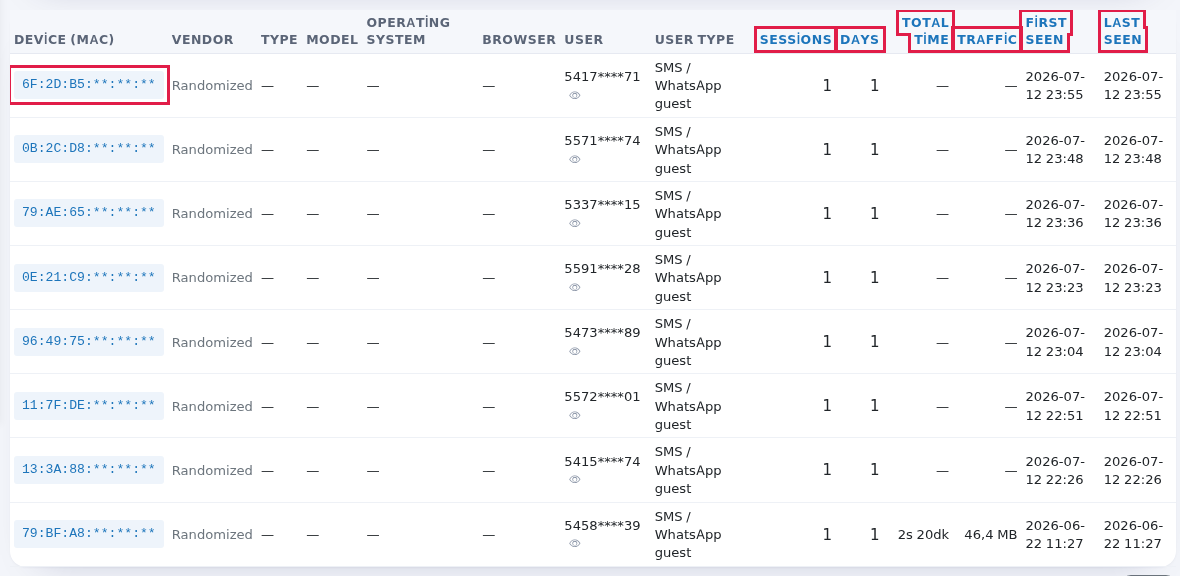
- To see a device's connection history, click its address in the Device (MAC) column. Device session history opens: start, end, duration, traffic, IP address, user, operating system and termination cause of each connection. If the device is still connected, a green Ongoing badge appears in the End column. Go back with Back to list.

- To export the list press Download CSV or Download Excel at the top right. The filters on screen are applied to the file; phone numbers and MAC addresses stay masked in the file too.

Every field and button on the screen
| Field / Button | What it does |
|---|---|
| Download CSV, Download Excel | Downloads the filtered list as a file (masked). |
| Information box | "Guest phone numbers and names are masked. Use the eye icon to reveal; every reveal is written to the audit log." and "Operating system data is collected only for guests who sign in through the portal after this feature was enabled. It is not collected for users added manually from the panel or for hotel records." |
| Devices, Sessions | Number of different devices and total connections in the range. |
| Randomized MAC share | Share of devices that use a different address on every network for privacy. New iPhones and Android phones do this by default; their vendor is not visible. |
| Total time, Total traffic | Total duration and data of all connections. |
| Start, End | Date range. At most 180 days. |
| MAC type | All, Real (vendor known) or Randomized. |
| Vendor | Vendors seen in the range (example: Apple, Inc.). Only shows when there are devices with a known vendor. |
| User type | SMS / WhatsApp guest, National ID sign-in, Staff / manually added, Hotel guest, Bulk created user. |
| Search | MAC fragment or phone. If you type a MAC fragment of 4 or more characters, both the MAC and the user name are searched. |
| Apply / Clear | Applies / resets the filters. |
| Device (MAC) | Masked device address (example: 6F:2D:B5:**:**:**). Click it to open the device's session history. |
| Vendor (table) | Device brand. For random addresses a grey Randomized is shown. |
| Type, Model, Operating system, Browser | Taken from what the browser reported when signing in through the portal: Phone, Tablet or Computer. If unknown, a dash is shown. |
| User | The guest who signed in with the device (masked). Hotel guests show a Room number badge. If several people used the same device, a badge such as +1 appears. The eye icon reveals the full number (if you are allowed; every reveal goes to the audit log). |
| User type (table) | How the guest signed in. Unknown if it cannot be found. |
| Sessions, Days | How many times the device connected and on how many different days. |
| Total time, Traffic | The device's total connected time and data. Durations use Turkish short units on the screen (s = hour, dk = minute). |
| First seen, Last seen | First and last connection in the range. |
| … records, Previous, Next | Total number of devices and paging. |
| Device session history | One device's connections: Start, End, Total time, Traffic, IP, User, Operating system, Termination cause (the end reason reported by the firewall). |
| Back to list | Returns to the device table. |
Messages you may see
| Message | Meaning / what to do |
|---|---|
| No records in the selected range. | No device was seen on these dates. Widen the date range or remove filters with Clear. |
| This vendor does not send MAC addresses in RADIUS requests, so the device list stays empty. … | Shown when the list is empty without any filter. Your firewall may not send device addresses; contact support to check your setup. You can still follow guests on the Guests lists. |
Frequently asked questions
Why do most devices show "Randomized" as vendor?
New phones use a random device address on each Wi-Fi network for privacy. The brand cannot be read from that address. This is normal; the same device usually comes back to the same network with the same address, so repeat visits are still counted.
The operating system and browser columns are empty.
This data is collected only when the guest signs in through the captive portal, and only for sign-ins after the feature was enabled. It is not collected for users added manually from the panel or for hotel records.
I need to see the full phone number.
If you are allowed, press the eye icon next to the number. Every reveal is written to the Audit Log under the name of whoever opened it.
Can this report replace the 5651 records?
No. For legal access records use the 5651 Logs screen. This report is for marketing and business analysis.