
Useroam Connector
What is it for?
Useroam Connector is a small Windows application installed on a Windows computer inside the organisation'syour own network. WhenIn aorganisations using Active Directory or LDAP it does two jobs: it checks the password staff membertype entersduring theirsetup usernameagainst your own directory, and passwordit onbrings the setupstaff page,list into the panel.
When do you use it?
- Your staff sign in to computers and e-mail with an Active Directory or LDAP account.
- You want the staff list to come from the directory instead of creating people one by one in the panel.
If you do not use Active Directory you do not need the Connector. Create staff in New User with the type Staff WiFi (certificate); the password is verifiedchecked through this connector. It is never sent toagainst the panelpanel's andown neverrecord. storedIn there.
Where do I get it?ThecaseDownloadNotthe Connector app (Windows)installedbuttonon theStaff WiFi →Statuscard. Direct address:https://panel.useroam.com/api/connector-download.php
1. Where itcard is installednormal.
Before you start
On
- A Windows
machinecomputer or server insidethe companyyour network.Thatthatmachinestays on. - It must
be able toreach the directory server (Active Directory / LDAP)used for authentication. The connector's public IP address doesnothave to matchand thedevice'sinternet. - The
registeredkey that pairs the Connector with your device is provided by Useroam; ask your reseller or Useroam support during installation.
Step by step
- Open Staff WiFi in the
panelleft—menu. On theconnectorStatusprovescarditspressidentityDownload the Connector app (Windows). The installer (UseroamConnectorSetup.exe) downloads. Direct address:https://panel.useroam.com/api/connector-download.php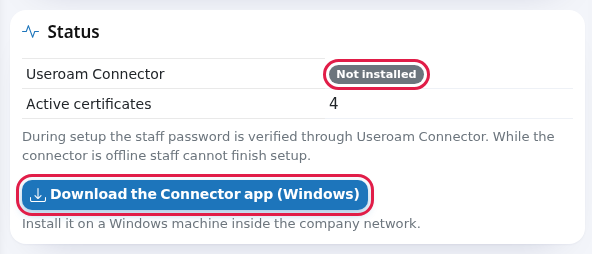
- Run the file on the Windows computer inside your network and finish the installation. The application's own windows are on that computer, not in the panel; this guide has no picture of them.
- After a few minutes refresh the panel. The Useroam Connector row should turn green Online, with a
keyLastissuedseentotimeit,belownotit.with its address.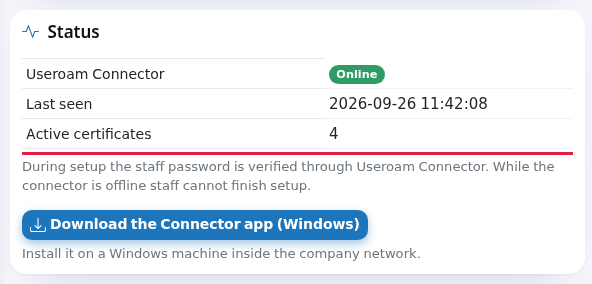
2. What it does PasswordStaffverification.When a staff member types their password onfrom thesetup page, the request goes to the connector, the connector asks the directory, and the answer comes back.User sync.Active Directory / LDAP users are copied into the panel anddirectory appear in the Staff and certificate status list.GroupsYouarecancopiednowtoo.sharePasswordsthearesetupnot.link: Inviting Staff.
The three states of the status row
| Badge | What it means | What to do |
|---|---|---|
The
| Nothing. | |
| Offline | The | Check that the |
| Not installed | No
| Install the Connector if you use Active Directory. Otherwise this is |
Where does the password travel?
When staff type their password on the setup canpage, be completed; thereit is noencrypted and held on the Useroam server for a very short time (a few seconds at most); the Connector picks it up, asks your directory and reports the result. The waiting record is deleted straight away; the password is never stored in readable form. When the staff list is synchronised, passwords are not transferred.
The public IP of the computer running the Connector does not need to checkmatch against.the Devicesdevice IP registered in the panel; the Connector identifies itself with the key it was given, not by IP.
Frequently asked questions
If the Connector is off, do devices that are already holdset aup certificatedrop areoff?
No. authenticatedSet-up bydevices thatjoin certificate,with their certificate, and thisthat check does not go through the connector.Connector. EvenOnly so,new dosetups and staff list updates stop. Do not leave the connectorConnector downoff permanently.
I created a new employee in the directory and they are not in the list.
Wait for long:the userConnector's syncnext stopssynchronisation. asIf well.the Last seen time is old, the Connector is not running.
Can 4.one Organisationsorganisation withouthave both Active DirectoryNeitherand thelocal connectorusers?
Yes. nor a directory is mandatory. Local usersUsers created by hand in the panel can also receive certificates; in that case the password is checked against the panel's own user records. When you create the user, setwith the type to Staff WiFi (certificate) —are seechecked Invitingagainst staff.the panel record, the others through the Connector.
Related
pagespages:Staff
Wi-Fi Administration →- Settings and
status;Status- Inviting Staff
- Guests
→> New User.