
Sending Calendar
What is it for?
The Send Schedule (on screen: Delivery Schedule) shows how many people every campaign and survey in your account will reach in the next run, and through which channel. It answers "what happens if it runs now?". The screen only shows; it never starts a delivery.
When do you use it?
- After publishing a campaign, to check that the message will really go out.
- When looking for the answer to "why is my campaign not sending?" (is the window closed, are there candidates).
- When you want to see whether the delivery engines are running.
Before you start
- The screen shows the campaigns and surveys of all devices in your account (every NAS) together; the NAS column shows which device each belongs to.
- You cannot change campaigns and surveys here; go to Campaigns or Surveys.
Step by step
- In the left menu, under Bumerang, open the CAMPAIGN heading and click Send Schedule.
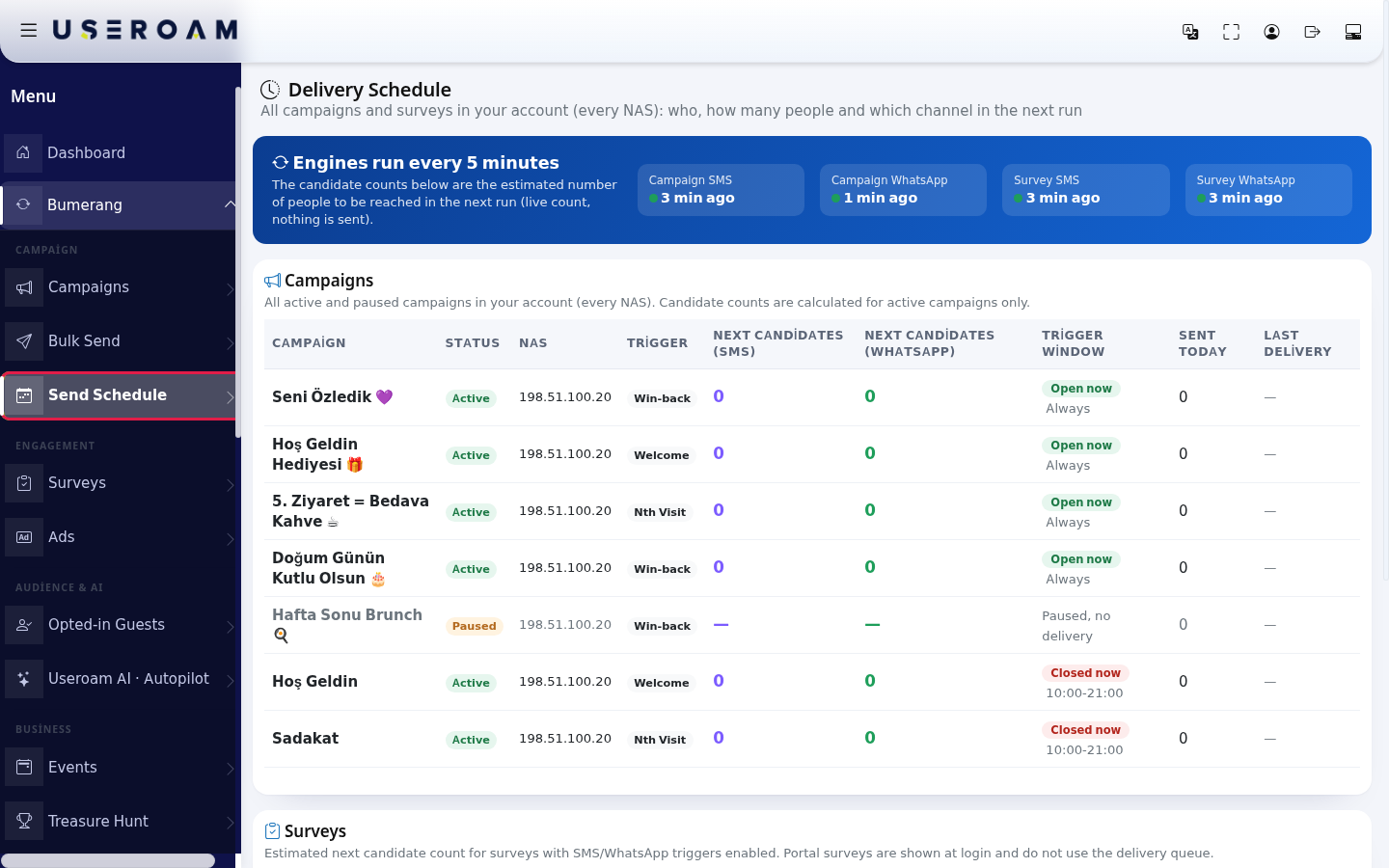
- In the blue bar at the top (Engines run every 5 minutes), check when each of the four delivery engines last ran: Campaign SMS, Campaign WhatsApp, Survey SMS, Survey WhatsApp. A green dot means the engine ran in the last 6 minutes, orange means a delay of up to 20 minutes, red means the engine has stopped. Grey "no log" means no record was found.

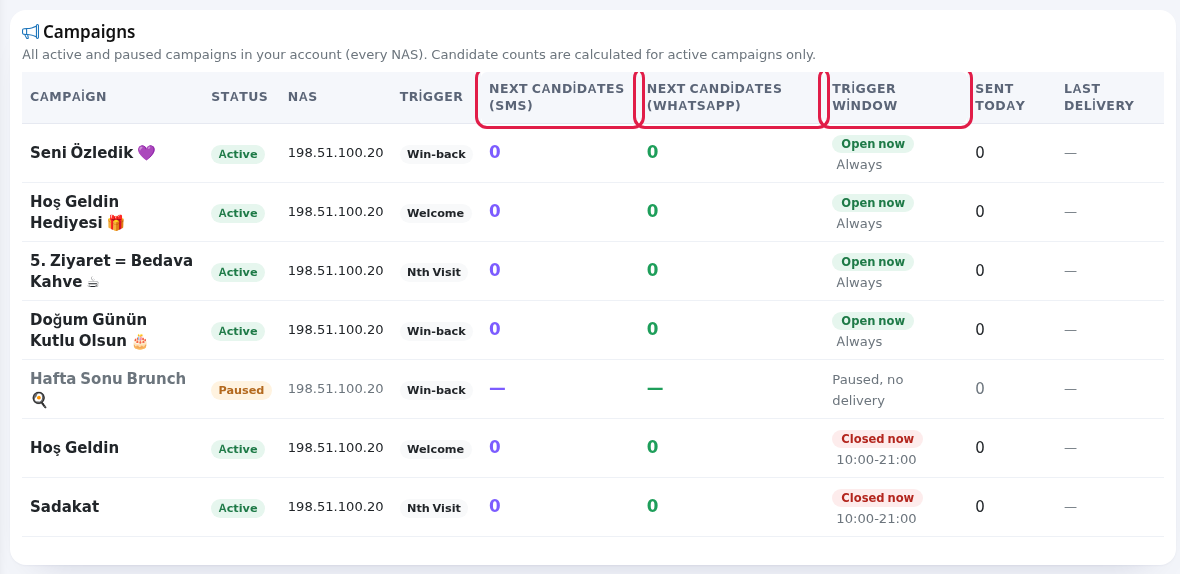
- In the Campaigns table, look at each campaign's Next candidates (SMS) and Next candidates (WhatsApp): how many people the next run will reach on that channel. The Trigger window column shows the sending hours and the current state: Open now or Closed now (example: 10:00-21:00); with no hour limit it says Always.
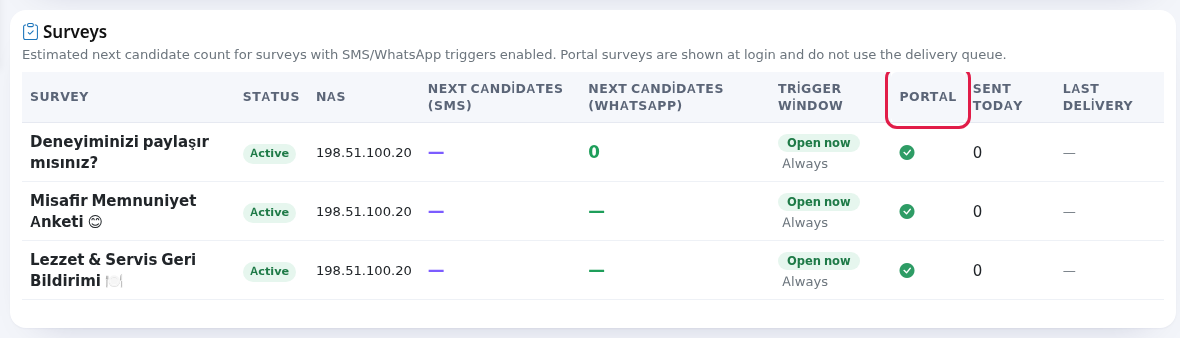
- In the Surveys table, see the next candidate count for surveys with an SMS or WhatsApp trigger. A tick in the Portal column means the survey is also shown on the Wi-Fi login screen; portal surveys do not use the delivery queue.
- Read the note at the bottom: candidate counts are live estimates; once the engine runs, the number may shift slightly after dedup, delivery and channel rules. "200+" means the count was capped at 200 for performance.

Table columns
| Column | Meaning |
|---|---|
| Campaign / Survey | Its name. |
| Status | Active or Paused. Paused rows are faded; no candidates are counted and the window column says "Paused, no delivery". |
| NAS | The device the campaign or survey belongs to. |
| Trigger | Welcome, Win-back (We Missed You) or Nth Visit (Loyalty). |
| Next candidates (SMS) / Next candidates (WhatsApp) | The estimated number of people for the next run. A dash means that channel is not used. |
| Trigger window | The allowed sending hours and days (Mon, Tue, Wed, Thu, Fri, Sat, Sun). Open now / Closed now. |
| Portal | Surveys only: whether the survey is shown on the Wi-Fi login screen. |
| Sent today / Last delivery | Messages sent today and the time of the last delivery. |
| Empty table | "No campaigns yet." with a Create a new campaign link; "No surveys yet." with Create a new survey. |
| Card descriptions | Campaigns: "All active and paused campaigns in your account (every NAS). Candidate counts are calculated for active campaigns only." Surveys: "Estimated next candidate count for surveys with SMS/WhatsApp triggers enabled. Portal surveys are shown at login and do not use the delivery queue." |
| Page tour | Engine health ("Delivery engines run every 5 minutes. Here you see when each engine last ran.") and Upcoming deliveries ("Shows how many people each active campaign/survey will reach in the next run and through which channel."). |
Frequently asked questions
The candidate count is always 0.
There are three possibilities: no guest meets the condition (for example no new guest in the last 24 hours), the consented audience is empty, or the trigger window is closed right now. Look at the Closed now badge on the row and at the Opted-in Guests count.
An engine dot is red.
The engine has not run for more than 20 minutes. Wait a few minutes and refresh; if it stays red, contact support.
Does opening this screen send messages?
No. The page is read only; it never starts a delivery.