
SLA Rules
The SLA Rules tab holds two settings: delay rules that alert managers when a request is not taken or not completed in time, and the Closing photo requirement, which sets how many photos a request type needs before it can be closed.
What is it for?
- Catches forgotten or dragging jobs before you notice them yourself.
- Documents with photos that repairs and cleaning were really done.
When do you use it?
- When you have a service promise such as "malfunctions are fixed within 2 hours".
- When you want room service to be taken within 15 minutes.
- When you want housekeeping to close every cleaning with a photo.
Before you start
- Alerts land on the Hotel Notifications tab. If you also want SMS, the hotel needs at least one staff member with the manager role and a phone number (Staff).
Step by step
- Open the tab. In the left menu press Hotel → SLA Rules (or the SLA Rules tab on Request Management). Enter the closing photo counts (optional). In the Closing photo requirement card enter the number of photos needed for each type (Room Cleaning, Extra, Late Check-out, Early Check-in, Malfunction).
0asks for no photo; the maximum is 5. Press Save rule.
- Add a delay rule. In the SLA Rules card pick Request type, Stage and Duration (min). Tick Also send SMS if you want an SMS too. Press Add Rule. A new rule is active straight away.
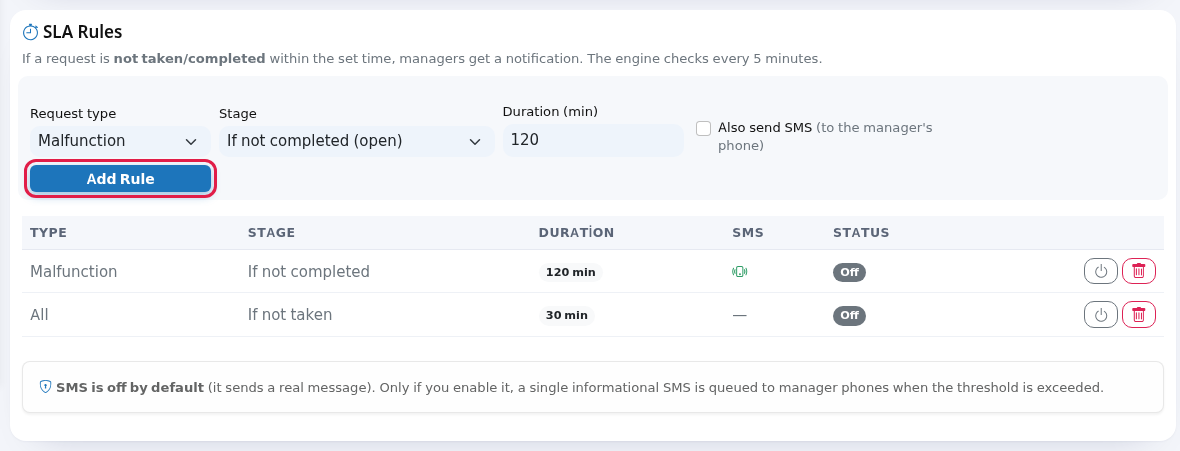
- Turn a rule on or off, or delete it. In the list, the power icon on the right is On/Off and the bin deletes (confirm Delete this rule?).

Every field and button on the screen
Closing photo requirement
| Field / button | What it does | Example |
|---|---|---|
| Explanation: Enter how many photos are required per request type. Enter 0 to make photos optional. The rule applies both in the panel and in the staff app. | - | - |
| Room Cleaning, Extra, Late Check-out, Early Check-in, Malfunction | Minimum photos needed to close a request of that type (0-5). | Malfunction: 1 |
| Save rule | Saves all numbers together. When a rule exists, rows of that type on Request Management get a Close with photo button; the Request Monitor cannot close such a request. | - |
SLA Rules
| Field / button | What it does | Example |
|---|---|---|
| Explanation: If a request is not taken/completed within the set time, managers get a notification. The engine checks every 5 minutes. | An alert arrives at most 5 minutes late. | - |
| Request type | All or a single type: Room Cleaning, Extra, Late Check-out, Early Check-in, Malfunction, Room Service. | Malfunction |
| Stage | If not taken (pending): alerts when nobody has taken the request when the time runs out. If not completed (open): alerts when the request is still open (pending or in progress) when the time runs out. | If not completed (open) |
| Duration (min) | Minutes from the moment the request was opened (1-1440). Default 30. | 120 |
| Also send SMS (to the manager's phone) | When an alert is raised, one informational SMS is queued to the hotel's staff with the manager role. Off by default because it sends a real SMS. SMS is only sent on accounts with an active marketing (Bumerang) licence. | unticked |
| Add Rule | Adds the rule to the list. | - |
| List columns | Type, Stage (If not taken / If not completed), Duration, SMS (an icon when on, SMS on), Status (Active / Off). | - |
| On/Off (power icon) | Pauses or resumes the rule. A rule that is off raises no alerts. | - |
| Delete (bin) | Deletes the rule after Delete this rule? | - |
| Note: SMS is off by default (it sends a real message). Only if you enable it, a single informational SMS is queued to manager phones when the threshold is exceeded. | - | - |
| No rules yet. | Shown while the list is empty. | - |
How does it work?
- At most one alert is raised per request and rule; the same rule does not alert twice for the same request.
- Managers whose email address is filled in and whose Email notifications switch is on in the Staff screen also get every alert by email titled Job is overdue. This does not depend on the Also send SMS box (Staff).
- The alert text looks like Oda 115: Arıza 30 dk+ üstlenilmedi (SLA 30 dk). It is always generated in Turkish, even when the panel is in English.
- When you add a new rule, open requests whose time has already run out also raise an alert on the first check. Close old open requests first.
Frequently asked questions
I added a rule but no notification arrives.
The check runs every 5 minutes. Make sure the rule is Active and that there is an open request of that type past its time. Alerts appear on the Notifications tab.
No SMS arrived.
SMS needs the box ticked, a manager staff member with a phone number at the hotel and an active marketing licence on the account.
Does the photo requirement apply in Useroam Go too?
Yes. The app also refuses to close the request without the required number of photos.
Related pages
- Hotel Notifications · Request Management · Hotel Report (SLA and delay report)