
Role Guide: Hotel Staff (Housekeeping and Technical)
This page is for hotel housekeeping and technical staff. It covers room cleaning and faults step by step.
1. What this role sees
- Requests: requests for your department (cleaning, faults, extra requests) and requests you opened.
- Rooms: room tiles; with areas, a Rooms | Areas switch at the top. In areas, only places you are responsible for.
- Tasks: tasks given to you or your department.
- Profile and Report Lost Item.
2. Cleaning a dirty room (housekeeping)
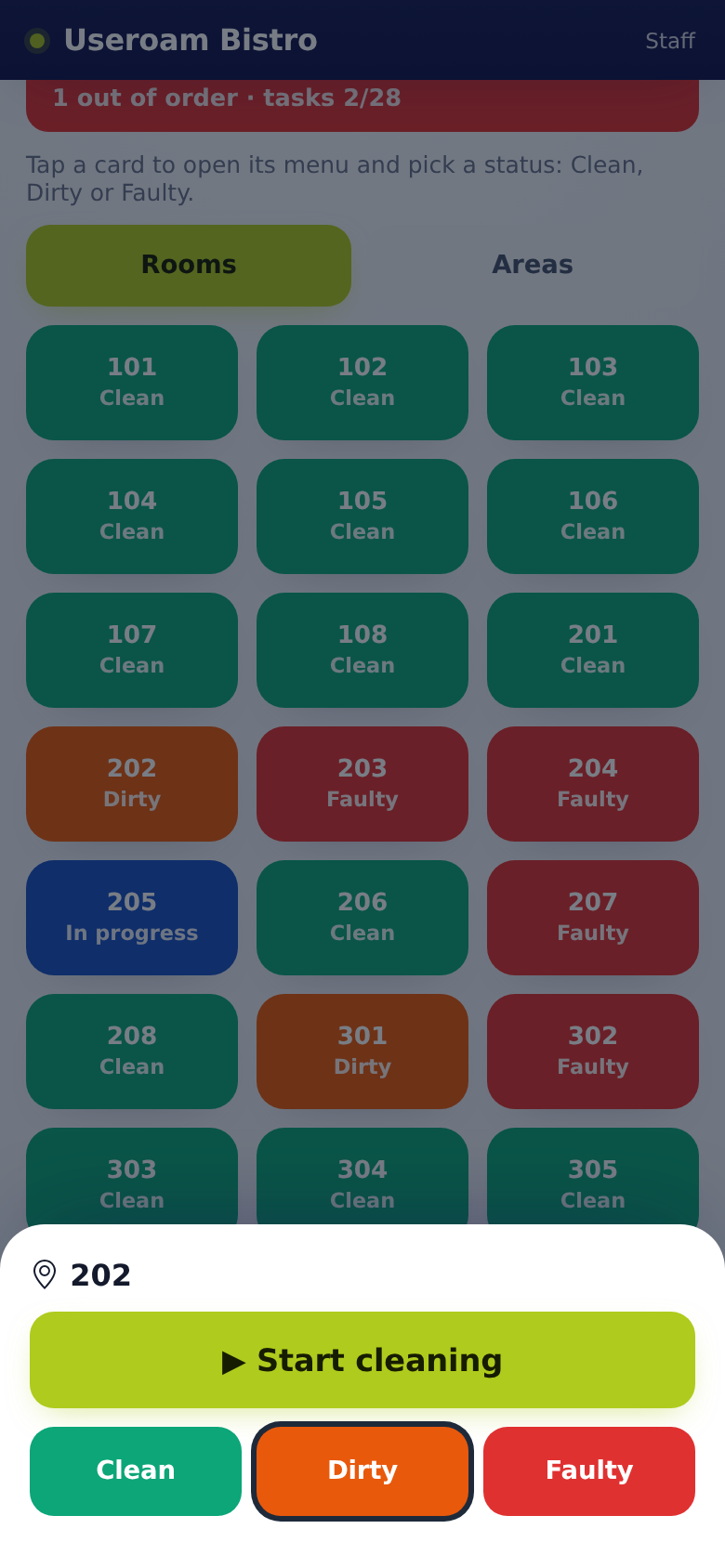
- On Rooms, tap an orange (Dirty) room.
- Tap ▶ Start cleaning. A cleaning request is opened in your name, the room turns blue and shows In progress · Your name.
- Clean the room.
- On Requests, close that cleaning request with Close with photo. The room turns Clean by itself. (While a job is open, the Clean button is locked.)
3. A fault job (technical)
- Take the job: tap Take on the fault card on Requests or, in the room, tap ▶ Start job in the room menu. Both do the same.
- Go to the room.
- Fix the fault.
- Close it with Close with photo. The screen shows Fault closed.
4. If you spot a problem in a room
- Tap the room and choose Faulty.
- Write a short note, add a photo if you like, tap Report. A fault request opens.
Marking a room Dirty opens no request; the room joins the cleaning queue.
5. Lost items
- On Profile, tap Report Lost Item.
- Enter the room number and the item, add a photo and save.
6. FAQ
I cannot mark the room Clean. The room has an open cleaning or fault request. Close it; the room turns clean by itself.
A guest wrote on a request. Tap the speech bubble on the card; your reply goes to the guest.
A room says it is assigned to me. Your manager gave you the room; its cleaning job is yours. The tile shows · assigned to you.
I also get notifications by email. If your manager entered your email address in the panel and turned on Email notifications, you also get an email when a job is assigned to you and when a task assigned to you is late. To stop them, tell your manager.
I get no notifications. In the store app check Profile → Notifications; in the web app, add it to the home screen and allow notifications.
Related pages: Useroam Go → Rooms, Requests, Profile.